CRM and Helpdesk: Integrate for Customer Success
Master crm and helpdesk integration. Unify customer data, automate processes, and achieve superior business outcomes. Boost efficiency and growth.
 Grant CooperFounder14 min read
Your support team is answering an urgent ticket from a frustrated customer. The issue looks simple until someone asks a basic question: Is this account in renewal? Nobody in support knows. Sales has that information in the CRM, but the rep handling the account doesn't know the customer has opened multiple recent tickets.
That split is where most customer friction starts. Not in bad intentions, and not in a missing feature. It starts when sales, success, and support work from different slices of the same customer story. In practice, crm and helpdesk decisions aren't really about choosing two tools. They're about deciding whether your company will operate from fragmented records or shared intelligence.
The Strategic Imperative of Unified Customer Data
Initially, crm and helpdesk integration is often viewed as a workflow cleanup project. Sync the contact record. Show the account owner in the ticket. Push notes back and forth. That helps, but it understates the underlying shift.
This convergence has been building for years. During the 2000s, helpdesk software evolved into broader support centers as cloud and mobile CRM adoption accelerated. Microsoft’s 2003 CRM entry is one clear marker of that shift. It tied customer relationship management more directly to business systems and support workflows. Today, 70% of businesses use CRM for customer service, and integrated CRM and support capabilities are associated with a 27% increase in customer retention, as noted in this history of CRM and support convergence.
The operational lesson is simple. Customer data isn't departmental property. It’s shared infrastructure.
Why fragmented context creates expensive mistakes
A support agent without contract context handles a strategic account like any other queue item. A salesperson without live service history walks into a renewal call blind. A customer success manager sees the health score, but not the actual friction causing it.
That’s why I treat customer data design as an operating model issue, not a systems issue. If you want a practical example of how shared records change coordination across complex organizations, this piece on unifying data for justice organizations is useful because it shows the broader pattern clearly.
Teams dealing with customer support data silos usually don't have a software shortage. They have a context shortage.
Unified customer operations start when every team can act on the same account reality, not their own partial version of it.
What leaders should optimize for
The strategic question isn't, “Can these systems connect?” It’s, “Can every customer-facing function make better decisions because they share one current picture of the account?”
That distinction matters. A basic sync reduces swivel-chair work. A unified data model changes prioritization, escalation, renewals, expansion, and service quality. Once leaders see crm and helpdesk this way, integration stops being an IT line item and becomes a customer operations priority.
CRM vs Helpdesk What Sets Them Apart
A lot of confusion comes from the fact that crm and helpdesk platforms increasingly overlap. But they still do different jobs.
The cleanest way to explain it is this. A CRM is the system that tracks the relationship over time. A helpdesk is the system that manages service activity in the moment. One is mostly proactive. The other is mostly reactive.
The practical distinction
If I had to explain it to a new ops leader, I’d say the CRM is the customer’s business biography. It holds the long arc: company details, pipeline stage, owner, contract history, lifecycle stage, and commercial context. The helpdesk is the action console. It captures the incoming problem, assigns ownership, tracks status, manages SLAs, and records resolution work.
Neither replaces the other cleanly.
A CRM can show that a customer is high value and nearing renewal. It usually doesn't give agents the best environment to triage queues, route tickets, and coordinate urgent resolution work. A helpdesk can manage the issue efficiently, but on its own it often lacks the deeper commercial and relationship context.
For teams comparing service operations models, this guide on help desk vs service desk is also worth reviewing because it clarifies adjacent support roles that often get mixed together.
CRM vs. Helpdesk Core Focus and Functions
| Aspect | CRM (Customer Relationship Management) | Helpdesk |
|---|---|---|
| Primary purpose | Manage the long-term customer relationship | Manage incoming support requests and service workflows |
| Time horizon | Ongoing lifecycle and account history | Immediate issue handling and resolution |
| Main users | Sales, customer success, account management, leadership | Support agents, support managers, technical teams |
| Typical data | Contacts, companies, deals, renewal dates, lifecycle stage, notes | Tickets, conversations, priority, status, SLA, resolution details |
| Operating mode | Proactive relationship management | Reactive service execution |
| Core question answered | What is happening with this account over time? | What needs to be solved right now? |
Where teams get this wrong
The most common mistake is trying to force one tool to behave like the other. Sales leaders want the CRM to become a support console. Support leaders want the helpdesk to become a full account system. Both approaches create friction.
Practical rule: Keep the distinction clear even when the platforms are connected. The CRM should remain the relationship record. The helpdesk should remain the execution layer for service.
A second mistake is assuming overlap means redundancy. It doesn’t. Shared fields and linked records are useful, but the jobs remain different. That’s why crm and helpdesk strategy works best when leaders design the systems around how teams operate, not around vendor category labels.
The Power of Synergy Why Integration Matters
Disconnected systems don't just slow teams down. They change how people behave. Agents ask customers to repeat information. Sales reps avoid digging through support history because it takes too long. Managers make decisions from partial dashboards.
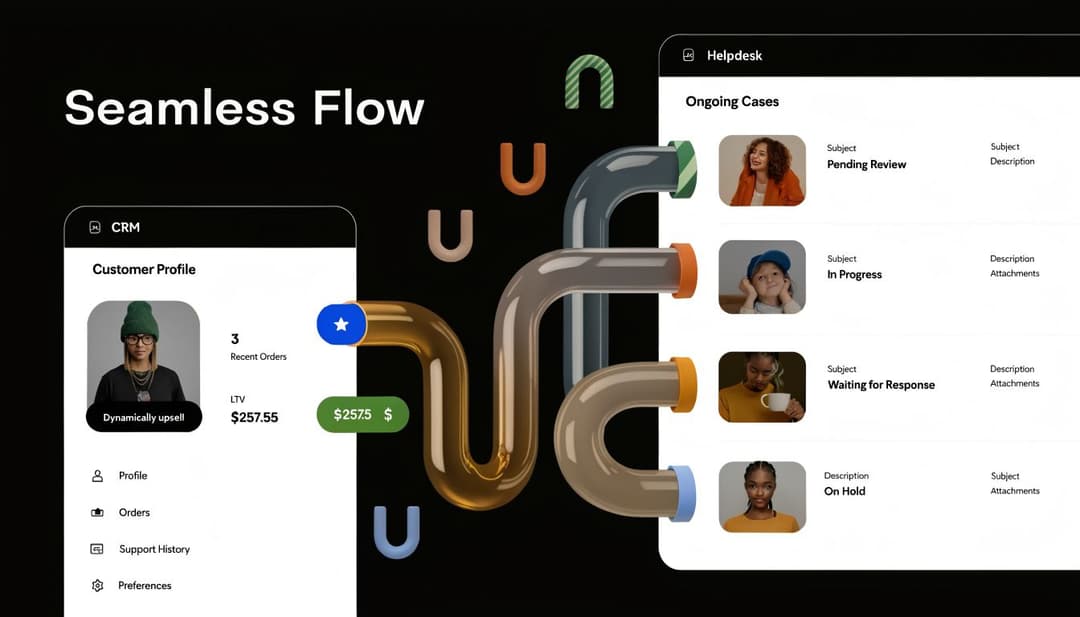
The cost isn't abstract. The main barrier to effective system use is siloed data between departments. That poor data quality and separation leads to 15% lower customer retention and forces teams to spend 30% more time on administrative tasks, according to this analysis of barriers to effective CRM utilization.
What changes when context flows both ways
When crm and helpdesk platforms share meaningful context, the quality of decisions improves immediately.
A support agent can see whether the account is strategic, whether there’s an open commercial motion, and whether a success manager already owns the relationship. That changes prioritization and escalation. A sales rep can see repeated product friction before a renewal conversation. That changes the tone of the call and the preparation behind it.
The value of that shared context gets even larger once teams start layering AI on top of it. This overview of AI enablement for CRM platforms is useful because it frames AI as an operational layer on customer data, not just a writing assistant bolted onto a database.
Three integration outcomes matter most in practice:
- Better prioritization: Teams can route high-risk or high-value issues with more confidence.
- Cleaner handoffs: Support, success, and sales don’t have to reconstruct the same customer history over and over.
- Faster operational decisions: Managers can act on one account picture instead of reconciling multiple views.
If you're evaluating platforms, a crucial test is whether your customer support integrations create usable context inside live workflows, not whether they merely pass fields back and forth.
Before integration and after integration
Before integration, a support team sees a queue. After integration, they see a queue attached to accounts, revenue context, open risks, and ownership.
Before integration, sales sees a pipeline. After integration, they see pipeline health informed by actual service behavior.
A short walkthrough helps here:
The strongest crm and helpdesk setups don’t make teams work harder. They remove the guesswork that disconnected systems force people to do manually.
Building Your Unified Support Engine
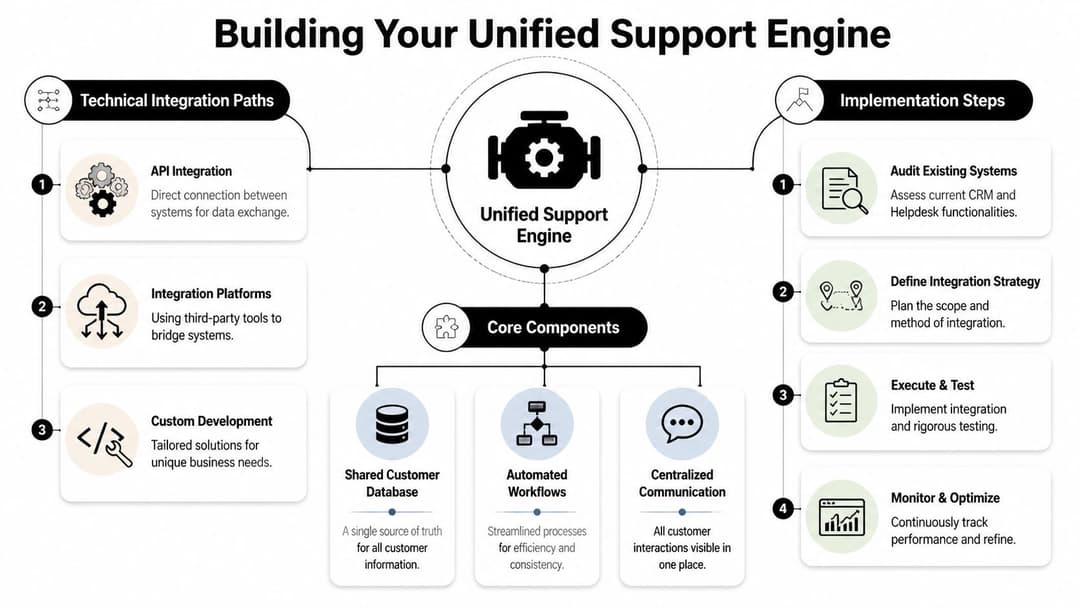
Most integrations fail because teams start with connectors instead of architecture. They ask how to sync two tools before they decide what customer truth should look like.
A better approach is to build a unified support engine. That means deciding which systems produce authoritative data, how records should move, and what automations should trigger from customer behavior.
Choose the right integration path
There are three common paths, and each has trade-offs.
Native connectors
These are the fastest to launch. If you use platforms like HubSpot, Salesforce, Zendesk, Freshdesk, or Intercom, native integrations usually cover the basics well enough for early-stage alignment.
They work best when you need contact sync, ticket visibility, owner lookup, and simple workflow triggers. They break down when your routing logic, account model, or data hygiene rules are more complex than the default connector can support.
Middleware and integration platforms
Tools like MuleSoft, Workato, or similar orchestration layers offer practical solutions. They help teams map fields, transform data, and manage business logic across multiple systems.
This path is usually stronger when your support operation depends on more than crm and helpdesk alone. Once billing, product telemetry, and conversation history all need to inform service logic, middleware gives you more control.
Custom API workflows
This is the most flexible path and the one that matters most if you’re building toward autonomy. Proficiency with REST and SOAP is critical for smooth synchronization, and well-designed integrations can reduce operational latency by up to 40%. The same integration quality supports skill-based routing that sends 70% of tickets to the correct agent on the first pass, improving resolution times by 25% to 30%, based on this review of CRM technical skills and integration design.
Build for automation, not just visibility
A lot of teams stop once the agent can see CRM data inside the ticket. That’s useful, but it’s not enough.
The true power comes when the shared data starts driving action:
- Routing based on account context: Enterprise account, active trial, overdue onboarding, expansion opportunity.
- Escalation based on risk signals: Repeated issues, account owner involvement, unresolved service history.
- Automation based on behavior: Triggering outreach, follow-up tasks, or internal alerts without manual triage.
If you want ideas on how automation can streamline customer service, focus on the workflows that remove repetitive judgment calls from the queue rather than adding more macros to it.
The next layer is an intelligence layer
This is the point where crm and helpdesk start to blur. Once customer records, conversations, billing context, documentation, and product activity sit in one accessible layer, the old tool boundary matters less than the quality of decisions produced from that layer.
That’s also where AI-native systems become materially different from traditional integrations. A platform like Halo AI can connect emails, documentation, internal notes, CRM data, and live operational signals so autonomous agents can resolve issues, guide users through product workflows, and hand off with full context when needed.
Operational advice: Don’t design for data sync alone. Design for the decisions and actions you want the system to take without a human chasing context first.
Measuring the ROI of Unified Customer Operations
Leaders often measure crm and helpdesk projects with local metrics. Support looks at response time. Sales looks at pipeline velocity. Success looks at renewals. Those views matter, but they miss the point of integration.
A unified operating model should produce blended outcomes. Better first-contact resolution. Better churn visibility. Better prioritization across the whole account lifecycle.
Start with shared operational metrics
When customer data is centralized, teams can track performance in ways siloed systems can't support. Firms with centralized data management from CRM-helpdesk integration see 28% higher first-contact resolution rates. Advanced analytics on unified data can improve ticket resolution efficiency by 35% and support predictive models that forecast churn risk with 85% accuracy, according to this review of CRM requirements and analytics outcomes.

Those numbers matter because they point to a better measurement model. Don’t just ask whether support got faster. Ask whether support got smarter in ways that affect retention, expansion, and resource allocation.
The blended KPI set that actually matters
In practice, I’d recommend tracking a short set of integrated metrics:
- First-contact resolution with account context: Not just whether the ticket closed quickly, but whether strategic accounts are getting the right level of service on the first pass.
- Churn-risk detection quality: Whether service behavior, product friction, and commercial signals are surfacing risk early enough for intervention.
- Cross-functional response quality: Whether support, sales, and success are acting from the same account picture.
- Administrative load: Whether teams are spending less time hunting for context and more time resolving issues.
For teams trying to connect support investments to business results, this guide on customer support ROI analysis helps frame the conversation in financial terms instead of queue terms.
What good measurement looks like
A strong measurement system doesn't drown teams in dashboards. It makes trade-offs visible.
If first-contact resolution improves but churn risk still goes undetected, your workflows may be efficient but not intelligent. If ticket handling speeds up while account teams still work from different records, you’ve improved execution without solving the coordination problem.
Measure crm and helpdesk integration by how well it improves customer decisions across teams, not by whether two tools now share a few fields.
A Practical Roadmap for System Integration
The implementation work is rarely blocked by software first. It’s usually blocked by messy data, unclear ownership, and weak change management. The roadmap has to address all three.
Start with data discipline
Before any sync goes live, audit the records that matter most. Contacts, companies, account owners, contract fields, lifecycle stages, ticket categories, and support history all need clear mapping rules.
A few practical checks matter more than is generally expected:
- Define the source of truth for each field. If renewal date lives in the CRM, don’t let the helpdesk overwrite it.
- Clean duplicates before rollout. Bad records replicated across systems become harder to fix later.
- Standardize naming and status logic. If support and sales use different account labels, the integration will spread confusion faster.
The goal isn't perfect data. It’s trusted data.
Roll out in phases
A phased rollout is usually safer than a big migration unless your systems are already tightly governed. Start with the workflows that create the most friction and the clearest business value.
That often means:
- Visibility first: Surface account owner, lifecycle stage, and key commercial context in the helpdesk.
- Workflow second: Add routing, alerts, and escalation logic based on shared data.
- Automation third: Trigger actions from account behavior, support patterns, and operational signals.
This sequencing gives teams time to adapt. It also lets leaders catch bad mapping logic before it spreads into every workflow.
Train teams on decisions, not features
Feature training alone doesn’t stick. Reps need to understand what changes in their daily judgment.
Support should know when CRM fields affect priority. Sales should know how support history should change renewal prep. Success should know which service patterns matter enough to trigger intervention.
That’s where many CRM projects fail. The underserved but important angle is the move toward CRM-less architectures. Traditional CRM projects have a 30% to 60% failure rate, and AI-native systems that unify structured and unstructured data are gaining attention because they can potentially reduce ticket loads by over 50% and cut admin time by 30%, as discussed in this piece on CRM-less support architecture.
Think bigger than a two-system connection
The strategic question isn't whether you should keep a CRM forever. It’s whether your future operating model should depend on one as the center of gravity.
That’s a different conversation. In many SaaS environments, the most valuable signals now live outside classic CRM objects. Product usage, support conversations, call recordings, bug history, and internal notes often say more about account risk than a manually updated opportunity field.
If your integration roadmap ends with “the sync works,” you’re stopping too early. The stronger target is a shared intelligence layer that can outlast the systems connected to it.
Beyond Integration The Rise of Autonomous Support
Simple syncing used to be the goal. It isn’t anymore.
A key opportunity in crm and helpdesk strategy is building a unified intelligence layer where customer context becomes continuously usable. Not just visible. Usable by humans, workflows, and AI systems at the moment action is required.
That shift changes the role of support. A modern support system doesn’t just log issues and route them. It identifies patterns, pulls in account context, recognizes risk, and helps resolve the problem without waiting for a human to gather the story manually.
Autonomous support sits on top of that foundation. AI agents with access to the full customer picture can answer questions, guide users through product flows, detect when a request should escalate, and feed intelligence back into sales, success, and product teams. At that point, the line between CRM and helpdesk matters less than whether your system can understand the customer and act appropriately.
If you want a deeper look at how that operating model works, this overview of an autonomous customer support system is a useful reference point.
The companies that get ahead won't be the ones with the most tools. They’ll be the ones that turn customer data into coordinated action across the business.
If your team is rethinking crm and helpdesk as a unified intelligence layer, Halo AI is one option to evaluate. It connects support conversations, documentation, CRM data, and operational systems so autonomous agents can resolve issues, guide users inside the product, and hand off with full context when human intervention is needed.
How Halo helps
When Halo's AI agent hits a real product issue, it doesn't just escalate — it files the bug in Linear, flags it in Slack, and hands your team the full conversation context automatically. Learn more about Halo's AI-first inbox.