Email to Ticket System: A Guide to Autonomous Support
Unlock efficiency with an email to ticket system. Learn how they work, key automation opportunities, and how AI can provide autonomous support resolutions.
 Grant CooperFounder14 min read
Support leaders usually know the moment a shared inbox has stopped working. It’s when two agents answer the same customer. Or when nobody answers at all because the message got buried under renewals, bug reports, billing threads, and internal forwards. The inbox still looks familiar, so teams keep pushing it past its limits. That’s where the damage starts.
The pattern is predictable. A customer replies to an old thread, the subject line no longer matches the issue, attachments live in three different places, and engineering asks for reproduction steps that support can’t quickly find. If you’re also trying to streamline bug resolution processes, the inbox becomes more than messy. It becomes an operational bottleneck that slows support, product, and customer success at the same time.
A proper email to ticket system fixes the first layer of that problem by turning every incoming message into a structured record with ownership, status, and history. If you’re comparing what that looks like in practice, Halo’s shared inbox and ticketing workflow is a useful example of how teams move from passive email handling to managed support operations. What's more, ticketing is no longer the finish line. It’s the base layer that makes automation, reliable handoffs, and eventually autonomous support possible.
Introduction: Escaping the Shared Inbox Nightmare
A shared inbox fails gradually, then all at once. At first, it feels manageable because everyone can see the same messages. Then ticket volume grows, customer expectations tighten, and your team starts using workarounds instead of process.
One agent stars emails. Another creates folders. A manager forwards priority threads to Slack. Someone keeps a spreadsheet of unresolved issues because the inbox can’t show clean ownership. Customers don’t see any of this, but they feel it in delayed replies, repeated questions, and inconsistent follow-up.
The problem isn’t email itself. Email still matters in B2B support because customers use it for escalations, procurement questions, technical incidents, and long-form issue details. The issue is that a shared inbox treats every message like a loose conversation instead of a managed unit of work.
Shared inboxes hide operational debt. They don’t just slow replies. They remove accountability at the exact moment your volume requires it.
An email to ticket system changes the operating model. Each incoming email becomes a trackable ticket with a unique identity, a current status, an owner, and a history your team can use. That gives support leaders something a mailbox never can: a way to manage flow instead of just reading messages.
This is also where modern support starts to separate from old help desk thinking. Basic ticketing creates order. Better routing adds speed. Integrated context adds consistency. Autonomous support sits on top of all three. Without that foundation, AI can draft responses, but it can’t reliably resolve work across systems, teams, and handoffs.
From Chaos to Clarity: The Business Impact of a Ticketing System
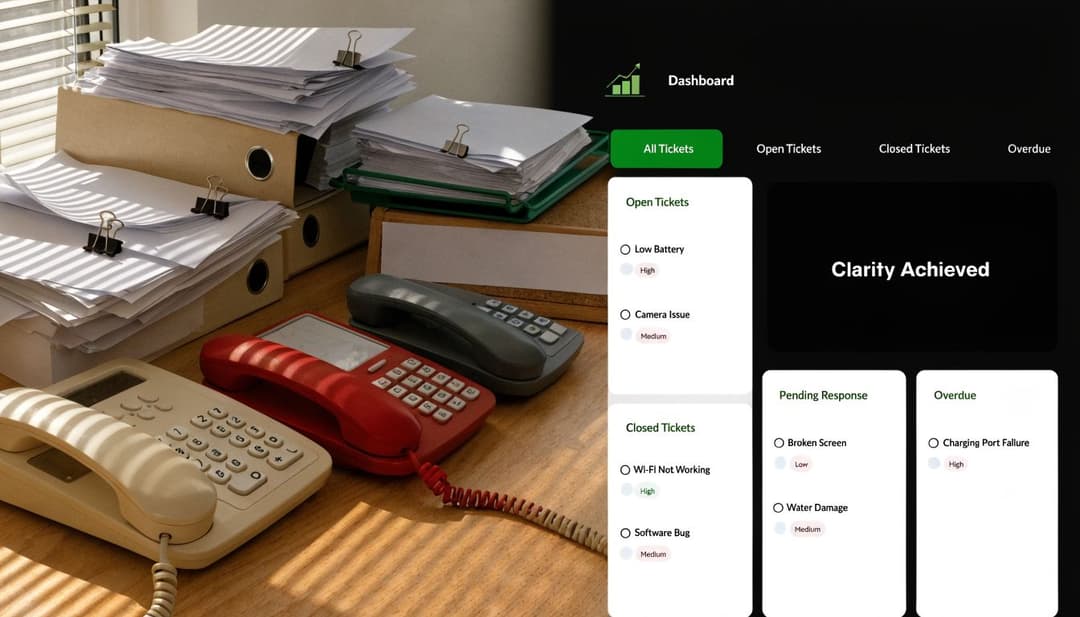
An email to ticket system is best understood as a control layer. It takes a raw inbound message and turns it into an operational object your team can route, prioritize, measure, and resolve. That sounds simple, but it changes how support behaves every day.
According to Pylon’s analysis of B2B email support ticketing, companies implementing email ticketing systems experience 67% faster first response times compared to teams relying on traditional shared inboxes. For mid-sized B2B firms, that often translates to a 40-60% reduction in first response time, 30-50% gains in team productivity, and 25-35% increases in CSAT scores.
What changes when email becomes a ticket
The first gain is structural. A ticket has fields that an inbox doesn’t. It can carry:
| Element | Why it matters |
|---|---|
| Unique ID | Gives every issue a reference point for support, product, and success teams |
| Status | Shows whether work is open, waiting, blocked, or resolved |
| Assignee | Makes one person or queue responsible |
| Priority | Separates routine questions from urgent incidents |
| History | Preserves context across replies and internal collaboration |
That structure matters because support quality usually breaks at handoff points. A customer doesn’t care whether the delay came from triage, reassignment, or missing internal notes. They only see silence. A ticketing system reduces that ambiguity and creates a visible workflow that managers can improve.
Why the ROI shows up quickly
The fastest return usually comes from removing hidden labor. Teams spend less time scanning inboxes, forwarding threads, asking who owns what, and rebuilding context from scattered replies. Leaders also get metrics they can act on instead of anecdotes from the loudest queue.
If you’re building the business case internally, Halo’s guide to improving customer support ROI is useful because it frames support efficiency in terms executives already understand: response time, labor efficiency, customer experience, and cost control.
A ticketing system also makes service commitments real. You can define SLA logic, queue rules, escalation triggers, and workload balancing in a way a mailbox never supports cleanly. That’s the point where support stops being reactive admin work and starts functioning like an operating system for customer issues.
A short walkthrough helps if you’re evaluating the model visually:
Practical rule: If your team can’t tell who owns a customer issue, what state it’s in, and whether it’s aging toward breach, you don’t have a support process. You have shared visibility into disorder.
How Email to Ticket Systems Ingest and Process Requests
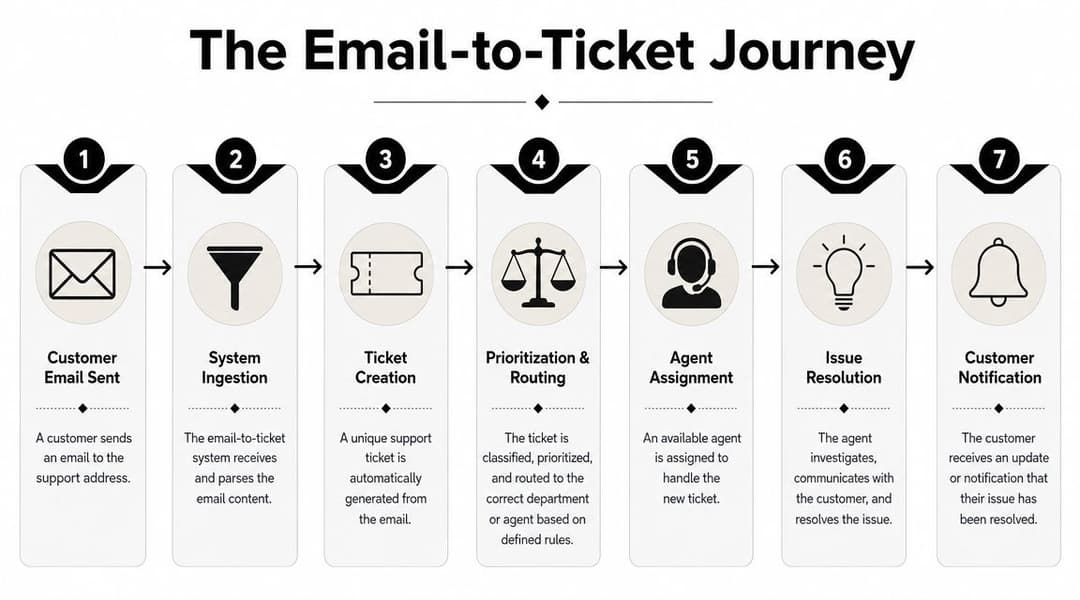
The technical path from email to ticket is less mysterious than generally perceived. It works like a digital mailroom. Messages arrive, the system reads them, extracts what matters, creates a record, and sends that record into the right queue.
The intake layer
Most systems ingest mail through IMAP or POP3 connections. Once the message is fetched, the platform parses the sender, subject line, body content, reply chain, and attachments. It then decides whether the email belongs to an existing thread or should create a new ticket.
In practical terms, the intake layer needs to get four things right:
- Thread recognition so replies stay connected to the original issue.
- Attachment preservation so screenshots, invoices, logs, and documents don’t disappear.
- Sender identification so the ticket links back to the correct customer or account.
- Content extraction so useful details can drive routing and prioritization.
If you want to see how parsing works outside a full help desk stack, DigiParser email parsing is a good reference point. It shows the mechanics of pulling structured data from messy email content, which is exactly what a mature email to ticket system has to do well.
The routing layer
Once the system has a structured ticket, routing decides whether the workflow becomes efficient or painful. Some teams start with simple round-robin assignment. That’s fine at lower volume, but it breaks when ticket complexity varies or certain agents already carry heavy backlogs.
According to Sparrowdesk’s overview of email ticketing systems, workload-based assignment algorithms can reduce average resolution time by up to 30% in high-volume environments. The reason is operational, not magical. They prevent overload by distributing tickets based on live workload signals, which matters because context switching can increase average handling time by 20-40%.
That’s why strong routing logic usually mixes multiple inputs:
- Keyword and intent signals such as billing, outage, access, or urgent
- Customer attributes pulled from CRM or subscription systems
- Queue rules based on product area, language, or account tier
- Agent availability so open work doesn’t stack on the wrong person
For teams working on queue design, Halo’s article on support ticket triage automation is a practical companion because it focuses on the mechanics of classification and assignment rather than generic automation advice.
Bad routing creates invisible rework. The ticket still exists, but each handoff adds delay, lowers quality, and increases the odds that the customer has to repeat the problem.
The best implementations keep ingestion and routing tightly connected. If parsing is weak, routing becomes guesswork. If routing is rigid, even good parsing won’t save the workflow.
Beyond Ticketing: Automation and Integration Patterns
A ticket becomes more valuable when it stops being an isolated record and starts acting as a node in a broader support system. That’s where automation rules and integrations matter. They turn static intake into active operations.

Rules that remove manual triage
Manual triage is expensive because senior people often do it poorly under time pressure. They read the subject line, skim the body, infer urgency, and make a routing choice with incomplete customer context. That’s workable at low volume. It doesn’t scale.
According to Richpanel’s review of email-to-ticket systems, automated routing that uses metadata from email headers and CRM data can achieve a 40-50% reduction in manual triage time. When paired with ML-enhanced categorization, teams see 35% faster response times and 28% higher CSAT scores because the request reaches the right expertise faster.
A solid ruleset usually starts with plain business logic:
- Billing terms in the subject line send the ticket to finance operations.
- Known enterprise accounts trigger tighter SLA handling.
- Bug-like language plus screenshots routes to technical support instead of general support.
- Replies from churn-risk accounts notify customer success alongside support.
The ML layer sits on top of that. If your team wants a clean explanation of the text-processing side, learn about NLP with Typist. It’s helpful for understanding how systems classify intent from messy language rather than relying only on exact-match keywords.
Integrations that make tickets smarter
The most useful integrations enrich the ticket before a human opens it. A CRM can add account tier, owner, renewal status, and product footprint. Billing systems can show payment state. Product tools can add recent events. Bug trackers can capture escalation paths.
Here’s what works well in practice:
| Integration | Operational value |
|---|---|
| CRM | Gives agents account context before they reply |
| Slack or Teams | Pushes urgent escalations to internal responders |
| Linear or Jira | Converts product issues into trackable engineering work |
| Knowledge base | Suggests known fixes and reusable replies |
| Call and meeting tools | Adds conversation history for complex accounts |
Platforms start to blur the line between help desk and autonomous support stack. For example, Halo AI’s CRM and helpdesk integration model reflects a broader shift toward support systems that pull live context across tools instead of forcing agents to gather it manually after the ticket arrives.
The important trade-off is complexity. Every integration adds value, but it also adds failure points. If data sync is stale or fields map poorly, automation can misroute work with confidence. Good teams don’t just add integrations. They decide which systems are authoritative for customer identity, urgency, product context, and escalation ownership.
Operational Best Practices and KPIs to Track
Buying a system won’t clean up support operations by itself. Teams get value when they pair the platform with service rules, ownership discipline, and metrics that influence behavior. Without that, ticketing software just becomes a nicer place to store confusion.
Run support with operating rules, not inbox habits
The strongest teams define a few essential standards and enforce them consistently. They don’t rely on tribal knowledge or heroic agents to keep quality high.
A practical operating model usually includes:
- Clear status definitions so “open,” “waiting,” and “resolved” mean the same thing to every team.
- Internal notes discipline so escalations include troubleshooting steps, customer impact, and next actions.
- SLA triggers that escalate aging work before customers chase for updates.
- Queue ownership so every category has a responsible team, not a vague shared pool.
- Knowledge capture from resolved tickets so repeated issues become reusable guidance.
Mature support teams don't ask, “Did someone see this?” They ask, “What rule failed, and how do we fix it?”
There’s also a management habit that matters more than most dashboards: ticket review in context. Don’t only review the worst escalations. Review ordinary tickets that took too long, bounced between teams, or sat waiting without a clear reason. That’s where process debt lives.
Track the KPIs that change behavior
A useful KPI set is small. Too many metrics spread attention and create reporting noise. The goal is to monitor flow, quality, and backlog health closely enough to spot problems before they turn into customer escalations.
These are the metrics most support leaders should care about:
| KPI | What it reveals |
|---|---|
| First response time | Whether intake and triage are working |
| Average resolution time | Whether issues move cleanly through the system |
| CSAT | Whether the customer felt the process worked |
| Backlog and backlog age | Whether the team is keeping pace or accumulating risk |
| Reopen patterns | Whether resolutions are durable or rushed |
A KPI only matters if someone owns the action behind it. If first response time worsens, inspect queue design and staffing coverage. If resolution time climbs, look for routing failures, weak documentation, or cross-functional blockers. If backlog age rises, stop debating cosmetic dashboard changes and fix throughput.
For leaders building a more disciplined review cadence, Halo’s piece on customer care KPIs is useful because it ties each metric to operating decisions rather than vanity reporting.
Support leaders also need to avoid one common mistake. Don’t optimize every metric in isolation. Lower response times can still produce poor outcomes if agents acknowledge quickly but transfer badly. Fast closure can still create reopen churn if the team resolves tickets cosmetically instead of structurally.
Common Pitfalls and How Halo AI Solves Them
Ticketing systems solve disorder, but they don’t automatically solve complexity. That distinction matters once your support operation becomes multi-channel, cross-functional, and partially automated.

Where standard systems break down
The biggest failure point is context loss during handoff. A ticket may contain the email thread, but the actual work often spans chat, CRM notes, bug trackers, meeting history, and product usage signals. Once the issue moves between channels or teams, the record starts fragmenting.
As noted in HelpSpot’s discussion of email-to-ticket systems, a 2025 Zendesk report found that 42% of teams experience context fragmentation in omnichannel setups, with an estimated 20-30% efficiency loss per ticket. The same source notes that 65% of support tickets now involve cross-channel escalations, which explains why a clean inbox-to-ticket flow is no longer enough on its own.
In practice, the common pain points look like this:
- The attachment problem where screenshots or logs don’t survive escalation cleanly.
- The retelling problem where customers repeat the issue to support, then success, then engineering.
- The routing ceiling where rules can classify work but can’t execute meaningful resolution steps.
- The human rebuild where agents spend time collecting account, product, and session context after the ticket already exists.
The failure isn’t that teams lack data. It’s that the data arrives in separate systems at different moments, and the ticket rarely carries all of it forward.
What autonomous support needs that legacy ticketing lacks
This is the point where autonomous support becomes a different category, not just a better macro or smarter trigger. An autonomous layer needs to ingest broad context, act on it, and preserve that context if a human takes over.
That’s where tools diverge sharply. Some can classify, suggest, and draft. Fewer can resolve while keeping the operational record coherent. Halo AI fits in that second group. It connects emails, documentation, CRM data, internal notes, call recordings, and product context so the system can create richer tickets, guide users through the product, produce bug reports with session detail, and hand off to humans without dropping the thread.
That matters because the old assumption is no longer enough. The assumption was that once email becomes a ticket, the support process is under control. For modern B2B SaaS teams, control requires more than ticket creation. It requires continuity across the whole resolution path.
A standard email to ticket system is still necessary. It just isn’t sufficient once your team wants to reduce repetitive work, protect context, and push toward autonomous resolution instead of better inbox management.
Conclusion: The Future is Autonomous Support
Shared inboxes break because they were never designed to run a support operation. They expose messages, not work. An email to ticket system fixes that by giving every request structure, ownership, and visibility.
That foundation matters more than ever. It’s what allows teams to route intelligently, enforce SLAs, measure performance, and integrate support with the rest of the business. Without it, every attempt at automation sits on unstable ground.
But the more important shift is what comes next. Ticketing used to be the destination. For modern B2B SaaS teams, it’s the prerequisite. Once email becomes a structured ticket, you can enrich it with customer context, connect it to product and engineering systems, and move from workflow automation to actual resolution.
That’s the path from support administration to support autonomy. Human agents still matter, especially for sensitive, high-value, or ambiguous issues. But they shouldn’t spend their day reconstructing context, forwarding screenshots, or reclassifying obvious requests. The system should do that work first, and do it reliably.
Teams that treat ticketing as a strategic layer, not just a mailbox replacement, will run leaner operations and deliver more consistent customer experiences. That’s where support stops acting like a cost center and starts operating like a durable growth function.
If your team has already outgrown the shared inbox and wants to move beyond basic ticketing, Halo AI is worth evaluating as part of that next layer. It combines structured ticket creation with autonomous resolution, product guidance, and context-rich handoffs so support can spend less time coordinating work and more time solving the issues that require human judgment.
How Halo helps
Halo's AI-first inbox unifies support email and chat, drafts replies grounded in your knowledge and customer context, and lets HaloPilot handle the repetitive threads so your team handles the judgment calls. Learn more about Halo's AI-first inbox.