Enterprise Self Service
Enterprise self service. Learn how enterprise self-service works, what it costs, and how to build a scalable program that resolves issues autonomously
 Matt PattoliFounder18 min read
You're probably in one of two situations right now. Either your team already launched a help center and chatbot, but tickets still keep piling up. Or you're being asked to “add AI self-service” and you can already tell that buying one more widget won't fix a support model that was never designed for autonomous resolution.
That tension is why enterprise self service gets misunderstood. Leaders often buy tools as if self-service is a feature. In practice, it behaves more like an operating model. It needs content, context, action, guardrails, and measurement working together. If one layer is weak, the whole experience feels capable in a demo and brittle in production.
The numbers explain why companies keep pushing here. A 2026 roundup reports that 90% of enterprise companies have implemented self-service customer portals, and 90% of enterprise customers use self-service tools at least monthly, with estimated annual savings of $10,000 to $100,000 per 1,000 customers using self-service according to WorldMetrics on self-service statistics. At the same time, many teams still struggle to turn traffic into true resolution.
When a Knowledge Base and a Chatbot Are Not Enough
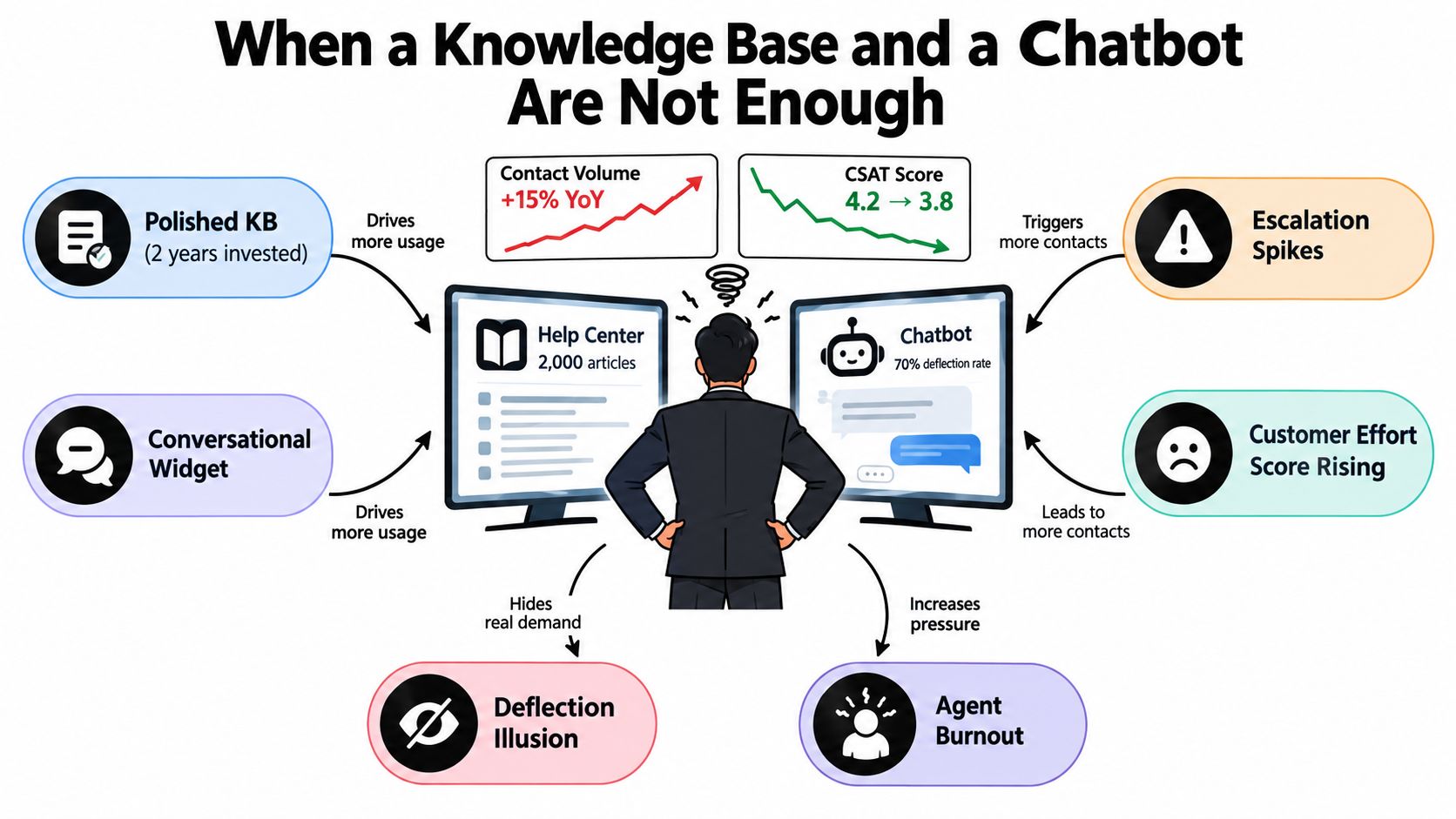
A support leader spends two years building a polished help center. The team writes hundreds of articles, cleans up navigation, adds search, then launches a chatbot in the corner of the app. For a month or two, everyone feels progress.
Then the familiar signals show up. Contact volume keeps climbing. Tier 1 queues slow down. Agents start pasting the same macros into ticket after ticket. Customers hit the bot first, but many still end up in human queues after a frustrating detour.
Tool presence is not the same as resolution
Many enterprise self service projects stall. A knowledge base can answer known questions, but it can't tell whether the user is on the billing page, whether their account has a permissions issue, or whether the article is outdated. A chatbot can greet users and deflect simple requests, but if it can't interpret context or take action, it becomes a nicer front end for the same old dead ends.
That's why stale content hurts more than missing content. Missing content creates an obvious gap. Stale content creates false confidence.
If you've ever audited a help center and found three articles for the same workflow, all partially correct, you've seen the pattern. Teams launch content faster than they govern it. If you're tightening that foundation, this guide on how to create a knowledge base is a useful companion.
The symptoms usually look healthy on the dashboard
This is the trap. Self-service metrics can look strong while the customer experience gets worse.
You might see:
- Repeat tickets rising: Customers try self-service first, fail, then open a case later.
- Copy-paste support behavior: Agents keep sending the same article because the issue is common, but the article still doesn't complete the job.
- Longer tier 1 handle time: Basic questions arrive mixed with half-resolved conversations from the bot.
- Deflection that flatters the system: Sessions end without immediate escalation, but the issue isn't solved.
Practical rule: If customers leave self-service only to contact you again about the same issue, you didn't reduce demand. You delayed it.
A stronger model treats enterprise self service as a stack. Content is one layer. Conversation is another. Context, execution, and escalation are separate design problems. When those pieces line up, self-service starts acting less like a library and more like a capable front line.
What Enterprise Self-Service Actually Is
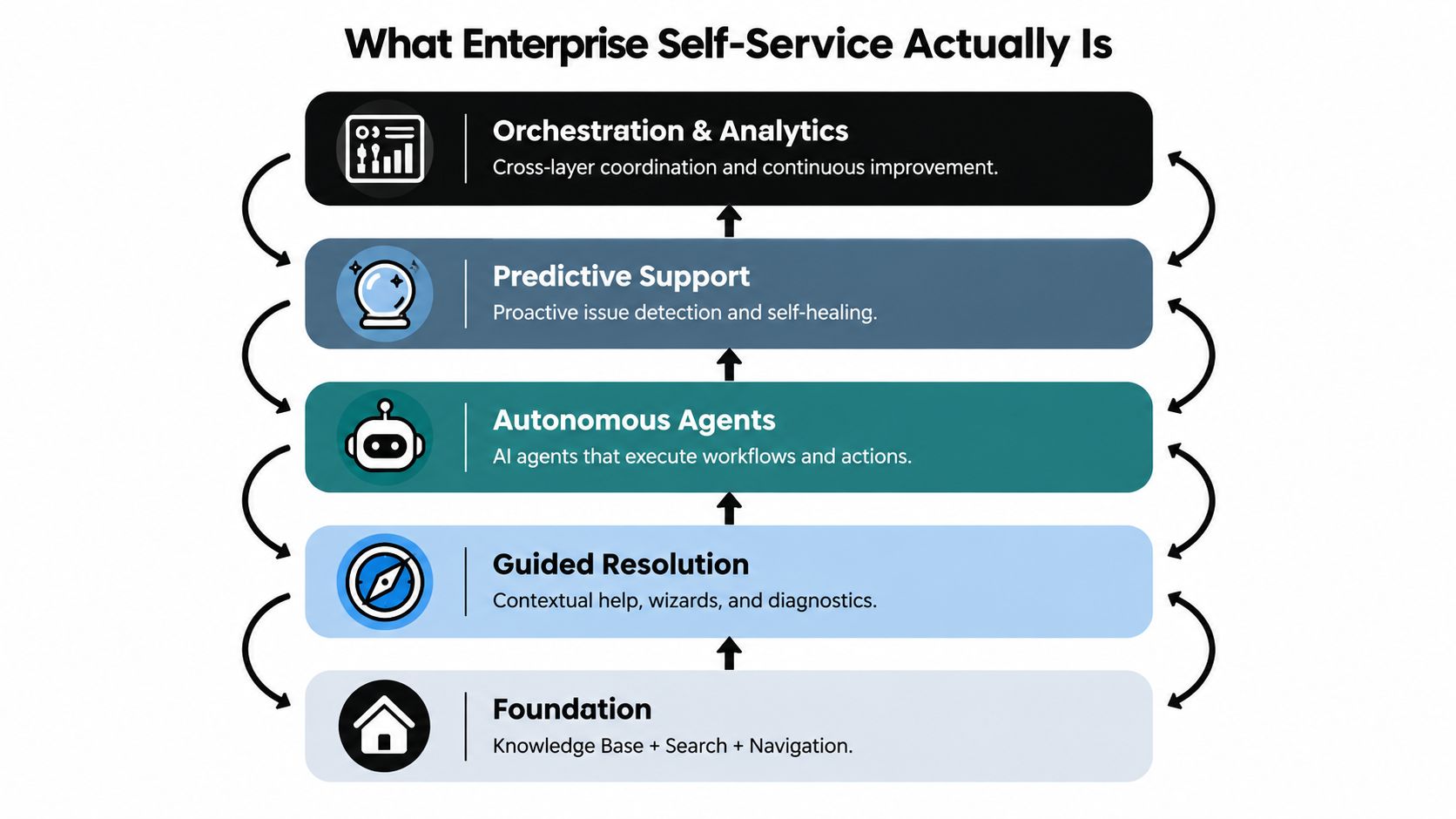
The simplest definition I use is this: enterprise self service is the layered capability that lets customers resolve work without needing a support agent to interpret, translate, or manually complete the next step.
That definition matters because it separates real self-service from digital wallpaper. A search bar isn't a strategy. A chatbot isn't an operating model. The architecture has to support durable resolution.
Think of it like a building
I like a house analogy because it makes the stack concrete.
The foundation is governed knowledge. This is your source of truth. Articles, process docs, known issues, policy notes, release changes, and troubleshooting logic all live here. If this layer is weak, everything above it inherits the weakness.
The walls are guided resolution. This includes search, decision trees, troubleshooting paths, and in-product help. These structures give shape to the experience and stop users from wandering.
Here's a useful reference if you're designing the portal layer itself: self-service customer support portal.
The plumbing is page-aware context. A strong system knows what screen the user is on, what account state applies, and what journey they're in. Without that, support still depends on the customer explaining the situation from scratch.
After that comes autonomous action. The system can do something, not just say something. It can reset access, pull account details, trigger workflows, or route the user into the correct governed path.
At the top sits orchestration and analytics. You inspect outcomes, identify gaps, and decide where autonomy is safe and where it isn't.
A short walkthrough makes the layers easier to see:
Why most programs stall early
Most companies get to layer one. Some reach layer two. Fewer make the jump into contextual and transactional self-service because trade-offs get real fast.
- Deeper knowledge takes ownership: Someone has to maintain article quality, structure, permissions, and version control.
- More autonomy increases risk: The moment a system can change account state, leaders need confidence thresholds, approvals, and auditability.
- Faster handoff can mask weak design: It's tempting to escalate quickly, but that can hide content and routing problems instead of fixing them.
This is also why resolution rates matter more than surface engagement. A 2024 Gartner survey found that only 14% of customer service and support issues are fully resolved in self-service, and even issues users saw as very simple were fully resolved only 36% of the time, according to Gartner's self-service resolution findings. Enterprise self service isn't hard because leaders lack portals. It's hard because durable resolution requires the whole stack.
Business Benefits and ROI in Practice
A support leader usually feels the value of self-service before finance signs off on it. Monday queues stop spiking as hard. Agents spend less time repeating password steps and more time fixing account-specific problems. Customers stop bouncing between an article, a bot, and a ticket just to complete one simple task.
That shift matters because enterprise self service is not just another entry point. It works more like a service operating model built in layers. The knowledge base handles known answers. Page-aware guidance helps users complete work inside the product. Integrated workflows carry out approved actions across systems. Governance decides where autonomy is allowed and where a human still needs to step in. ROI improves when those layers reduce durable demand, not when they merely hide it for a few minutes.
Start with the cost gap, then test for true resolution
The cost spread is large enough to get attention on its own. Independent summaries report that fully deflected self-service interactions can cost $0.10 to $0.25, compared with roughly $8 to $12 for live-agent contacts, according to Gitnux customer self-service statistics.
But that comparison only holds if the customer finishes the job.
A contained conversation is not the same as a resolved issue. If a user reads two articles, chats with a bot, and still opens a ticket, the company has funded two service paths and delayed the answer. That is why shallow containment can look efficient in a dashboard while creating more work downstream.
The common failure mode in self-service ROI is unresolved demand that returns later in a more expensive channel.
A useful analogy is a building lobby. A receptionist who points everyone toward the right hallway is helpful. A receptionist who can also verify identity, call the right office, and open the correct door removes much more labor from the system. Enterprise self service creates larger returns when it does the second job, with rules and oversight.
A worked example you can use internally
You do not need a complicated model to start. Use monthly support volume, estimate which issue types are repeatable and safe for autonomous resolution, then compare channel costs and follow-on effects.
| Metric | Agent-Handled Contact | Autonomous Self-Service Resolution |
|---|---|---|
| Typical cost range | Roughly $8 to $12 per contact | Roughly $0.10 to $0.25 per resolution |
| Staffing impact | Consumes queue capacity and agent time | Preserves agent capacity for exceptions |
| Variability | Depends on training, queue load, and handoffs | Depends on content quality, context, and workflow design |
| Best use | Complex, emotional, high-risk, or exception cases | Repeatable, well-governed, high-volume requests |
For a cleaner business case, pair that cost gap with a measurement plan. This walkthrough on how to measure customer support ROI is useful when you're building the internal model.
One caution helps here. Teams often overestimate the savings from a chatbot and underestimate the savings from page-aware and transactional self-service. Answering a question is helpful. Completing an address change, surfacing the right policy on the right page, or collecting the exact escalation context removes more work from support and reduces recontact risk.
Benefits that show up outside the support queue
Ticket reduction is the easiest gain to spot, but it is rarely the only one.
- Onboarding gets easier: New customers can finish more setup work without waiting for a queue.
- Execution becomes more consistent: The same approved answer and workflow can be used across regions and shifts.
- Content improvement gets more targeted: Journey data shows where users stall, which pages trigger help, and which tasks fail before a ticket is created.
- Agents spend time where judgment matters: Human teams can focus on exceptions, retention risk, and diagnosis instead of repetitive requests.
These gains compound because the system gets better at seeing work, not just handling contacts. A basic help center tells you what users searched for. A layered self-service model can show which product page triggered help, which step failed, whether an integration completed the task, and when policy required escalation. That gives leaders a stronger case for investment because they can connect autonomy to resolution quality, labor savings, and customer effort at the same time.
Strong ROI cases stay honest. They show which journeys should be automated, which ones need approval gates, and which ones belong with a human from the start.
Architectures You Can Build On
Teams don't need one architecture. They need the right mix, applied in the right order.
The mistake is trying to replace one model with another too early. A static help center, a routed virtual agent, page-aware guidance, and an autonomous workflow agent solve different parts of the problem.
Four common patterns
| Architecture | Resolution Depth | Integration Needs | Maintenance Burden | Escalation Behavior | Best Fit |
|---|---|---|---|---|---|
| Static knowledge base plus deflection chatbot | Shallow to moderate | Low | Moderate content upkeep | Escalates after basic answers fail | Early-stage teams with repeat FAQs |
| Intent-routed virtual agent | Moderate | Moderate | Higher intent tuning | Routes by issue type with cleaner triage | Teams with broad inbound categories |
| Page-aware chat | Moderate to deep | Moderate to high | Requires product context upkeep | Escalates with better session context | SaaS products with UI-heavy support demand |
| Autonomous agent across integrated systems | Deep for governed workflows | High | High governance and testing burden | Escalates exceptions or policy-bound cases | Larger teams with repeat transactional work |
Where teams get the trade-offs wrong
A static knowledge base is cheap to start, but it breaks when users don't know what to search for. An intent-routed virtual agent adds structure, but often still depends on rigid topic design.
Page-aware chat changes the equation because it grounds the conversation in the screen the user is viewing. That means fewer vague back-and-forths like “Where are you clicking?” or “Which settings page do you mean?” In product-led B2B environments, that context can matter more than adding another hundred articles.
Autonomous agents go further. They can execute a workflow, validate policy, and write back to connected systems. But safety matters. If a system can modify billing state, permissions, or provisioning, governance stops being optional.
A useful architectural reference is intelligent support system architecture.
A simple rule of thumb
Don't rip and replace if your lower layers still serve a job. Layer them.
Use the knowledge base as the source of truth. Add a virtual front door to recognize intent. Add page awareness where UI confusion drives ticket volume. Add autonomous actions only where the workflow is repetitive, rules-based, and easy to audit.
That layering mindset is what turns enterprise self service into infrastructure instead of another isolated experiment.
A Practical Implementation Roadmap
Most self-service rollouts fail for a boring reason. Teams rush to launch a smart-sounding assistant on top of thin content, weak permissions, and messy system data.
The technology usually isn't the first bottleneck. The operating discipline is.
Phase one and two
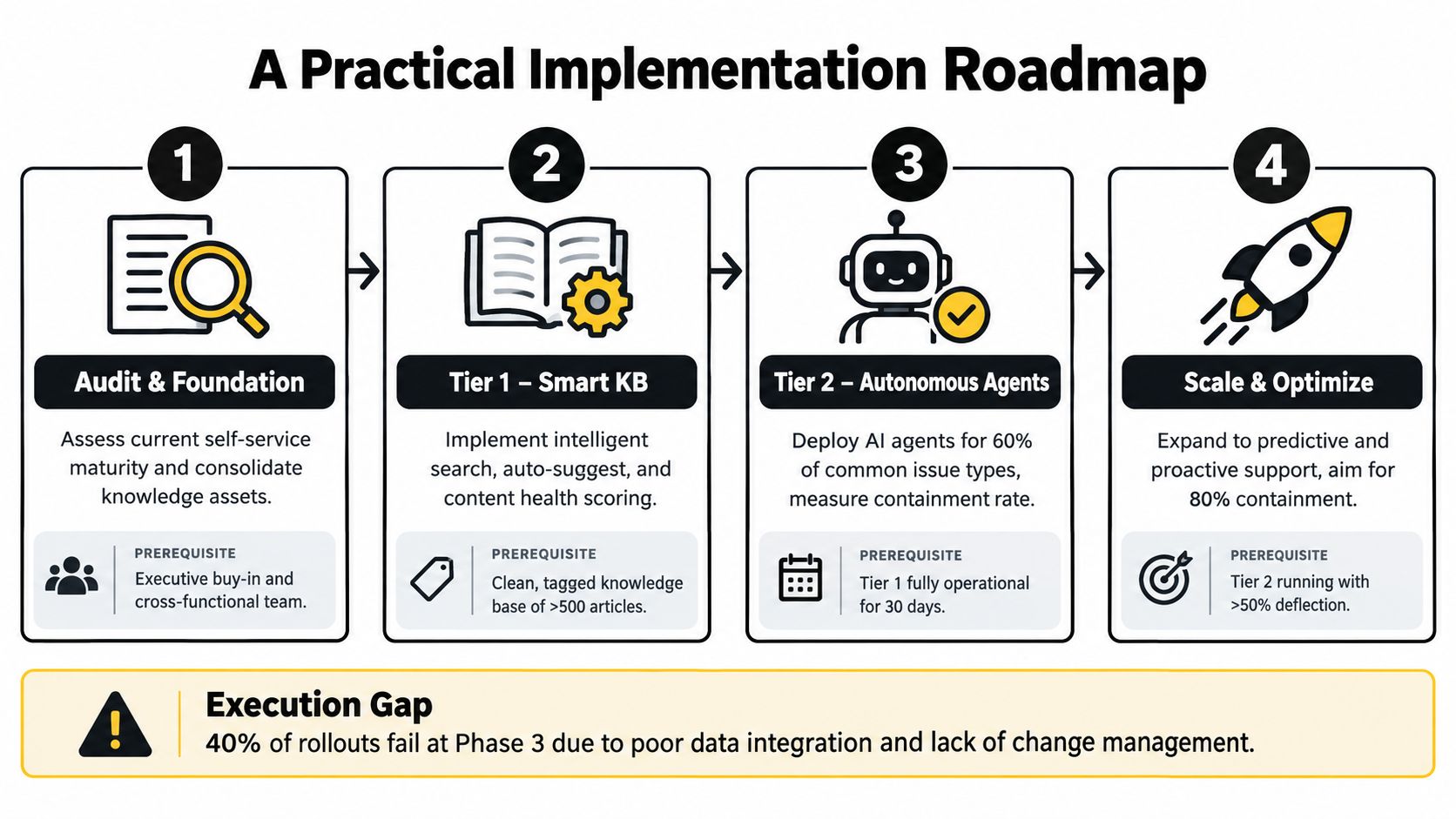
Foundation comes first. Audit content, remove duplicates, assign ownership, and define what counts as authoritative. If your CRM, ticketing data, or identity model is messy, surface that now. Self-service exposes those flaws quickly.
Enablement comes next. Design intents around real demand, not org charts. Customers don't think in department labels. They think in goals and problems. Gap analysis matters here. What questions fail search, fail bot flows, or force agents to paste the same workaround?
A practical build guide for sequencing those pieces is support automation implementation steps.
Phase three and four
Autonomy starts with controlled pilots. Pick a narrow set of repeatable journeys. Good candidates are requests with stable policy, clear success criteria, and clean rollback paths. The point isn't to impress stakeholders with broad AI coverage. The point is to prove a workflow can resolve safely.
Scale comes after governance hardens. By then you should have editorial workflows, localization rules, model review habits, and named owners for both knowledge and automations. Broad rollout without those controls usually creates a support shadow system that nobody fully owns.
What to check before scaling: If the team can't explain who approves content changes, who reviews failed actions, and who decides escalation policy, the system isn't ready for broad autonomy.
Prerequisites that matter more than people admit
Before moving from one phase to the next, validate these basics:
- Identity and access: SSO, role logic, and permission boundaries have to be clear.
- System connectivity: Your CRM, ticketing system, and product data need usable integrations.
- Editorial workflow: Someone must own review cadence, taxonomy, and retirement of stale content.
- Escalation design: Human handoff can't be an afterthought.
- Rollback paths: Every autonomous action needs a safe way to stop or reverse.
The execution gap is real. TDWI reports that over 60% of organizations say leadership supports self-service, yet less than half of business users actively engage with the tools, according to TDWI research on the state of self-service analytics. Approval is easy. Habit change, governance, and sustained use are the hard part.
KPIs and a Maturity Scorecard
If you measure enterprise self service with traffic charts alone, you'll get flattering numbers and bad decisions.
The KPI stack should separate leading indicators from lagging outcomes. Leading indicators tell you whether the system is usable. Lagging outcomes tell you whether it reduced work and solved problems.
What to track at each stage
Zendesk defines self-service score as total help-center sessions divided by total users who submitted tickets in a 30-day snapshot, and related measurement guidance defines deflection as self-service resolutions divided by self-service resolutions plus tickets created, with a 72-hour no-ticket window, as outlined in Zendesk reporting tools for measuring self-service.
That's useful, but it still isn't enough on its own.
| Maturity Stage | Primary KPI | Secondary KPI | Watch-out Metric | Target Range |
|---|---|---|---|---|
| Launch | Intent coverage | Time to first answer | Containment without verified resolution | Qualitative improvement over baseline |
| Optimize | Verified self-service resolution | Escalation rate | High session volume with repeat contact | Qualitative improvement over baseline |
| Scale | Cost per resolved contact | Repeat-contact rate | Strong deflection with weak customer outcomes | In mature programs, 25% to 40% ticket deflection is a common benchmark according to customer support ticket deflection statistics |
Why containment is a trap
A session can end without a ticket and still be a failure. The customer may leave, get blocked, and return later through email, chat, or phone. That's why mature teams track recontact windows and outcome verification, not just abandonment of the support flow.
Umbrex's guidance on self-service measurement distinguishes true successful self-service from simple containment and recommends pairing recontact tracking with cost-per-contact, as described in Umbrex on self-service success rate.
Scorecard principle: A self-service session only counts as a win if the customer's need stays solved.
At launch, I care most about intent coverage and failure patterns. During optimization, I care about verified resolution and escalation quality. At scale, I care about repeat contact, cost per resolved issue, and whether the system keeps solving the same classes of work without drift.
How Halo AI Delivers This in Practice
A support leader has seen this pattern before. The company launches a chatbot, links it to the help center, celebrates lower ticket volume for a week, then watches the same issues return through email, Slack, or escalations because the system answered a question but did not finish the job.
That is the gap Halo AI is built to close.
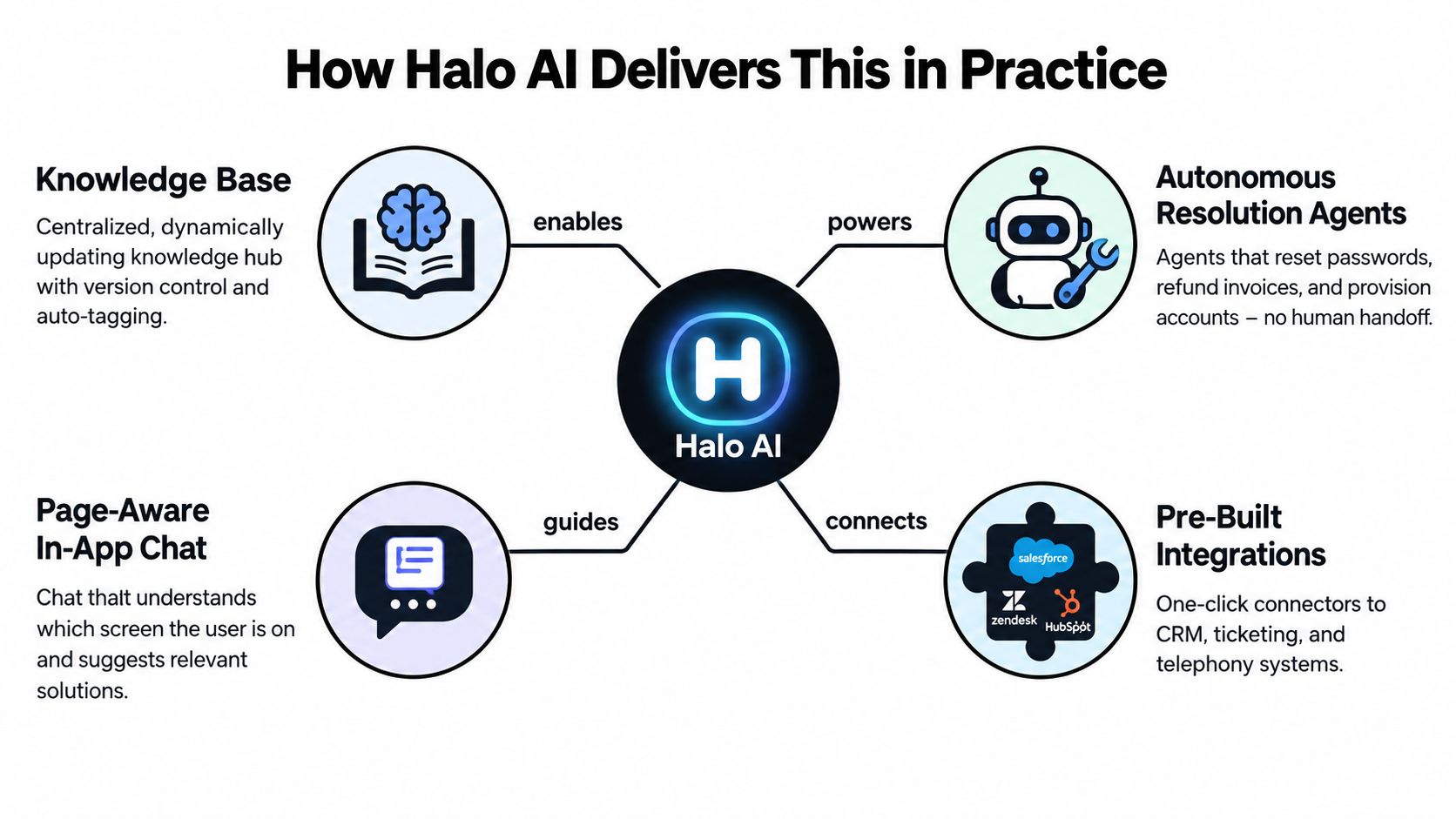
Halo AI applies the layered self-service model in a B2B SaaS support environment. It combines a knowledge base, page-aware in-app chat, autonomous resolution agents, and integrations with systems such as CRM, ticketing, billing, and collaboration tools. The useful part is not the label. It is the way each layer passes context to the next so the experience can move from explanation to resolution.
What the architecture looks like in practice
Start with the knowledge layer.
This layer works like the foundation under a building. If the source material is weak, every higher layer becomes unstable. Halo AI can centralize support docs, internal notes, call recordings, and prior cases so responses come from reviewed material instead of a model inventing its way through an answer.
Then the system adds a conversational front door inside the product itself. A user opens chat on the page where the problem is happening, asks in plain language, and gets a response shaped by both content and current context. The page matters. The user's role matters. Their plan, permissions, and account state matter too. Without that page awareness, the assistant behaves like a call center agent trying to help while blindfolded.
The next layer is where enterprise self-service becomes more than search with a chat box. An autonomous agent can guide the user through a workflow, complete an approved action, or escalate with session history attached. In practice, that can mean helping someone provision access, explaining an account-specific billing issue, or collecting the right fields for a bug report so engineering receives something structured instead of a vague complaint.
That handoff matters.
Support teams usually feel the difference in rework. Agents spend less time re-asking questions. Users spend less time repeating themselves. The self-service system becomes part of the operating model, not a side channel that creates extra cleanup.
Why this matters for support leaders
Halo AI shows what many enterprise teams miss at first: durable self-service needs four parts working together. It needs governed knowledge, page-aware guidance, controlled action, and integrations into the systems where work happens. Remove any one of those parts and the model starts to slip back toward shallow containment.
Trust is the test. Users adopt self-service when it gives accurate answers in the moment, respects what they are allowed to do, and knows when to pass the issue to a human with the full story attached. A polished bot persona cannot compensate for missing context or weak execution.
That is why this kind of platform matters in practice. It treats self-service as an operating system for resolution, not a nicer wrapper around the help center.
Governance, Scaling, and When Not to Force It
A user opens your support portal to report a suspected account takeover. The assistant recognizes the page, has access to policy, and can ask the right intake questions. It still should not reset controls, dismiss risk, or keep the user trapped in self-service. Good governance decides that boundary before launch, not after a bad incident.
That is the part many enterprise self service programs skip. A knowledge base can answer. A chatbot can collect intent. An operating model has to decide what the system may do, under which conditions, with what evidence, and when a human must take over.
I use a simple test here: accuracy, action safety, and explainability. Those three checks work like the legs of a stool. If one leg is weak, the whole experience wobbles. A system that sounds confident but cannot explain its recommendation will lose trust. A system that explains well but can trigger the wrong account action creates a different problem.
Rules that should exist before broad rollout
Before any autonomous workflow goes live, set the guardrails in plain terms:
- A confidence threshold: The system needs a clear point where it stops answering or acting and routes the case onward.
- An action allowlist: Only named, approved actions should run without extra review.
- A human escape hatch: Users need a visible path to a person when risk, frustration, or policy complexity rises.
- A logged audit trail: Teams need a record of what the system saw, what it recommended, what it changed, and why.
These controls matter because failure is uneven. Self-service usually performs worst on edge cases, policy-heavy requests, and moments where the user is anxious, angry, or asking for an exception.
When to force it and when to hold back
| Journey Type | Risk if Wrong | Recommended Autonomy | Required Governance |
|---|---|---|---|
| Simple repeatable product guidance | Low | High | Content review, page context, fallback path |
| Routine account workflows with clear policy | Moderate | Controlled autonomy | Permissions, action logs, rollback path |
| Billing disputes or sensitive account changes | Higher | Assisted autonomy | Human approval, clear policy checks, audit trail |
| Security-related or emotionally charged escalations | High | Human-led with support assist | Strict routing, identity checks, transcript logging |
The key question is not whether automation is available. The question is whether a wrong answer costs more than a human interaction. If the answer is yes, keep a person in the loop.
That includes account compromise, sensitive disputes, exception handling, and any case where reassurance matters as much as policy accuracy.
One useful reminder comes from channel design. Many IT teams already offer self-service, yet availability alone does not create trust or resolution. The State of IT Self-Service survey makes that point clearly. A portal can exist and still be ignored if it lacks context, clear ownership, or a safe escalation path.
How to scale without breaking trust
Scaling works best as a maturity ladder, not a switch.
Start with guided resolution. Let the system retrieve the right content, use page context, and gather structured inputs. Then add constrained autonomy for a short list of safe workflows, such as approved status checks or low-risk access tasks. Expand only when policy review, model evaluation, content refresh, and ownership are routine operating habits.
A three-journey pilot is usually enough to expose the issues. Choose one low-risk journey, one moderate-risk workflow, and one journey that should remain human-led. Score each one for resolution confidence, action risk, policy clarity, and escalation quality. That method keeps enterprise self service honest because it measures durable resolution, not shallow containment.
Analysts still expect the employee self-service market to grow. A recent market outlook from Verified Market Research projects continued expansion in employee self-service portals over the next several years. Growth, however, does not fix weak governance. Teams still need clear boundaries, operating rules, and proof that the system resolves issues safely over time.
Halo AI fits this model in a practical way. It combines governed knowledge, page-aware guidance, autonomous resolution, and connected system context so teams can scale self-service without treating every journey as automation-ready from day one. If you want to see how that looks in a live support environment, visit Halo AI.