Startup Customer Support Playbook 2026: Design Your Engine
Build a scalable startup customer support engine. This playbook covers team design, tooling, automation, & metrics for founders & support leaders.
 Matt PattoliFounder15 min read
Most startup teams don't realize their support model is failing until it starts stealing time from every other function. The founder answers tickets between roadmap reviews. The product manager fields “quick questions” that turn into debugging sessions. Engineering gets pulled into vague bug reports with no reproduction steps. Sales hears objections that support already explained three times, but nobody captured them in a reusable way.
That isn't a staffing problem first. It's a systems problem.
Good startup customer support isn't about buying a help desk and hiring a rep to clear the queue. It's about building an operating system that turns customer conversations into retained revenue, clearer product decisions, and faster resolution at every stage of growth. If you design that engine early, support compounds. If you don't, it becomes a tax on your team.
Why Your Startup Customer Support Approach Is Broken
If support still lives in a founder inbox, a Slack channel, and a few heroic people's memory, the system is already broken. It may feel scrappy and customer-centric, but it doesn't scale, and it doesn't produce clean learning. It produces interruptions.
The old startup playbook treated support as a reactive function. Someone complains, someone answers, everyone moves on. That model falls apart when customers expect speed, continuity, and context by default. According to customer support trends for 2025, 83% of customers expect to interact with someone immediately when they reach out, and 74% of consumers now expect 24/7 customer service. Those expectations change the math for every startup, even small B2B SaaS teams.
Support is no longer a side job
A lot of founders still act like support is something to “cover” until the company can afford a real team. That's backwards. Support is where churn risk shows up early, onboarding friction becomes visible, and weak product assumptions get exposed in customer language.
When support is handled ad hoc, three bad things happen:
- Issues stay personal instead of systemic. One person knows the workaround, but nobody documents it.
- Product feedback turns noisy. Engineering gets anecdotes, not patterns.
- Revenue risk hides in plain sight. Customers ask for help before they downgrade, stall, or disengage.
Practical rule: If your support process depends on memory, heroics, or “just ping me,” you don't have a process.
Hiring more people won't fix a bad design
Many startups respond to rising volume by adding headcount before they add structure. That works for a while, then costs climb and consistency drops. New hires answer the same question in different ways. Escalations bounce around. Knowledge fragments across tools.
The deeper issue is that manual effort grows faster than your team can sustain if you don't standardize intake, documentation, routing, and feedback loops. A support team without systems becomes a human API for every unresolved problem in the business.
A better model treats startup customer support as a learning engine first and a resolution engine second. That sounds abstract until you run it in practice. Every conversation should leave behind an asset: a documented fix, a product signal, an improved macro, a better help article, a clarified onboarding step, or a cleaner escalation path.
The competitive baseline has changed
Customers don't separate your support experience from your product experience. If the answer is slow, repetitive, or disconnected from their account context, they experience the whole company as harder to work with.
Customers don't care which internal team owns the answer. They care that the company remembers them and resolves the issue.
That's why startup customer support has to be designed as infrastructure. Not a queue. Not a cost center. Infrastructure that connects customer conversations to product, engineering, success, and revenue.
The Foundation Your First 100 Customers
At the beginning, efficiency is overrated. Learning isn't.
Teams often make the same mistake too early. They buy tools, set up automations, and start writing polished workflows before they've heard enough real customer language. That creates a neat-looking support stack built on guesses.

Stay manual on purpose
For your first 100 customers, founder-led or very high-touch support is usually the right move. Not because it's scalable. It isn't. Because it gives you raw material you cannot buy later.
You need to hear:
- The exact words customers use when they describe your product
- Where they get stuck during setup, onboarding, and daily use
- Which questions repeat across accounts
- Which “support” issues are product design issues
- Which requests come from high-value workflows versus edge cases
This phase should feel slightly uncomfortable. You'll answer the same question too many times. You'll jump on calls that could have been avoided. You'll explain features that should've been obvious in the UI. That's useful discomfort. It tells you where the system is weak.
Capture patterns before you automate anything
You don't need a complex setup yet. A spreadsheet, a Notion database, or a simple shared doc is enough if you log the right fields consistently.
Track each issue with a few practical fields:
Customer segment
Note who asked. New customer, admin user, technical user, executive sponsor, trial account.Question in customer language
Paste the wording they used. Don't rewrite it into internal jargon.Root cause
Separate user confusion, missing docs, product bug, onboarding gap, permissions issue, or feature request.Current resolution
What solved it today, even if it was manual.Reusable asset needed
Help article, UI change, macro, in-app guidance, bug escalation, or onboarding update.
A lot of teams skip the fifth field. That's the one that turns support from a service desk into a system builder.
If you're starting to organize those assets, this guide on how to create a knowledge base is a useful reference for structuring articles around actual customer questions instead of internal product categories.
Early support work should produce a library of customer language, not just a record of closed conversations.
What works and what doesn't
What works is direct access to customers, fast follow-up, and disciplined note-taking. What doesn't work is pretending every request deserves a process before you know whether it's common, strategic, or temporary.
A few grounded habits help:
- Reply like a product operator. Don't just answer the question. Ask what they were trying to do.
- Summarize patterns weekly. One short internal memo beats dozens of scattered Slack messages.
- Tag friction, not just topic. “Billing” is weaker than “billing confusion during seat expansion.”
- Write rough docs early. They don't need polish yet. They need usefulness.
This stage isn't about reducing workload. It's about collecting the ingredients for every scalable layer that comes next.
Systematize Your Support Scaling to 1000 Customers
Once the same questions keep repeating, you've reached the point where startup customer support needs structure. Not enterprise complexity. Just enough repeatability that answers stop depending on who happened to be online.
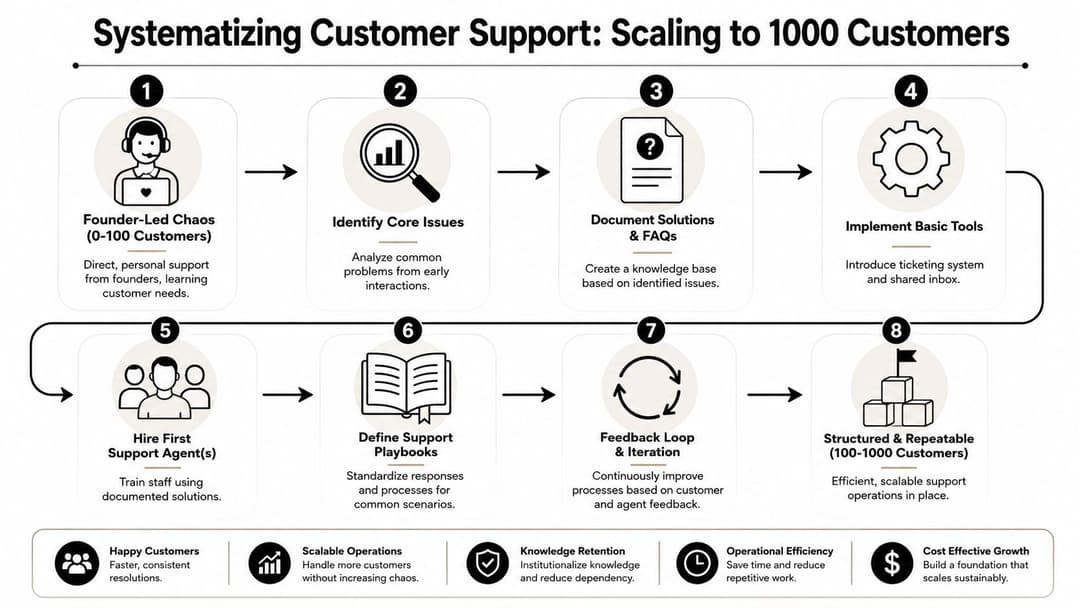
The first move is simple and often delayed too long. Turn your most common questions into self-service. A practical method is to launch self-service around the top 10 most-asked questions, then add article-view analytics plus thumbs-up and thumbs-down feedback so your team can update weak content continuously, as described in this B2B customer service guidance from Pylon.
Build the first layer of operational backbone
Don't start by documenting everything. Start by documenting what burns the most time and what blocks customer progress.
A strong first support system usually includes:
- A lightweight ticketing workflow that assigns ownership and keeps conversations from disappearing in email threads
- A small knowledge base built from recurring questions, not from your feature list
- Shared macros or saved replies for issues with stable answers
- Clear tags for bug, billing, setup, permissions, feature request, and how-to questions
- A weekly review habit for article gaps and repeated escalations
This is also the point where many teams benefit from borrowing ideas from adjacent operations disciplines. If your support queue is becoming messy across intake, routing, and follow-up, this piece on workflow optimization for social operations is worth reading because the underlying problem is similar: too much manual coordination, not enough standardized flow.
Choose a tool that matches your stage
Founders often buy for imagined future complexity and ignore present needs. That leads to bloated setups nobody maintains.
For this stage, the right system usually does three things well:
| Need | Good enough choice | What to avoid |
|---|---|---|
| Shared ownership | A simple shared inbox or basic help desk | Heavy workflows that require an admin to operate |
| Reusable answers | A searchable help center and macros | Docs hidden across scattered internal tools |
| Basic reporting | Visibility into open issues, repeats, and handoffs | Dashboards with more charts than decisions |
The wrong tool creates admin work. The right one makes patterns visible.
Your first support hire should not be a ticket closer
A lot of startups hire their first support person as if the role is pure queue management. That's too narrow. Your first support hire should own three jobs at once.
First, they resolve issues. Second, they maintain knowledge. Third, they act as the company's pattern detector.
That means the role should include responsibilities like:
- Cleaning up repetitive answers into durable documentation
- Flagging product friction with enough detail that product can act on it
- Improving intake quality so engineering doesn't get vague escalations
- Spotting account risk signals that customer success or founders need to know
If you're designing that transition from founder support to a more durable operating model, this article on how to scale customer support maps well to the decisions that show up here.
The first support hire shouldn't just close tickets. They should reduce the number of tickets that need to exist in the same form again.
When teams do this well, the queue gets cleaner, docs get sharper, and product conversations get more credible because support brings patterns instead of noise.
Automate and Instrument Beyond 1000 Customers
By this point, support volume has enough repetition that manual handling becomes expensive in two ways. It costs team time, and it delays the work only humans should be doing. That's where automation starts paying off, if you apply it with discipline.
Salesforce reports that 30% of service cases were resolved by AI in 2025, and that share is projected to reach 50% in 2027. The same source says teams using AI agents expect 20% lower service costs and 20% faster case resolution times on average, with 79% of service leaders viewing investment in AI agents as essential to meet business demands, according to Salesforce service statistics.
What to automate first
The mistake here is obvious once you've seen it fail. Teams automate edge cases before they automate repetitive, well-bounded work.
Start with categories like:
- FAQ-style questions where the answer already exists in docs
- Order or billing status checks when the system can access account context
- Conversation summaries for handoff and internal notes
- Knowledge retrieval across product docs, notes, and prior interactions
- Personalized recommendations when the answer depends on account setup or prior history
That's where AI-native support tools differ from old chatbots. The useful ones don't just deflect. They ingest product and customer context before responding, then hand off when certainty drops or the issue requires judgment.
One example is Halo AI, which is built around autonomous ticket resolution, page-aware in-product guidance, and context-rich bug reporting. The point isn't that every team needs the same platform. The point is that your evaluation criteria should now include context ingestion, handoff quality, and whether the system improves from real conversations rather than just serving static scripts.
What to measure without drowning in dashboards
You don't need a giant analytics stack. You need a compact dashboard that tells you whether the support engine is getting faster, more useful, and less dependent on human repetition.
Track a short list:
First Response Time
How quickly someone or something acknowledges and starts helping.CSAT
Useful when paired with issue category, not viewed as a vanity average.Autonomously resolved share
The percentage of issues closed by automation without needing a human rescue.Escalation quality
Whether handoffs arrive with enough context to move work forward.
If you need a practical baseline for choosing and defining those measures, this guide to key performance metrics for customer service is a good companion.
A related lever many teams overlook is customer education. If the same setup questions and workflow confusion keep showing up, async training content can remove load before a ticket starts. For that, I'd look at approaches like VideoLearningAI's customer training, especially for onboarding and repeat product education.
After the metrics are live, review them in context, not isolation. A drop in response time is good only if answer quality and successful resolution hold up.
Here's a useful product walkthrough of how modern AI support can look in practice:
Automation should remove repetitive labor, not remove accountability.
The best support automation doesn't hide work. It makes work visible, structured, and easier to improve.
Bridge the Gap to Product and Engineering
Many startup customer support systems break again, not at the point of answering customers, but at the point of turning customer issues into usable product and engineering input.
Help Scout's guidance gets at the core problem well: a frequently missed question in startup support is how to design it so it doesn't create a hidden workload for the product team, and most advice doesn't explain how to operationalize that loop without burying engineers in noisy tickets, as noted in this startup support article from Help Scout.
The handoff model that actually works
Support should not escalate raw conversations. It should escalate qualified issues.
That means support owns the first layer of diagnosis:
Confirm the problem category
Bug, how-to, permissions issue, billing issue, outage symptom, or feature request.Reproduce if possible
If nobody on the support side has tried the workflow, the escalation is premature.Assess impact
One confused user is different from a blocked admin or a broken shared workflow.Package evidence
Screen context, steps taken, timestamps, environment clues, and customer impact.
Product and engineering should not parse a messy ticket queue to figure out what matters. Support should deliver a cleaner feed of validated signals. If you're building that collaboration layer, this guide on support integration with product development is aligned with how strong teams route insight without creating chaos.
A support escalation should answer the engineer's first five questions before they have to ask them.
Sample Triage & Escalation SLA Playbook
A lightweight SLA model keeps everyone sane. It doesn't need legal language. It needs clarity.
Sample Triage & Escalation SLA Playbook
| Priority | Definition | Response SLA | Escalation Path |
|---|---|---|---|
| Critical | Core workflow unavailable, multiple customers blocked, or severe production issue | Immediate triage by support and same-day engineering review | Support lead → engineering on-call or designated urgent channel |
| High | Important feature impaired, workaround weak or unavailable, clear customer impact | Same business day | Support lead → product manager and engineering owner |
| Medium | Limited-scope bug, reasonable workaround exists, or repeated usability problem | Next planned review cycle | Support → product backlog with evidence and frequency notes |
| Low | Minor UI issue, isolated edge case, or non-urgent feature feedback | Scheduled backlog review | Support logs and groups with similar feedback |
The value of this table isn't speed alone. It prevents every complaint from being treated like an emergency.
The bug report template engineers will respect
Support teams earn credibility with engineering when escalations are precise. Here's a practical template that works well:
Issue summary
One sentence describing what broke or failed.Customer impact
Who is affected and what workflow is blocked.Reproduction steps
Ordered steps using the exact path taken.Expected behavior
What should have happened.Actual behavior
What happened instead.Environment and context
Browser, device, relevant settings, account type, and timing if known.Evidence attached
Screenshots, screen recordings, console logs, session links, or relevant IDs.Workaround status
Whether support found one, and whether it's acceptable.
Feature requests need a different template. Don't send “customer wants X.” Send the underlying job to be done, the current friction, affected workflow, and whether the request reflects a pattern or a one-off preference.
A clean support-to-product loop has a few habits that matter more than tools:
- Weekly issue review with grouped themes, not isolated anecdotes
- Separate bug intake from feature feedback so engineers aren't triaging strategy in real time
- Tag by impact and pattern rather than just by customer name
- Close the loop back to support when fixes ship or priorities change
When this system works, support stops being a noisy side channel and becomes a trusted operating partner.
Conclusion The Evolution of Your Support Engine
Strong startup customer support evolves in stages. Early on, you stay close to the customer and learn manually. Then you codify what repeats. Then you automate the right work and instrument the system so you can improve it. Finally, you connect support tightly to product and engineering without turning either side into a dumping ground.
Teams often try to skip a stage. They automate before they understand demand. They hire before they document. They escalate before they triage. That's why support feels heavier than it should.
The better path is less glamorous and far more effective.
What the mature model looks like
A healthy support engine does a few things at once:
- It resolves customer issues reliably
- It captures reusable knowledge from each conversation
- It sends cleaner signals into product and engineering
- It protects humans from repetitive work
- It gives leadership visibility into friction, risk, and opportunity
That's why support should be treated as part of the company's operating core, not as cleanup after the “real” work gets done.
The long-term advantage
As your company grows, the tools will change and the channels will multiply. The principles won't. Listen closely early. Document relentlessly. Build feedback loops on purpose. Automate only after you understand the work well enough to automate it safely.
If you do that, support becomes more than a response function. It becomes one of the few systems in the business that touches customer experience, retention, product quality, and operational efficiency at the same time.
For teams thinking about what that next stage looks like in practice, this perspective on automated customer experience is a useful extension of the model.
The end state isn't fewer conversations with customers. It's better conversations, better systems, and less waste around both.
If your team is ready to move from reactive ticket handling to an AI-native support system, Halo AI is worth evaluating. It's designed for B2B SaaS teams that want autonomous resolution, in-product guidance, cleaner escalations, and a support operation that learns from every interaction instead of starting from scratch each time.
How Halo helps
Halo helps B2B SaaS support teams scale without scaling headcount: an AI agent absorbs routine volume, an AI-first inbox keeps humans fast on the rest, and every conversation makes the system smarter. Learn more about Halo for customer support teams.