AI Agent for SaaS: What It Is and How It Works
Learn how an AI agent for SaaS resolves tickets autonomously, guides users in-app, and creates bug reports. See real capabilities, ROI, and integration paths.
 Matt PattoliFounder15 min read
At 2 a.m., most SaaS problems stop looking strategic and start looking operational. A release went out late on Friday. Chat starts filling with confused users. The same three questions show up over and over, but mixed into them are a billing issue, a permissions problem, and one report that might be a real bug. Support is trying to keep up. Engineering is asleep. A founder is asking in Slack whether this is churn risk or just noise.
That moment is where a lot of teams first realize they don't need a better FAQ bot. They need a system that can read context, take action, and hand off cleanly when it should. That's the useful frame for an AI agent for SaaS. Not a prettier chat window. A new operating layer that sits across support, product, and back-office systems.
The 2 A.M. Support Problem Every SaaS Team Recognizes
A mid-stage B2B SaaS team usually doesn't break under one dramatic incident. It breaks under accumulation. A release ships. Tier 1 questions pile up. Someone asks how to re-enable SSO, someone else can't find a setting that moved, and another customer thinks they were charged twice. Each issue is small by itself. Together, they create a queue that steals the next day before it starts.
The painful part isn't just volume. It's context switching. Human agents have to decide which tickets are simple, which ones need account data, which ones hint at a bug, and which ones are angry enough to escalate fast. At night, that sorting job gets slower and riskier.
A useful overnight system does three things at once:
- Absorbs the repeatable work so common questions don't wait until morning
- Separates urgent from routine so issues surface quickly
- Preserves context so the morning team doesn't have to reconstruct what happened
That's why after-hours coverage has become a design problem, not just a staffing problem. If your team has already felt the gap between business hours support and real customer behavior, the operational pattern in after-hours customer support gaps will feel familiar.
Practical rule: If your queue spikes overnight after product changes, you don't have a staffing problem first. You have a system design problem.
The shift is simple to describe. Instead of waiting for humans to wake up and start triage, an agent becomes the first layer that reads the ticket, checks the customer record, searches the right knowledge, and resolves what can be safely resolved. It doesn't need to be perfect to change the economics. It needs to be reliable on the repetitive work and disciplined about handoffs.
What an AI Agent for SaaS Actually Is
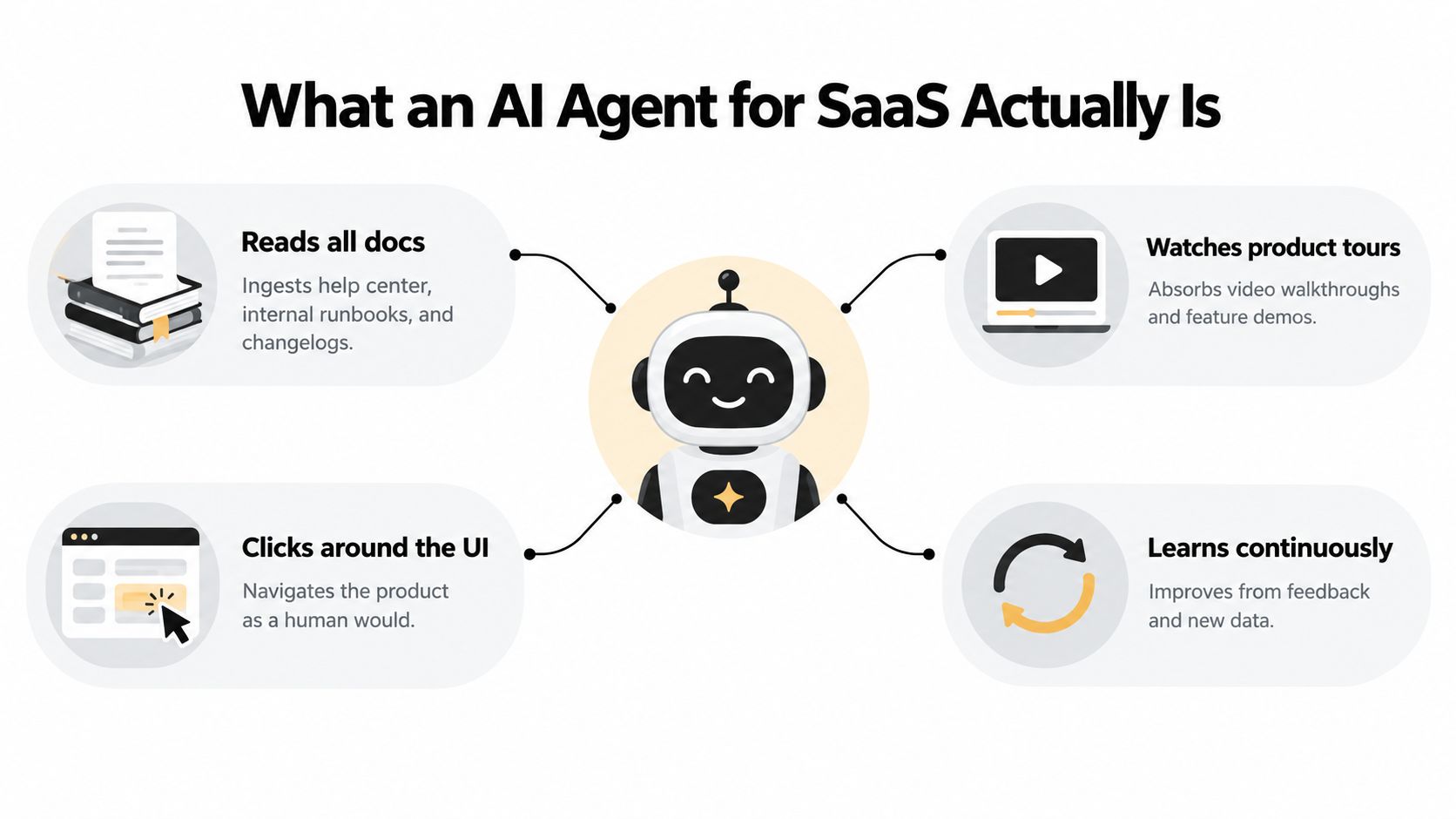
The easiest way to understand an AI agent for SaaS is to compare it to a new teammate who somehow had an unfairly productive first week. It read every help article, every internal runbook, and every changelog. It watched product tours. It can move through the app like a user. It answers in plain language. And it remembers the last conversation when the customer comes back.
That combination is what makes it different from older support automation.
The four parts that matter
An agent usually combines four building blocks:
A reasoning layer
This is the language model that interprets the request, decides what information is missing, and chooses the next step.Retrieval across operational data
It doesn't rely only on canned answers. It pulls from docs, past tickets, CRM records, billing details, and internal notes.Action tools
This is the jump from assistant to operator. The system can call APIs, update records, prepare a structured escalation, or work through workflows.Memory
Good agents don't restart from zero each session. They retain relevant customer context and use it to avoid repetitive questioning.
How that's different from a chatbot
A legacy chatbot mainly matches intent and returns a prewritten path. It's useful for FAQs and dead simple routing. But it usually stops at "Here's an article" or "Please contact support."
An agent behaves more like an investigator with tools. It can ask, "Which workspace are you in?" then check the account, see the user's plan, inspect the relevant setting, and either fix the issue or explain why it can't.
If you're sorting through the language vendors use, the distinction in generative AI vs agentic AI is worth understanding because a lot of product pages blur the line.
The defining trait isn't that the system can chat. It's that it can perceive context and do work.
For SaaS teams, the important phrase is page awareness plus action-taking. If the system knows what screen the user is on and can operate inside the workflow, it stops behaving like a help sidebar and starts behaving like a support layer.
The Core Capabilities That Matter in Production
A lot of pilots look impressive in demos because demos hide the hard parts. Production reliability shows up in a smaller set of capabilities. If an agent can't perform these consistently, it usually stays a side project.
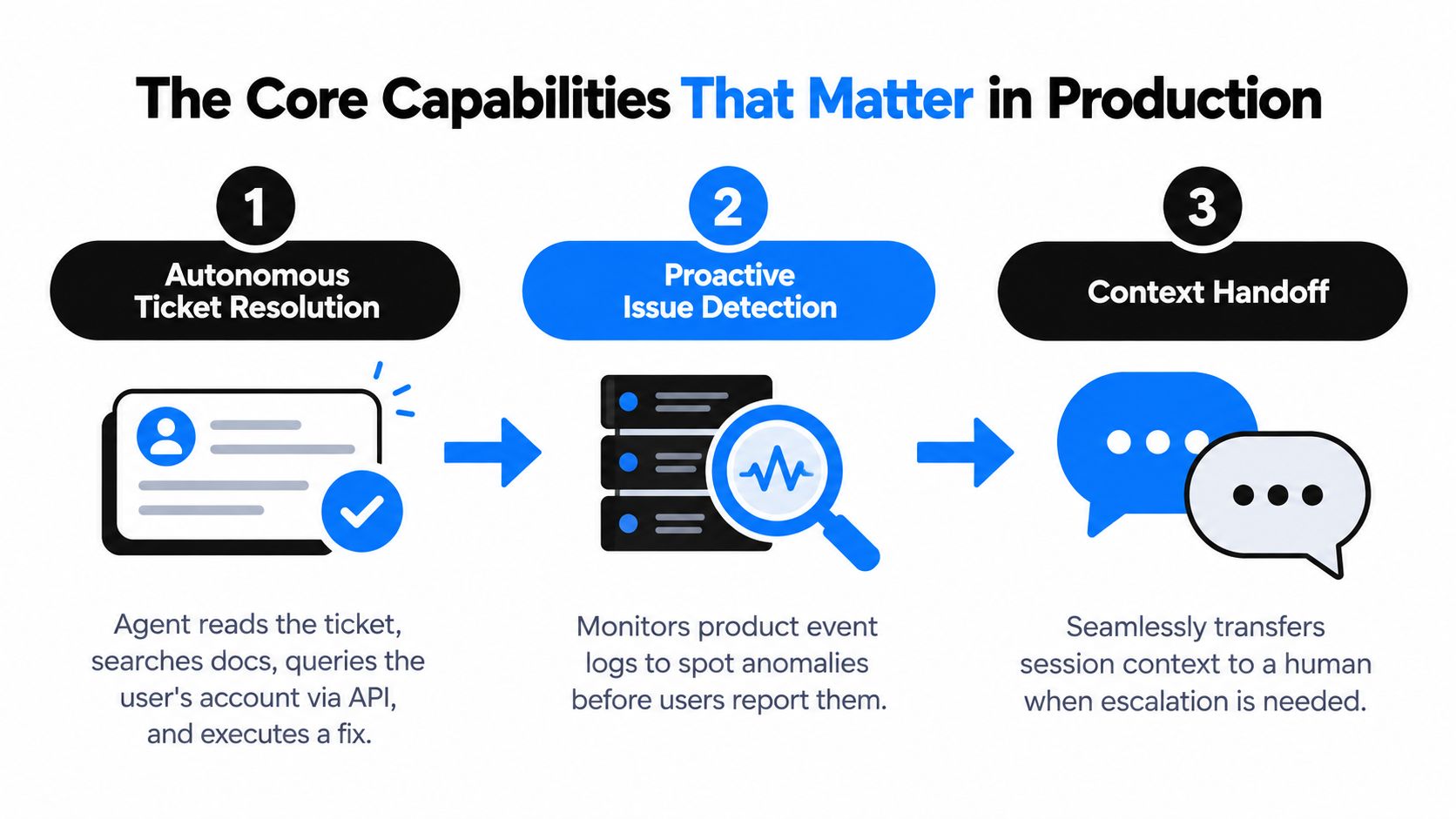
Autonomous ticket resolution
This is the capability most buyers think about first, and for good reason. One 2026 industry summary reported that 66% of customer service organizations were using AI agents, up from 39% in 2025, while another roundup said over 70% had deployed AI or were actively piloting it, compared with roughly 45% in 2023. The same summary pointed to deployments resolving 60 to 80% of customer inquiries without human involvement, with top systems reaching 85%+ automation on simple categories such as password resets, order status, and FAQs, according to these 2026 AI customer support adoption and ROI statistics.
Inside a SaaS workflow, autonomous resolution usually looks like this:
- The agent reads the inbound ticket
- It retrieves product and account context
- It decides whether a safe action exists
- It executes through API or UI tooling
- It writes back with confirmation and next steps
That can mean changing seats, surfacing invoice context, re-sending an invite, toggling an allowed setting, or collecting the exact missing detail before handoff.
For teams designing this layer, ThirstySprout's builder guide to agents is a useful technical reference because it explains how tool use, memory, and workflow orchestration fit together.
If you want a product-focused view of what these systems can do in support, customer support AI capabilities is a good framing resource.
In-app guidance
A second production capability matters just as much, even though buyers ask about it less. The agent shouldn't only wait in the inbox. It should work inside the product.
If a user stalls on a billing settings page, opens the wrong menu, or can't find where to invite teammates, a page-aware agent can detect the current screen and guide the user through the next step. In stronger implementations, it can open the correct modal, highlight the exact control, and explain the consequence before the user clicks.
That changes support from reactive to embedded. It also reduces the number of tickets that ever get created.
A quick walkthrough helps ground the model:
Automated bug reporting and clean handoff
The third capability is less flashy and often more valuable internally. When the issue is a product defect, the agent should stop pretending support content will solve it.
Instead, it should capture reproduction steps, environment details, and session evidence, then file a structured bug in Jira or Linear. A strong handoff includes what the user was trying to do, what happened instead, what browser or environment they used, and what support already attempted.
Good escalation doesn't just move the case to a human. It moves the case with enough context that the human can act immediately.
That's where trust comes from. Users don't care whether an AI answered first. They care whether the issue was handled.
Benefits and ROI for SaaS Teams
The ROI conversation gets weak when teams reduce it to one number. Deflection matters, but it's only one slice of the business case. Finance, support, and product leaders usually care about three things together: coverage, cost-to-serve, and quality.
One 2026 support trends summary reported that the median AI self-service deflection rate is 22%, while B2B SaaS teams in their first year typically achieve only 10 to 15% deflection. The same source says help centers refreshed within 30 days deflect 45% of contacts versus 18% for help centers left untouched for six months, according to these customer support trend benchmarks. That last point matters because content freshness affects agent performance more than most buyers expect.
What the economics actually change
The labor side is straightforward. Multiple 2026 summaries cited historical benchmark data estimating human-resolved tickets at about $5 to $15 each, versus roughly $0.50 to $2.00 for AI-resolved tickets, suggesting a 40 to 60% cost reduction from automation in many cases, as summarized in Freshworks' review of AI ROI in customer service.
But lower cost per ticket is not enough on its own. If the agent closes tickets that come back a day later, the savings are fake. That's why recontact rate is one of the better signals of quality.
AI Agent ROI Metrics for SaaS Support
| Metric | Baseline (Human-Only) | Target with AI Agent | Why It Matters |
|---|---|---|---|
| Coverage hours | Limited to staffed shifts | 24/7 automated first layer | Customers don't wait for business hours to get triage or routine resolution |
| AI resolution rate | None | Mature systems often verify 55 to 70%, with top-quartile systems reaching 75 to 85%, according to this AI support KPI benchmark | Shows whether the agent can fully resolve work instead of just replying |
| First contact resolution | Human dependent | Strong deployments operate around 70 to 80% first-contact resolution in the same benchmark | Measures whether issues get solved in one interaction |
| Recontact rate | Often hidden across queues | Strong deployments aim for under 15% recontact in the same benchmark | Catches false saves and over-aggressive containment |
| MTTR | Depends on queue backlog | Lower for escalated cases because context is pre-collected | A better intake layer shortens resolution time for the work humans still handle |
The cleanest way to think about ROI is as a triangle:
- Cost-to-serve drops when repetitive work is automated
- Retention risk falls when users get help faster and with less friction
- Product intelligence improves because the system captures patterns from conversations, bugs, and stalled workflows
A CFO might approve the first point. A support leader needs the second. A product leader usually gets the most long-term value from the third.
Integration and Implementation Considerations
Most agent failures don't happen because the model sounds bad. They happen because the operating system around the model is weak. The missing pieces are usually data access, monitoring, escalation design, and governance.
Recent enterprise summaries described those as the common failure modes. One 2026 synthesis reported only about 11% of pilots becoming operational at scale, while another 2026 source cited 46% of AI proofs-of-concept reaching production, as discussed in this analysis of why many AI agent pilots fail before production. The exact number matters less than the pattern. Getting an agent to answer isn't the hard part. Getting it to operate safely is.
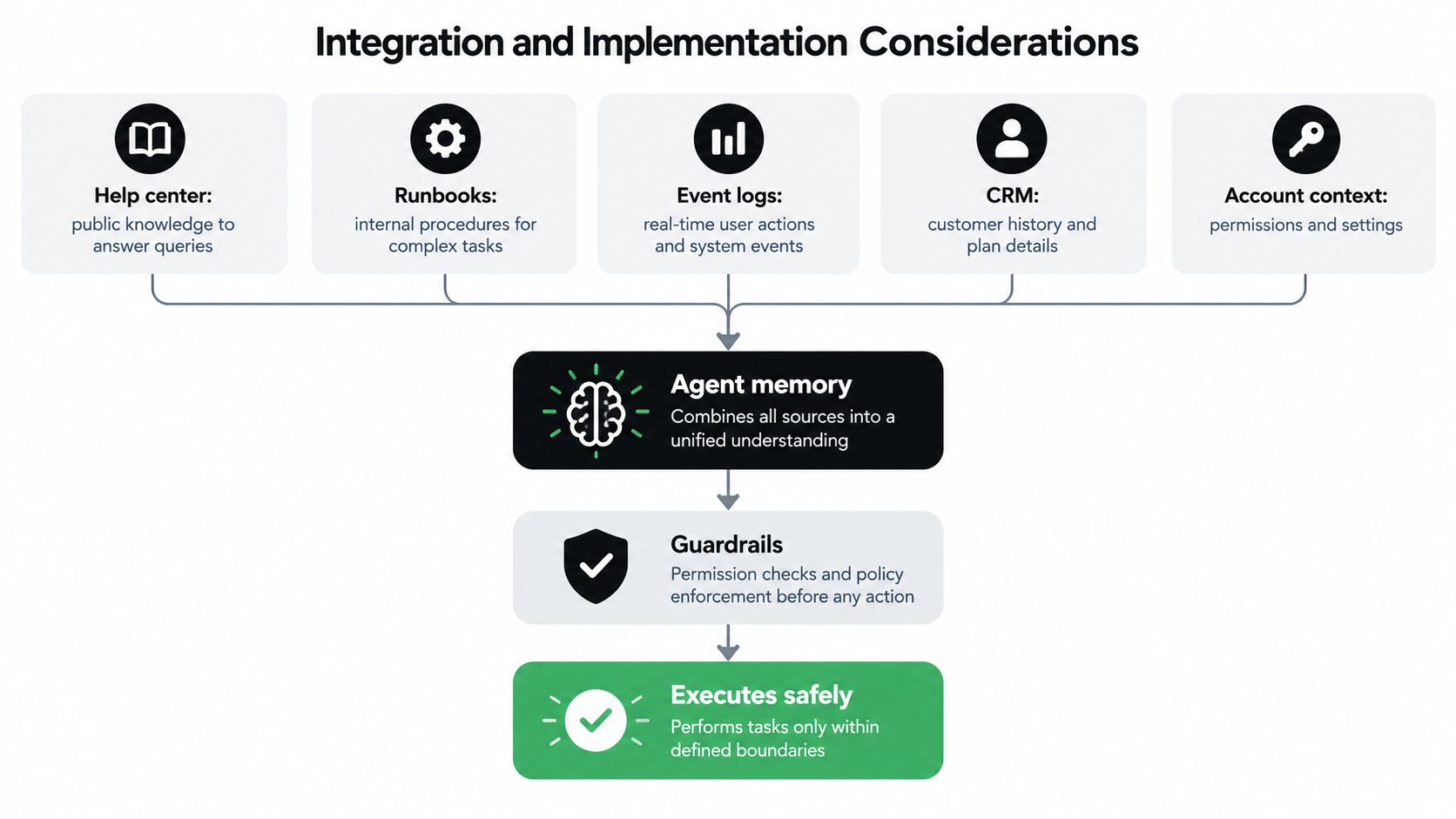
The data layer has to be wider than docs
A production agent needs more than a help center. It usually needs access to:
- Public knowledge such as help articles and setup guides
- Internal runbooks that explain exception handling
- Historical tickets that reveal how humans solved edge cases
- CRM records with account tier, owner, and renewal context
- Billing systems for invoices, plan status, credits, and disputes
- Product event logs that show what the user did
If one of those layers is missing, the agent starts sounding certain while operating half-blind.
A practical integration checklist should also include AI agent integration considerations, especially around system boundaries and ownership.
Guardrails and escalation are not optional
Security and control design need to exist before broad rollout. In practice, that means role-based access, PII redaction where appropriate, auditable action logs, scoped write permissions, and a kill switch.
The escalation path is equally important. When the agent hands off, the human shouldn't receive a blank slate. They should receive the conversation, retrieved context, actions attempted, confidence notes, and the reason for escalation.
If a human has to re-ask the same questions the agent already asked, your handoff design is broken.
One vendor example in this category is Halo AI, which connects support data, product context, and systems like Slack, Stripe, Intercom, and HubSpot so the agent can resolve issues, guide users in-app, and create bug reports with session context. The useful point isn't the vendor name. It's the operating model: broad context plus constrained action.
Instrument the system like software, not content
Teams that run these agents well treat them like decision systems. Production evaluation should log retrieval steps, tool calls, escalation reasons, and outcomes. Enterprise deployments increasingly use multi-metric evaluation across resolution rate, answer accuracy, hallucination rate, tool-use accuracy, escalation quality, and business outcomes, with offline evaluation gating production release and A/B testing measuring live performance, according to this AI support evaluation framework.
If you can't tell whether a failure came from bad retrieval, weak policy, wrong tool use, or missing permissions, you can't improve the system.
Real-World SaaS Use Cases in Action
The easiest way to understand this category is to watch it work inside familiar support moments. Not broad promises. Specific flows.
Onboarding inside the product
A new workspace admin logs in and asks where to invite teammates. A basic chatbot would return an article called "Managing users." A stronger agent checks the page the admin is on, sees they have the right permissions, opens the invite modal, suggests the relevant role options, and explains what each role can access before the action is confirmed.
The important design choice is restraint. The agent shouldn't make account changes. It should prepare the action, explain it, and ask for confirmation when needed.
That keeps onboarding fast without making the product feel unpredictable.
Billing clarification with policy-aware action
A customer writes in because they think they were charged twice. The agent pulls invoice history from Stripe, sees a recent plan change, identifies a prorated upgrade, and replies with a clear explanation in plain language. If refund policy allows a corrective action, the agent can surface that option or prepare the workflow for approval.
Buyers often get confused about what "autonomous" should mean. It doesn't mean unbounded authority. It means the system can gather the facts, interpret the policy, and complete the narrow actions you've approved.
A good billing agent behaves more like a careful operator than a loose assistant.
Bug triage that reaches engineering ready to work
A user reports that exports fail on a specific screen. The agent asks one or two clarifying questions, reproduces the path if the environment allows it, captures console details and session context, and files a ticket in Linear or Jira with steps to reproduce.
Then it posts the summary to Slack for the on-call engineer. Support doesn't spend half an hour rewriting the report. Engineering doesn't spend another half hour trying to understand it.
What stays with the agent and what escalates depends on policy:
- Close automatically when the issue is clearly resolved through guidance or a safe account action
- Escalate with context when the issue indicates a defect, a permissions conflict, or a policy exception
- Hold for approval when financial or administrative actions need human review
These are not edge cases. They're the repetitive operating moments where the category earns its keep.
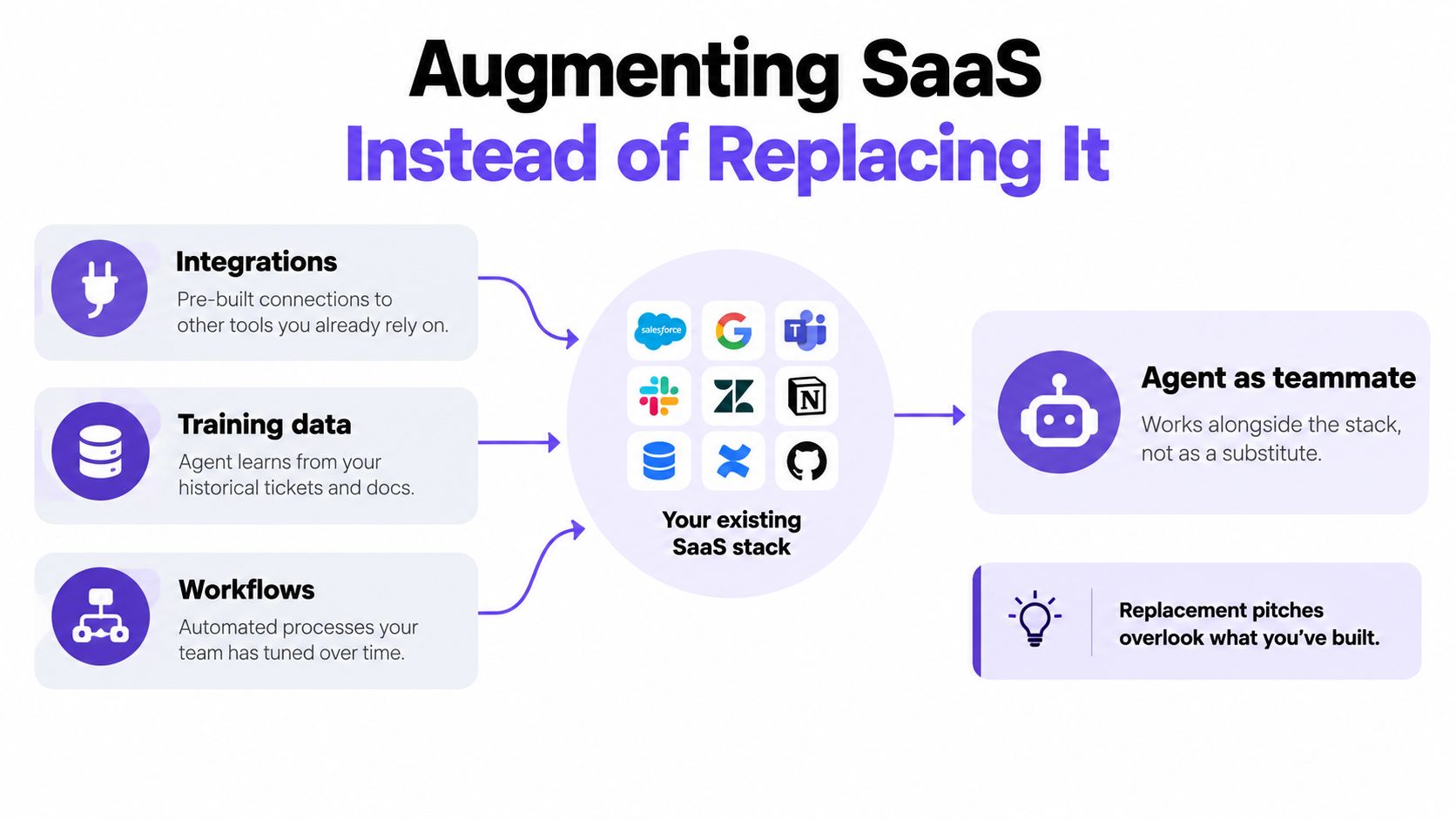
Augmenting SaaS Instead of Replacing It
A lot of market messaging still treats agents as if they'll replace the SaaS stack underneath them. That's usually the wrong frame for near-term buying decisions.
Independent 2025 research found that 68% of leaders expect agents to augment SaaS rather than replace it, while more than one in three companies would switch vendors to get agent functionality, according to the G2 report covered by Business Wire. That points to a more realistic buyer question: not "Will agents replace my software?" but "Which software layers become more valuable when an agent sits on top of them?"
Why the augmentation model fits reality
Most companies have already invested in Salesforce, HubSpot, Zendesk, Stripe, Slack, Jira, and internal systems that contain the operating context. Replacing them isn't what creates value first. Connecting them is.
An agent layer can read from those systems, reason across them, and push outcomes back into them. That means slower rip-and-replace cycles, but higher expectations at renewal time. Buyers will increasingly ask whether a vendor has useful agent functionality and whether it plugs into the stack they already run.
Replacement pitches usually ignore where your workflows, permissions, and historical knowledge already live.
There's also an organizational effect that gets missed. When the agent takes routine work, human teams don't disappear. Their job mix changes. Support spends more time on edge cases and account judgment. Product teams get cleaner bug reports. Operations teams spend more time designing the system than manually moving information through it.
That's the strategic budgeting implication for next year. The question isn't only which tool you buy. It's where you want intelligence to sit in your stack.
Your 30-Day Evaluation Checklist
A useful evaluation shouldn't try to prove everything. It should answer whether the system can handle a defined slice of your workload safely enough to justify expansion.
Week one and two
Start by defining the cohort. Pick a ticket category or product workflow with enough repetition to matter, but not so much risk that every action needs executive review. Establish your baseline using the core support metrics in this ITSM metrics explainer, including MTTR, first response time, first contact resolution rate, and AI resolution rate.
Then scope data access. The vendor should tell you exactly what it needs from your knowledge base, ticket history, CRM, billing system, and product telemetry. This is also where security review starts. If the answer to permissions is vague, stop there.
Week three
Run a shadow deployment on a limited share of traffic. Early agent deployments typically resolve 30% to 50% of tickets end to end, mature workflows reach 50% to 70%, and integrated action-taking agents can reach 70% to 85%, with a median escalation rate of 22% of AI-engaged tickets, according to these 2026 AI agent benchmarking statistics.
Use those figures as directional context, not a promise that your environment will behave the same way. Your own cohort matters more.
Track at least these signals:
- Verified resolution quality rather than simple containment
- Escalation accuracy so the right work reaches humans
- Time to first useful action on issues like bug reports or billing checks
Week four
Pressure-test failure handling. Ask how the system behaves when product context conflicts with CRM data, when a billing tool is unavailable, or when retrieval returns ambiguous documentation.
Use a vendor checklist that includes rollback, monitoring, and governance criteria. The questions in AI support platform evaluation criteria are a good starting point.
Red flags are usually obvious once you know where to look:
- Vague accuracy language with no evaluation plan on your data
- No clear handoff design for humans to override or continue work
- Weak logging that hides why the system made a decision
- Broad write access without confidence thresholds or approvals
Buy the agent you can inspect, constrain, and improve. Avoid the one that only demos well.
A strong 30-day test won't answer every roadmap question. It will tell you whether the system is becoming an operator or staying a novelty.
Halo AI is built for the version of this problem that real SaaS teams have: resolving support tickets, guiding users in the product, and creating structured bug reports using context from docs, CRM, billing, calls, and internal systems. If you want to see what a page-aware, action-taking support layer looks like in practice, visit Halo AI.