Average Handle Time: A Guide to Smarter Support Metrics
Learn to calculate and improve your average handle time (AHT) without sacrificing quality. This guide covers benchmarks, pitfalls, and AI strategies.
 Grant CooperFounder14 min read
Most advice about average handle time starts from the wrong premise. It assumes lower is better.
That sounds sensible until you run a support team for a complex product. Then you learn fast that a short interaction can mean an incomplete answer, a rushed handoff, weak troubleshooting, or a customer who comes back tomorrow with the same issue. In B2B SaaS, average handle time is useful, but only when you treat it as a signal about system design, agent enablement, and issue complexity, not as a stopwatch to squeeze.
A support leader should read AHT the way an operator reads a dashboard light. It tells you something changed. It doesn't tell you, by itself, whether the change is good, bad, temporary, or channel-specific. The strategic move is to use average handle time alongside quality, resolution, and automation data so you can tell the difference between genuine efficiency and hidden rework.
Why Chasing a Low Average Handle Time Can Be a Mistake
Support teams often inherit a simplistic rule: if average handle time drops, performance improved. That rule breaks down quickly in real operations.
Mainstream guidance tends to frame AHT as a speed metric with a broad benchmark in the 6 to 10 minute range, while also warning that the right target depends on channel, issue complexity, and industry, and that a blended AHT can mislead decision-makers, as noted by Zendesk's guidance on average handle time. That matters even more in B2B SaaS, where a shorter interaction can mask unresolved product issues, weak onboarding, or incomplete internal handoffs.
Low AHT can hide expensive problems
When leaders push hard on speed, agents adapt to the metric. They shorten discovery, avoid edge cases, and move faster to close. On paper, that looks efficient. In practice, customers reopen tickets, escalate to customer success, or lose confidence in the product.
A low AHT can also point to upstream failures:
- Weak documentation: Agents answer the same basic questions repeatedly because the help center doesn't solve them.
- Poor routing: Customers land with the wrong team first, then get transferred after partial troubleshooting.
- Training gaps: New agents stick to surface-level responses because they don't yet know the product thoroughly.
- Product friction: Certain flows generate confusion that support absorbs one conversation at a time.
Practical rule: Never celebrate a lower average handle time until you've checked whether quality, resolution, and repeat-contact patterns moved in the same direction.
AHT is still worth tracking. It's just not the headline metric many teams make it out to be. In mature support operations, it works better as one part of a balanced view that includes issue resolution, QA review, and customer outcomes. If you want a stronger framework for that broader view, this guide to customer support quality metrics is a useful complement.
How to Calculate Average Handle Time Correctly
Bad AHT data usually comes from bad definitions, not bad math. Teams think they're measuring interaction time, but they're mixing only live conversation time with partial wrap-up work and inconsistent channel logic.
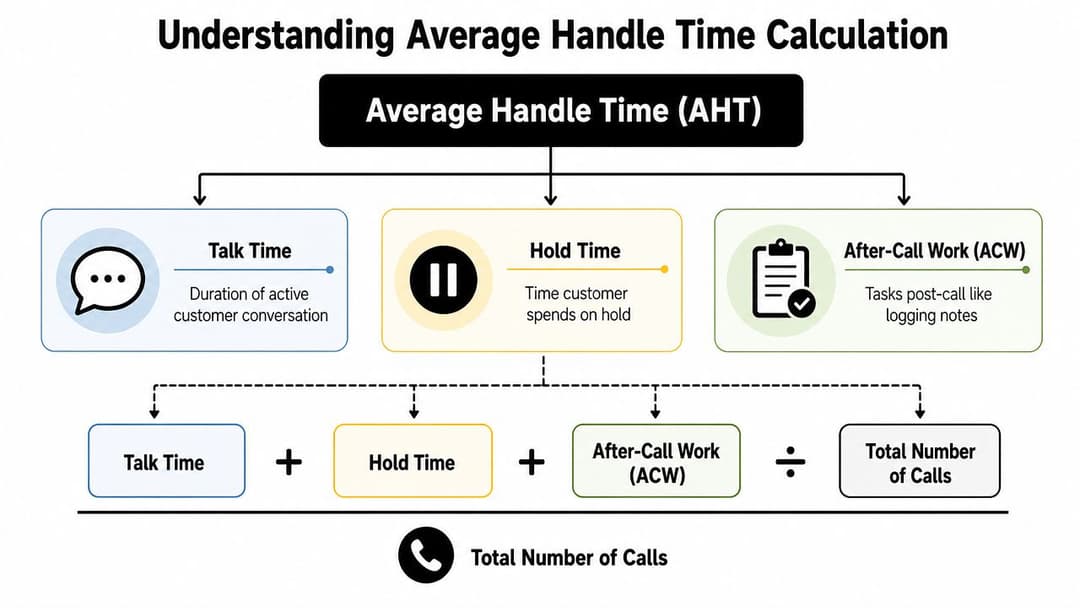
The clean definition is straightforward. Average handle time includes talk time, hold time, and after-call work (ACW), and you calculate it by dividing total handle time by the number of handled interactions, according to Kayako's explanation of AHT. The same source notes that a general customer service benchmark is 6 minutes and 10 seconds, while Calabrio reports about 6 minutes and 3 seconds, which reinforces the idea that AHT is broader than the live conversation alone.
The formula that actually matters
Think of AHT like a pit stop. The clock doesn't stop when the mechanic stops touching the car. It includes everything required to get the car back on track safely.
For support, that means:
AHT = (Talk Time + Hold Time + After-Call Work) / Total Handled Interactions
Each component needs a consistent definition.
- Talk time: The period when the agent is actively speaking or messaging with the customer in a live interaction.
- Hold time: Any period when the customer is waiting during that same interaction while the agent researches, consults another team, or completes a process.
- After-call work: The work required to finish the interaction operationally, such as notes, tagging, dispositioning, ticket updates, or documenting a bug for follow-up.
Where teams usually get it wrong
The most common mistake is excluding ACW because it doesn't “feel” customer-facing. That's a bad operational assumption. If agents spend meaningful time logging details, creating internal tickets, or updating Salesforce, HubSpot, Linear, or Jira after the call, that work belongs in handle time.
Another mistake is blending unlike interactions. A short billing clarification and a technical troubleshooting call should not be treated as equivalent just because both are “handled.” If your reporting stack forces that blend, your average becomes less useful.
AHT should reflect the full labor required to complete an interaction, not just the part the customer hears.
Set the baseline before you optimize
Before you try to reduce AHT, make sure everyone uses the same definitions across QA, workforce management, and support leadership. That means agreeing on questions like these:
- What counts as ACW
- When the clock starts and stops
- How transfers are treated
- Whether follow-up tasks belong in the same interaction bucket
- Which channels are reported separately
A lot of support teams skip this alignment step and then argue over whether the metric moved for operational reasons or reporting reasons. Clean metric design prevents that.
If your team is still building a reliable measurement layer, this overview of customer support KPIs and metrics helps place AHT in the right reporting context.
AHT Benchmarks Across Different Industries
Benchmarks help when they stop bad comparisons. They hurt when leaders treat them as universal targets.
Average handle time varies materially by industry and use case. Klipfolio's benchmark summary lists 4–6 minutes for customer service, 8–12 minutes for technical support, 6–10 minutes for sales, and 5–8 minutes for collections. The same source cites sector-level figures from Centrical of 528 seconds for telecommunications, 324 seconds for retail, and 282 seconds for business and IT services and financial services.
Average Handle Time Benchmarks by Industry 2026
| Industry / Function | Average Handle Time Range |
|---|---|
| Customer service | 4–6 minutes |
| Technical support | 8–12 minutes |
| Sales | 6–10 minutes |
| Collections | 5–8 minutes |
| Telecommunications | 528 seconds |
| Retail | 324 seconds |
| Business and IT services and financial services | 282 seconds |
What these benchmarks actually tell you
They don't tell you what your target should be. They tell you that context changes the meaning of the metric.
Retail interactions are often narrower. Technical support often requires diagnosis, replication, permissions checks, and coordination across systems. Sales calls can be short when qualification is clear, or longer when discovery is deeper. Collections has its own cadence and compliance realities. A single “good AHT” number can't capture that variation.
For B2B SaaS teams, this aspect often confuses stakeholders. If your support function includes implementation questions, admin configuration, API troubleshooting, and product bugs, your baseline will naturally differ from a team handling mostly transactional inquiries. A longer handle time may reflect complexity, not inefficiency.
How to use benchmark data without misusing it
A practical way to work with AHT benchmarks is to segment by interaction type first, then compare within those segments.
Use a structure like this:
- Channel segment: Voice, chat, email, messaging.
- Issue segment: Billing, access, onboarding, bug report, workflow setup.
- Customer segment: New customer, power user, admin, enterprise account.
- Resolution path: Fully resolved, partial resolution, escalated, handed off.
That approach turns benchmarks into a starting point for internal diagnosis. It also gives customer success, support, and product teams a shared language for discussing complexity. If your organization is aligning support with retention and expansion, these customer success metrics are worth tracking alongside AHT.
The Hidden Costs of an Obsessively Low AHT
Some metrics create obvious failure modes. AHT creates subtle ones.
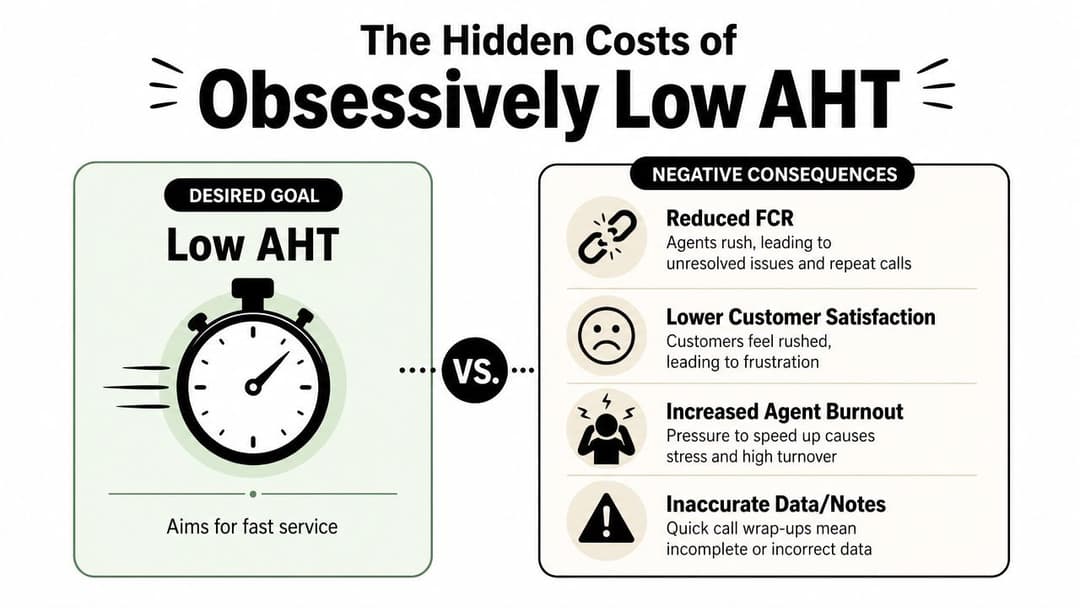
When leaders overcorrect for speed, they usually don't see the damage in the same dashboard where they're celebrating improvement. The cost shows up later, in repeat contacts, shallow notes, unhappy agents, and product teams that can't trust the data support passes over.
Customers feel the rush
AHT pressure changes agent behavior fast. Agents interrupt more. They ask fewer diagnostic questions. They avoid teaching moments because education takes time. They choose the answer that closes the conversation, not always the one that prevents the next ticket.
That hurts most when the issue is ambiguous. In SaaS, a customer may describe a symptom that sounds simple but is at the intersection of permissions, setup, product behavior, and team process. If the agent optimizes for speed first, the customer gets a partial answer and the case comes back through another channel.
Fast interactions aren't the same as efficient operations. Efficient operations solve the right problem once.
Internal systems degrade too
Low AHT pressure often shortens wrap-up work. That creates poor CRM hygiene, thin ticket notes, and bug reports with missing context. Engineering gets less usable reproduction detail. Customer success loses continuity. The next agent starts cold.
This is one reason experienced operators separate healthy efficiency from compressed handling. Healthy efficiency comes from better systems. Compressed handling comes from rushing humans.
Here's what that usually looks like in practice:
- Reduced first-contact resolution: Agents close before confirming the issue is solved.
- Lower customer confidence: Customers feel managed, not helped.
- Higher rework: Follow-up contacts and escalations consume the time you thought you saved.
- Worse operational visibility: Notes and tagging become less reliable.
- Team fatigue: Constant pressure to move faster strips judgment out of the role.
AHT should never stand alone
If leadership wants to track AHT aggressively, they should also review QA findings, reopen patterns, and signs of team strain. The metric itself isn't the problem. The problem is using it in isolation.
This is especially important for managers coaching agents. If every review boils down to “move faster,” agents stop using judgment in the moments where judgment matters most. Over time, that increases frustration and attrition. This article on customer support agent burnout is useful for leaders who are seeing speed pressure spill into morale and performance.
5 Modern Strategies to Improve AHT Intelligently
The best AHT improvements don't start with telling agents to hurry. They start with removing the reasons work takes longer than it should.
That's why modern support operations treat average handle time as an outcome of workflow quality, knowledge quality, routing quality, and automation design.
1. Fix the knowledge gaps agents hit every day
If agents keep pausing to search docs, ping Slack, or ask a senior teammate the same question, your AHT problem is really a knowledge access problem.
Tighten the internal knowledge layer first:
- Retire duplicate articles: Two conflicting process docs can add more delay than no doc at all.
- Map content to real ticket categories: Organize by what customers ask, not by internal department names.
- Include decision paths: Good support docs don't just define features. They tell agents what to check first, second, and third.
2. Reduce workflow friction inside the tool stack
A lot of handle time is software navigation time in disguise. Agents lose minutes switching between Intercom, Zendesk, Salesforce, Slack, Stripe, and internal admin tools.
Look closely at where the interaction slows down:
- Authentication checks
- Account lookup
- Manual tagging
- Ticket classification
- Bug handoff formatting
If these steps are inconsistent, AHT rises for reasons that have nothing to do with agent skill. Teams that want to improve B2B team call performance often see gains from tighter workflows before they touch staffing or scripts.
Operational test: If your best agents are still slow on a certain workflow, the process is the issue, not the people.
3. Coach for judgment, not just speed
Training that focuses only on brevity backfires. Better coaching teaches agents to recognize which interactions deserve depth and which ones need clean, fast execution.
For example, a password reset should move quickly. A permissions issue affecting a team rollout should not. The coach's job is to help agents sort those paths early, ask better diagnostic questions, and know when to resolve, educate, or escalate.
4. Use AI to assist agents before you automate full resolution
AI changes average handle time because it changes where work happens. In omnichannel support, formulas and benchmarks already vary across channels, and for AI-first teams raw AHT becomes less informative unless it's paired with containment, escalation, and post-interaction work metrics, as explained in Zoom's discussion of AHT in AI-assisted support.
That shift matters. If AI drafts replies, summarizes context, suggests next steps, or pulls relevant account history, the human portion of handle time may drop while total resolution quality improves. That's a healthy change. But if AI pushes more ambiguous issues to humans without enough context, the metric may look better in one layer while the human queue gets harder.
5. Let autonomous systems take repetitive work off the board
The most impactful use of automation isn't shaving seconds off every human interaction. It's removing repetitive interactions from the human queue entirely.
That's where tools such as Halo AI fit into the stack. It can deploy autonomous agents that resolve tickets, guide users in-product, create detailed bug reports, and hand off to humans with more context already captured. For AHT analysis, that changes the conversation. You're no longer just asking how long agents spend per interaction. You're asking which work should reach an agent at all, and what the human should receive when it does. Teams exploring that model should also think through automating repetitive support tasks so efficiency gains don't come at the expense of accountability.
Frequently Asked Questions About Average Handle Time
Average handle time creates more debate than most support metrics because teams try to use one number for too many jobs. These are the questions support leaders usually need to answer in practice.
Should average handle time be the same across phone, chat, and email
No. Different channels carry different kinds of work.
Phone interactions compress discovery and resolution into a live moment. Chat can involve pauses, multitasking, and parallel conversations. Email often includes research, waiting, and asynchronous follow-up. If you blend those channels into one AHT target, the number becomes much less useful.
A better approach is to set channel-specific baselines, then segment further by issue type. That gives you a metric that operations leaders can act on.
Should managers use AHT in individual performance reviews
Use it carefully. AHT can help identify coaching opportunities, but it's a poor standalone score for judging agents.
An agent handling the hardest queue will almost always look slower than an agent handling simpler requests. A senior teammate may also take longer because they solve deeper problems, document better, or absorb difficult escalations. If you must use AHT at the individual level, pair it with quality review and resolution context.
Don't ask whether one agent is “fast.” Ask whether they use time well for the work they handle.
When should a team avoid reducing AHT
Avoid pushing AHT down when the business is going through a product transition, onboarding a wave of new customers, changing pricing or packaging, or dealing with a known feature issue. In those periods, longer interactions may be necessary and appropriate.
This is also true when support is functioning as a listening layer for product and customer success. If agents are collecting valuable implementation detail, friction points, and bug evidence, forcing speed can destroy that signal.
How often should teams reset AHT targets
Reset them whenever the nature of incoming work changes meaningfully. That could happen after a product launch, a tooling migration, a routing redesign, or a shift in what automation handles first.
Teams often wait too long because they assume historical averages stay relevant. They often don't. If your channel mix, issue mix, or automation layer changes, the old target may no longer describe the operation you're running.
What does AI change about average handle time
AI changes both the numerator and the denominator. It can shorten human handling time, improve preparation before the interaction starts, or resolve some contacts without a human at all.
That means AHT still matters, but it loses value as a standalone measure. In AI-assisted and autonomous environments, leaders need to look at AHT together with escalation quality, handoff completeness, containment, and post-interaction work. Otherwise they'll miss where the labor moved.

What is a good average handle time for B2B SaaS
There isn't one universal answer, and that's the point. B2B SaaS teams support different products, account structures, buyer types, and issue mixes.
For one team, a shorter handle time may signal cleaner workflows and better self-service. For another, it may signal rushed troubleshooting and weak bug capture. The right target is the one that reflects your channel mix, complexity, and service model, while still protecting resolution quality.
If you're rethinking average handle time in an AI-first support environment, Halo AI is worth a look. It helps teams automate repetitive support work, guide users in-product, and hand off more complete context to humans so AHT becomes one part of a smarter operating model, not the whole story.
How Halo helps
With Halo's Ask AI you can ask questions like “what drove ticket volume up last week?” in plain English and get instant, data-backed answers from your connected support, CRM, and product systems — no SQL or dashboards required. Learn more about Ask AI, Halo's business intelligence chat.