9 Best Support Team Capacity Planning Tools in 2026
Support team capacity planning tools help balance ticket volume with agent workload by forecasting demand, optimizing schedules, and identifying bottlenecks before they affect customers. These platforms integrate with helpdesks to provide accurate predictions and smarter staffing decisions, preventing both understaffing that hurts response times and overstaffing that wastes budget during launches, seasonal peaks, and unexpected surges.
 Matt PattoliFounder11 min read
Support teams face an impossible balancing act: handle every ticket quickly while keeping agents from burning out. Too few agents and response times suffer. Too many and budgets spiral. The challenge intensifies during product launches, seasonal peaks, or unexpected surges when yesterday's staffing model suddenly doesn't work.
Capacity planning tools solve this by forecasting ticket volumes, optimizing schedules, and revealing bottlenecks before they impact customers. The best platforms integrate with your existing helpdesk, provide accurate demand predictions, and help you make smarter staffing decisions. Some even reduce capacity requirements entirely through automation.
We evaluated these tools based on forecasting accuracy, integration depth, ease of implementation, and value across different team sizes. Here are the top capacity planning solutions for support teams in 2026.
1. Halo AI
Best for: Teams wanting to reduce capacity requirements through AI-powered ticket automation
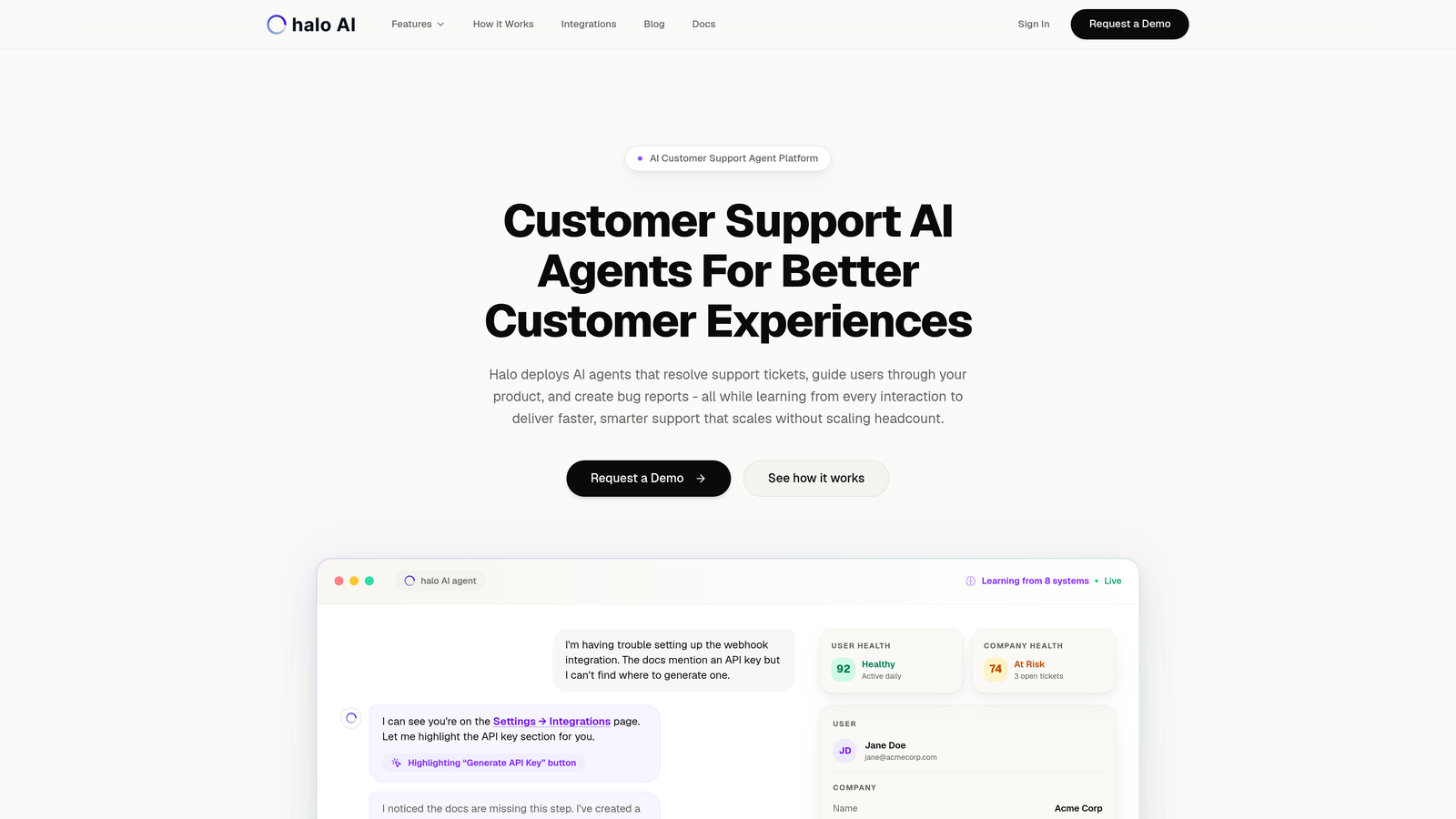
Halo AI takes a fundamentally different approach to capacity planning by reducing the capacity you need in the first place.
Where This Tool Shines
Instead of optimizing how you schedule human agents, Halo deploys AI agents that autonomously resolve support tickets. The platform learns from every interaction, becoming more effective over time while providing business intelligence that helps forecast demand patterns.
The page-aware context means AI agents see what users see in your product, enabling accurate resolutions without constant human oversight. When issues require human judgment, the system hands off seamlessly to live agents.
Key Features
Autonomous Ticket Resolution: AI agents handle routine inquiries independently, reducing human workload by addressing common questions, troubleshooting steps, and account issues.
Business Intelligence Analytics: Surface demand signals, customer health indicators, and volume trends that inform capacity planning decisions.
Live Agent Handoff: Automatically escalates complex issues to human agents with full context, ensuring nothing falls through cracks.
Multi-System Integrations: Connects with Zendesk, Intercom, Slack, Linear, HubSpot, and more for comprehensive workflow automation.
Continuous Learning: Every resolved ticket improves future performance, creating a support system that gets smarter with scale.
Best For
B2B companies and product teams experiencing rapid growth who want to scale support without proportionally scaling headcount. Particularly valuable for teams already using Zendesk, Freshdesk, or Intercom who need intelligent automation that integrates with their existing stack.
Pricing
Contact Halo for custom pricing based on your ticket volume and integration requirements.
2. Assembled
Best for: Support teams needing comprehensive workforce management with advanced forecasting
Assembled is purpose-built for modern support teams requiring sophisticated capacity planning and scheduling.
Where This Tool Shines
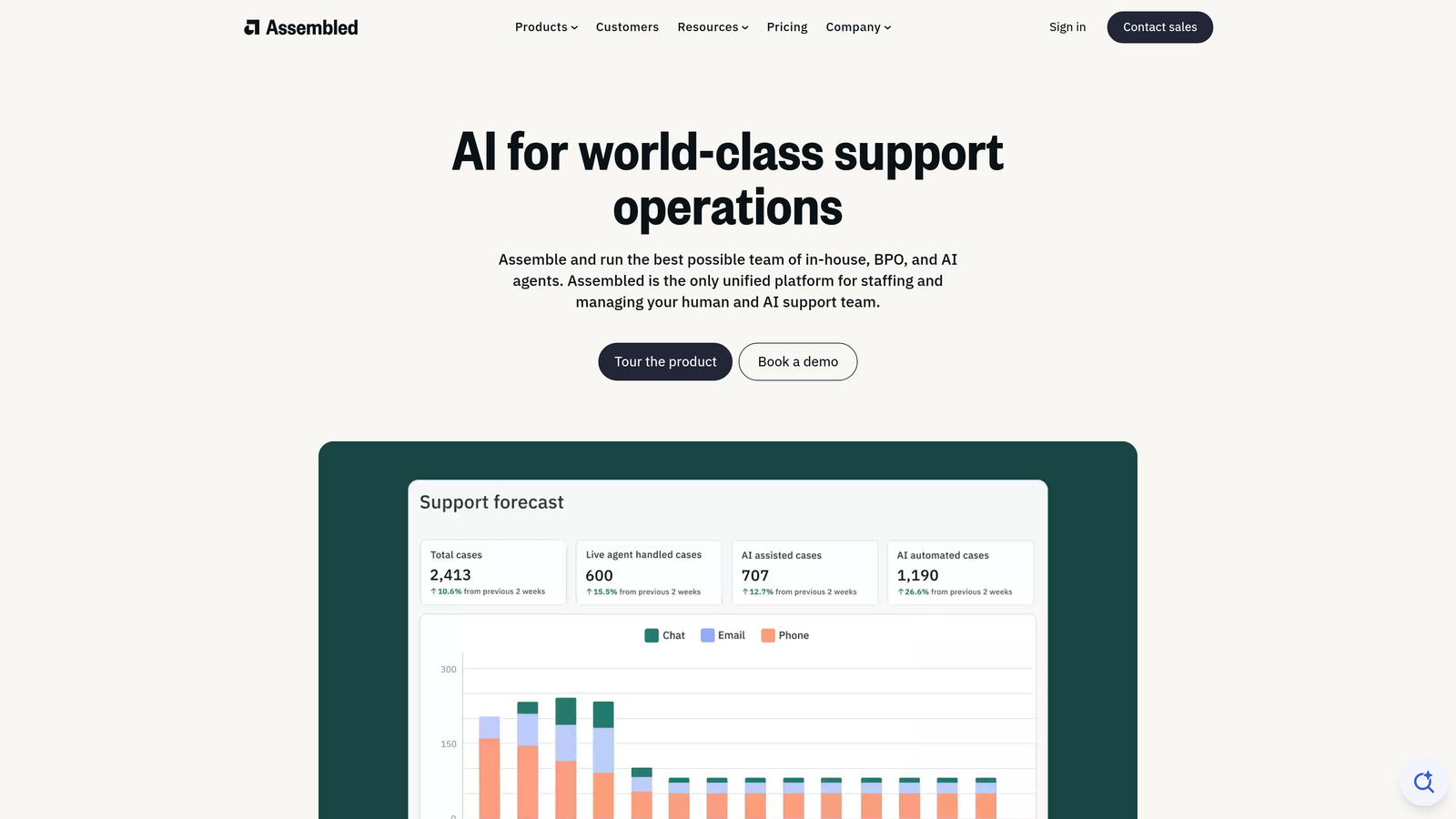
Assembled excels at predicting ticket volumes with AI-powered forecasting that considers historical patterns, seasonality, and business events. The platform generates optimized schedules automatically, then tracks real-time adherence to help managers spot coverage gaps before they impact service levels.
The dashboards provide clear visibility into capacity utilization, making it easy to justify hiring decisions or identify efficiency opportunities. Deep integrations with Zendesk and Salesforce mean your helpdesk data flows seamlessly into workforce planning.
Key Features
AI-Powered Forecasting: Predicts ticket volume by channel, time of day, and day of week using machine learning models trained on your historical data.
Automated Scheduling: Generates optimal shift assignments based on predicted demand, agent skills, and availability preferences.
Real-Time Adherence: Monitors whether agents are working scheduled activities and alerts managers to deviations that could affect coverage.
Capacity Planning Dashboards: Visualizes current and future capacity needs, helping leaders make informed staffing decisions weeks in advance.
Deep Helpdesk Integration: Pulls ticket data directly from Zendesk and Salesforce for accurate forecasting without manual data exports.
Best For
Mid-sized to enterprise support teams with 20+ agents who need sophisticated workforce management beyond basic scheduling spreadsheets. Ideal for teams experiencing predictable volume patterns who want to optimize agent utilization.
Pricing
Custom pricing based on team size and feature requirements. Contact Assembled for a quote tailored to your organization.
3. Tymeshift
Best for: Zendesk users wanting native workforce management without leaving their helpdesk
Tymeshift brings AI-driven scheduling and forecasting directly into the Zendesk ecosystem.
Where This Tool Shines
The native Zendesk integration means no data syncing or switching between platforms. Managers build schedules, review forecasts, and monitor performance without leaving their helpdesk environment. The AI analyzes your ticket patterns and suggests optimal shift coverage automatically.
Historical trend analysis helps identify recurring capacity challenges, like Monday morning surges or end-of-quarter spikes. The automatic shift optimization adjusts schedules as conditions change, keeping coverage aligned with actual demand.
Key Features
Native Zendesk Integration: Works entirely within Zendesk's interface, eliminating the need to learn separate workforce management software.
AI-Powered Scheduling: Recommends optimal shift patterns based on historical ticket volume, response time targets, and agent availability.
Real-Time Performance Monitoring: Tracks adherence to schedules and highlights when coverage falls short of demand.
Automatic Shift Optimization: Adjusts schedules dynamically as ticket volumes deviate from forecasts, maintaining service level targets.
Historical Trend Analysis: Identifies patterns in ticket volume, resolution times, and capacity utilization to improve future planning.
Best For
Support teams already committed to the Zendesk ecosystem who want workforce management capabilities without adding another platform to their stack. Works well for teams of 10-100 agents seeking streamlined capacity planning.
Pricing
Included as part of Zendesk's Workforce Management add-on. Pricing varies based on your Zendesk plan and agent count.
4. Playvox
Best for: Teams wanting to combine capacity planning with quality management and coaching
Playvox integrates workforce management with quality assurance and employee engagement tools.
Where This Tool Shines
Playvox recognizes that capacity planning isn't just about having enough agents—it's about having well-trained, engaged agents. The platform combines scheduling and forecasting with quality monitoring, coaching workflows, and gamification to improve both capacity utilization and performance quality.
The multi-channel support coverage ensures you're planning capacity across email, chat, phone, and social media. Performance gamification keeps agents motivated during high-volume periods when burnout risk increases.
Key Features
Integrated Quality Management: Monitor conversation quality alongside capacity metrics to ensure efficiency doesn't compromise service standards.
Workforce Scheduling: Create optimized schedules based on forecasted demand across multiple support channels.
Performance Gamification: Motivate agents with leaderboards, achievements, and rewards that reduce attrition during peak periods.
Multi-Channel Coverage Planning: Forecast and schedule capacity for email, chat, phone, and social media support simultaneously.
Agent Coaching Tools: Identify training gaps that affect resolution times and create targeted coaching plans to improve efficiency.
Best For
Support leaders who view capacity planning holistically and want to address both staffing levels and agent performance quality. Particularly valuable for teams managing multiple support channels with varying skill requirements.
Pricing
Custom pricing based on team size, channels supported, and modules required. Contact Playvox for a tailored quote.
5. NICE CXone
Best for: Enterprise contact centers needing comprehensive omnichannel workforce management
NICE CXone delivers enterprise-grade capacity planning for large, complex support operations.
Where This Tool Shines
NICE CXone handles the complexity of large contact centers with hundreds of agents, multiple skill groups, and diverse channel requirements. The multi-skill forecasting accounts for agents who handle different types of inquiries, ensuring you're planning capacity based on actual capabilities, not just headcount.
The what-if scenario modeling lets leaders test different staffing strategies before implementation. Intraday management automation adjusts schedules in real-time as actual volume deviates from forecasts, maintaining service levels without constant manual intervention.
Key Features
Advanced Multi-Skill Forecasting: Predicts demand by channel, skill group, and interaction type for precise capacity planning across complex operations.
Omnichannel Capacity Planning: Manages workforce needs across voice, email, chat, SMS, social media, and emerging channels from one platform.
Intraday Management Automation: Automatically adjusts schedules when real-time conditions differ from forecasts, rebalancing coverage without manager intervention.
Employee Self-Service Scheduling: Allows agents to bid on shifts, request time off, and swap schedules within policy guardrails, reducing administrative overhead.
What-If Scenario Modeling: Test different staffing levels, shift patterns, and skill mix scenarios to optimize capacity before making changes.
Best For
Large enterprises with 100+ agents, multiple contact center locations, and complex omnichannel support requirements. Best suited for organizations with dedicated workforce management teams.
Pricing
Enterprise pricing based on agent count, modules selected, and implementation requirements. Contact NICE for a detailed proposal.
6. Calabrio ONE
Best for: Organizations prioritizing workforce optimization with strong analytics and employee engagement
Calabrio ONE combines workforce management with voice-of-the-employee tools and predictive analytics.
Where This Tool Shines
Calabrio's predictive analytics go beyond basic forecasting to identify trends that affect capacity planning—like increasing handle times on specific issue types or declining first-contact resolution rates. The voice-of-the-employee tools help you understand why agents leave, addressing retention issues that create capacity gaps.
Cross-channel analytics provide visibility into how work flows between channels, helping you plan capacity for the entire customer journey rather than siloed touchpoints. Compliance management ensures schedules meet labor regulations and break requirements automatically.
Key Features
Predictive Analytics: Forecasts demand using machine learning that identifies subtle patterns human planners might miss.
Dynamic Scheduling Optimization: Continuously adjusts schedules based on changing conditions, agent preferences, and business priorities.
Voice of the Employee Tools: Surveys and feedback mechanisms that help reduce attrition by addressing engagement issues before agents leave.
Cross-Channel Analytics: Tracks customer journeys across touchpoints to plan capacity for end-to-end experiences, not isolated interactions.
Compliance Management: Automatically enforces labor laws, union rules, and company policies in schedule generation.
Best For
Mid-sized to large support organizations that view workforce optimization as more than scheduling—teams that want to improve retention, engagement, and performance alongside capacity planning.
Pricing
Custom pricing based on organization size, required modules, and deployment preferences. Request a quote from Calabrio for specific costs.
7. Surfboard
Best for: Growing support teams wanting simple, visual capacity planning without enterprise complexity
Surfboard brings modern design and ease-of-use to workforce management for scaling teams.
Where This Tool Shines
Surfboard prioritizes quick setup and intuitive interfaces over feature bloat. The visual shift planning board makes it easy to see coverage at a glance and drag-and-drop agents to fill gaps. You can be up and running in days, not months.
The ticket volume forecasting is straightforward—no data science degree required. Slack and calendar integrations mean agents see their schedules where they already work. Time-off management handles PTO requests without spreadsheet juggling.
Key Features
Quick Setup: Get started with minimal configuration—import your team, connect your helpdesk, and start planning capacity within days.
Visual Shift Planning: Drag-and-drop interface that makes schedule creation and adjustment intuitive, even for first-time workforce planners.
Ticket Volume Forecasting: Simple forecasting based on historical patterns without requiring advanced analytics expertise.
Slack and Calendar Integrations: Sync schedules to Google Calendar, Outlook, or Slack so agents see their shifts in familiar tools.
Time-Off Management: Centralized PTO request and approval workflow that prevents scheduling conflicts automatically.
Best For
Support teams of 10-50 agents who've outgrown spreadsheets but don't need enterprise workforce management complexity. Ideal for startups and scale-ups wanting fast implementation and easy adoption.
Pricing
Affordable per-agent monthly pricing that scales with your team. Contact Surfboard for current rates and volume discounts.
8. Klaus
Best for: Identifying capacity bottlenecks through conversation quality analysis and performance insights
Klaus approaches capacity planning from a quality assurance perspective, revealing efficiency opportunities.
Where This Tool Shines
Klaus doesn't forecast ticket volumes or create schedules directly. Instead, it identifies why your current capacity isn't sufficient by analyzing conversation quality and agent performance. The AI-powered reviews reveal training gaps that increase handle times, inconsistent processes that create rework, and knowledge gaps that require escalations.
Performance scoring and trends help you understand which agents are most efficient and why. Training gap identification shows where coaching could reduce resolution times, effectively increasing capacity without adding headcount. The workload distribution insights reveal whether tickets are assigned optimally across your team.
Key Features
AI-Powered Conversation Reviews: Automatically analyzes support conversations to identify quality issues, inefficient responses, and improvement opportunities.
Performance Scoring: Tracks individual and team metrics over time to reveal trends in efficiency and effectiveness.
Training Gap Identification: Highlights specific knowledge or skill deficiencies that increase handle times and reduce capacity efficiency.
Workload Distribution Insights: Shows whether ticket routing and assignment strategies are optimizing your existing capacity.
Major Helpdesk Integration: Works with Zendesk, Intercom, Front, Help Scout, and other popular platforms to analyze conversations wherever they happen.
Best For
Support teams who suspect their capacity challenges stem from inefficiency rather than insufficient staffing. Particularly valuable when combined with traditional workforce management tools to address both scheduling and performance optimization.
Pricing
Per-agent monthly pricing with different tiers based on features and review volume. Contact Klaus for specific rates.
9. Float
Best for: Planning capacity across support and cross-functional teams with visual resource management
Float provides visual capacity planning for teams that support multiple projects or initiatives simultaneously.
Where This Tool Shines
Float works well when your support team also handles implementation, onboarding, customer success, or project work alongside ticket resolution. The visual capacity planning board shows who's working on what, making it easy to balance support coverage with other responsibilities.
Team utilization tracking reveals whether you're over-allocating or under-utilizing resources. Project-based allocation helps you plan capacity for major initiatives like product launches that will spike support demand. Time tracking integration ensures your capacity plans reflect actual work patterns.
Key Features
Visual Capacity Board: See your entire team's allocation across projects, support coverage, and other responsibilities in one timeline view.
Team Utilization Tracking: Monitor whether team members are over-allocated, under-utilized, or optimally scheduled across all their responsibilities.
Project-Based Resource Allocation: Plan support capacity around product launches, implementations, or seasonal initiatives that affect ticket volume.
Time Tracking Integration: Connect with time tracking tools to compare planned capacity against actual hours worked.
Forecasting and Reporting: Generate reports on capacity trends, utilization rates, and resource needs for future planning.
Best For
Support teams that wear multiple hats—handling tickets, managing implementations, supporting sales, or working on projects. Particularly useful for smaller companies where support agents split time between reactive ticket work and proactive initiatives.
Pricing
Starts at $6 per person per month, making it one of the most affordable options for small teams. Pricing scales with team size and feature requirements.
Making the Right Choice
The best capacity planning tool depends on whether you want to optimize existing capacity or reduce capacity requirements altogether.
If you're looking to fundamentally change the capacity equation through automation, Halo AI reduces the number of agents you need by autonomously resolving tickets while providing business intelligence for smarter planning. For Zendesk-committed teams wanting native workforce management, Tymeshift delivers AI-powered scheduling without leaving your helpdesk. Enterprise contact centers with complex omnichannel requirements will find the depth they need in NICE CXone's comprehensive platform.
Growing teams seeking simplicity over enterprise features should consider Surfboard's visual, intuitive approach. If you suspect inefficiency is limiting your capacity more than insufficient headcount, Klaus reveals performance bottlenecks through quality analysis. Teams managing support alongside other responsibilities benefit from Float's project-based resource planning.
The most effective capacity strategy often combines approaches. Use automation to handle routine inquiries, reducing the human capacity you need to plan for. Then apply workforce management tools to optimize how you deploy that smaller team. This hybrid approach scales support without scaling headcount proportionally.
Your support team shouldn't scale linearly with your customer base. Let AI agents handle routine tickets, guide users through your product, and surface business intelligence while your team focuses on complex issues that need a human touch. See Halo in action and discover how continuous learning transforms every interaction into smarter, faster support.