How to Deal with Angry Customers: A De-escalation Guide
Learn how to deal with angry customers with our step-by-step de-escalation framework. Turn frustration into loyalty with proven scripts and AI-powered tools.
 Matt PattoliFounder14 min read
An angry ticket rarely arrives at a convenient time. It lands when the queue is full, the team is stretched, and the message subject is in all caps. The customer says your product broke their workflow, nobody has replied, and they want an answer now.
That moment feels personal, but it isn't. It's operational. If you know how to deal with angry customers, you stop reacting to the heat of the message and start managing the clock, the emotion, and the path to resolution. The teams that do this well don't rely on personality alone. They combine de-escalation habits, better routing, stronger knowledge systems, and automation that removes avoidable friction before frustration builds.
Why Every Angry Customer Is a Ticking Clock
The dangerous part of an angry customer interaction isn't only the complaint. It's the delay that follows when the team hesitates, overthinks the response, or lets the issue bounce between inboxes.
A common pattern looks like this. A customer reports a failure, gets silence, follows up with more heat, then posts publicly or starts talking about cancellation. By the time someone finally responds, the technical issue may still be fixable, but the trust problem is much bigger.
Speed decides whether anger hardens or softens
Support leaders learn this quickly. Angry customers usually aren't asking for a perfect speech. They're looking for evidence that someone competent is taking control.
Approximately 70% of customers who experience a service failure will remain loyal if the issue is resolved quickly and effectively, with speed being the single most critical factor according to Zendesk's discussion of angry customer handling. That should change how teams view an angry ticket. It's not just damage control. It's a retention moment.
The operational implication is simple. You need a response system that values fast acknowledgment as much as final resolution. Teams that obsess over SLA response time standards tend to perform better here because they don't leave early customer emotion unmanaged.
Practical rule: Treat the first reply as part of the solution, not as an administrative courtesy.
The first objective is emotional stabilization
Organizations often make one of two mistakes. They either rush into troubleshooting before the customer feels heard, or they over-apologize in a way that sounds scripted and weak. Both approaches prolong the interaction.
The better move is to separate the work into two tracks:
| Priority | What the customer needs | What the team should do |
|---|---|---|
| Emotional | Proof that someone is engaged | Acknowledge frustration and confirm ownership |
| Technical | Confidence that progress is happening | Clarify the issue, set next steps, and move fast |
That split matters because a customer's memory of the interaction often has more to do with how the company handled the moment than with the original defect. Teams that respond fast, name the issue clearly, and show control can recover situations that looked headed for churn.
If you're trying to figure out how to deal with angry customers at scale, start there. Anger is time-sensitive. The longer uncertainty sits, the harder the conversation becomes.
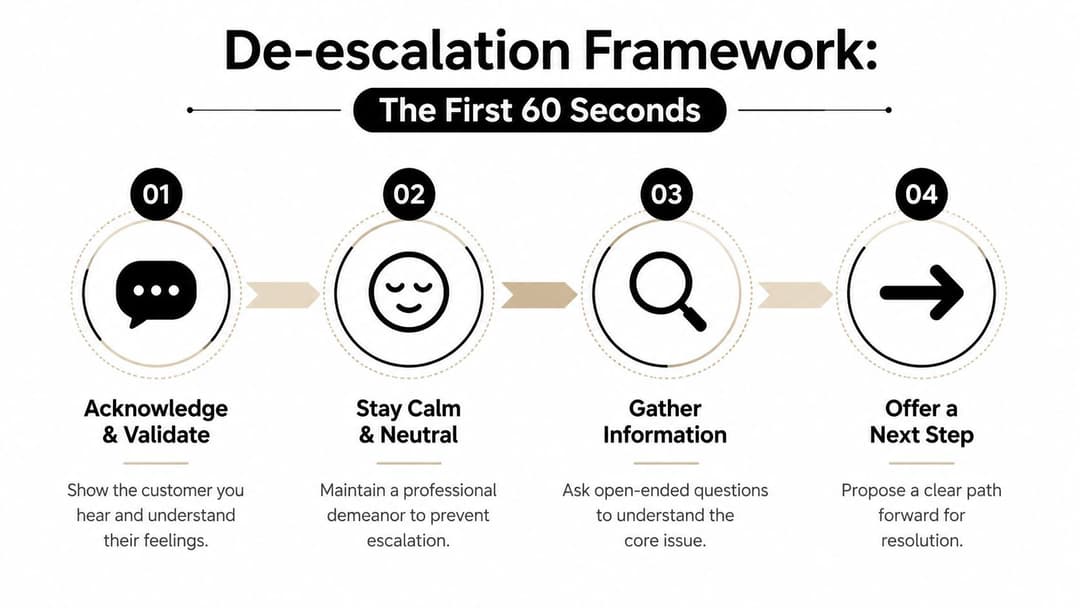
The First 60 Seconds Your De-escalation Framework
The first minute determines whether the conversation becomes cooperative or combative. For this reason, agents need a repeatable framework, not generic advice to "stay calm."
Match concern without matching heat
The most useful calibration rule I've seen is the 50% Intensity Rule. Support agents should respond at exactly half the customer's emotional intensity, a technique described as a standard benchmark in high-volume IT support in Corebee's guide to handling angry customers. If the customer is furious, your tone should show urgency and concern, but it can't mirror the same level of heat.
If you match their intensity, you create conflict. If you respond too softly, you sound detached. The midpoint works because it signals, "I take this seriously, and I'm stable enough to help."
A practical opening sequence
When a difficult message arrives, agents need a short sequence they can run almost automatically:
Acknowledge the emotion
Name the frustration without arguing with it. "I can see why this is frustrating."Signal control
Tell the customer what you're doing now. "I'm reviewing the account and the error details."Reduce ambiguity
Give a near-term next step. "I'll confirm what happened and come back with the fastest path forward."Ask one useful question
Don't ask for a life story. Ask for the one detail that moves the case ahead.
Teams that want fewer messy starts should also review methods for reducing first response time, because de-escalation falls apart when agents don't answer quickly enough to begin with.
What to say in the first reply
The goal is to validate pressure without casually admitting fault. That matters in B2B support, where wording can create unnecessary liability or confuse the record during contract disputes.
Use language like this:
- For email or chat: "I understand this is blocking work on your side. I'm checking the account and the reported behavior now."
- For a public post: "Thanks for flagging this. We're reviewing the issue and will follow up directly with the next step."
- For a live conversation: "I hear the urgency. Let's get specific about what's happening so I can move this forward."
Avoid these common misses:
- Defensive phrasing: "That shouldn't be happening" often sounds like disbelief.
- Empty empathy: "We apologize for the inconvenience" without a next step feels canned.
- Premature policy talk: Quoting terms too early tells the customer you're protecting the company before helping them.
Your opening reply should lower the temperature and increase clarity at the same time.
One more habit helps in written channels. Build a short pause before replying. A brief reset keeps agents from typing the first defensive thought that comes to mind and helps preserve a clean issue log.
Mastering Active Listening and Empathy
Once the initial heat drops, the real work starts. Angry customers often describe the symptom first, not the root cause. If agents listen only for the obvious problem, they miss the actual blocker, the business impact, or the reason this issue feels so loaded.
Listening for facts and listening for stakes

Active listening in support has two layers. First, capture the mechanics. What happened, when did it start, what changed, what screen or workflow is affected. Second, identify the stake behind the complaint. Is the customer worried about a missed deadline, a billing problem, an embarrassed internal handoff, or repeated friction with your team?
That distinction changes how you respond. "The dashboard won't load" and "my VP is waiting for this report" need the same troubleshooting process, but not the same conversation.
A strong paraphrase usually does more than a polished apology. Try:
- Mirror the event: "So the export fails after you click save, and it happens on the same account each time."
- Name the impact: "That means your team can't finish the handoff you planned today."
- Invite correction: "Did I get that right?"
If your team analyzes support transcripts, this is also where support conversation analysis tools help. They reveal whether agents are clarifying the issue or just waiting to deliver a scripted answer.
Empathy without legal or operational sloppiness
Empathy isn't agreeing with every accusation. It's showing that you understand the customer's experience and pressure.
This matters even more in edge cases. Some anger is genuine but highly controlled. Some is strategic. Some customers are trying to push for concessions, avoid payment, or create a record that benefits them later. In those moments, the wrong kind of apology can create problems.
A safer pattern looks like this:
| Weak response | Better response |
|---|---|
| "You're right, we failed you." | "I understand why this situation is frustrating." |
| "This is our mistake." | "I'm reviewing exactly what happened." |
| "We'll make sure this never happens again." | "I'll confirm the cause and the next step." |
You can validate emotion without making promises you can't keep or admissions you haven't verified.
Operational note: The customer needs to feel understood. They don't need you to speculate.
A short training resource often helps agents hear the difference between passive hearing and real listening. This walkthrough is useful:
Questions that lower friction
The best clarifying questions are short, specific, and easy to answer under stress.
- Anchor in time: "When did you first notice this?"
- Anchor in action: "What did you click right before the error appeared?"
- Anchor in scope: "Is this affecting one user, one account, or the whole team?"
- Anchor in desired outcome: "What would a workable resolution look like for you today?"
That last question matters. Sometimes the customer wants a fix. Sometimes they want a refund, a workaround, a timeline, or proof that someone competent owns the issue. Knowing which one you're handling saves time and reduces back-and-forth.
Navigating Resolution and Smart Escalation
A calm customer still needs a competent resolution path. Many support organizations often fall short in this area. The agent does the emotional work well, then the issue gets transferred, repeated, and delayed.
Transfers are where trust often drops
Transferring a support call extends resolution time by 30-50%, and the Equal Knowledge Authority model can reduce average resolution time by up to 40% in B2B SaaS environments according to Nutshell's analysis of CX strategies for angry customers. The implication is blunt. Every transfer should feel expensive.
Frontline agents need enough product knowledge and enough decision authority to solve more cases on first contact. If your model depends on constant handoffs to billing, product, technical support, or success, customers feel your org chart more than your service.
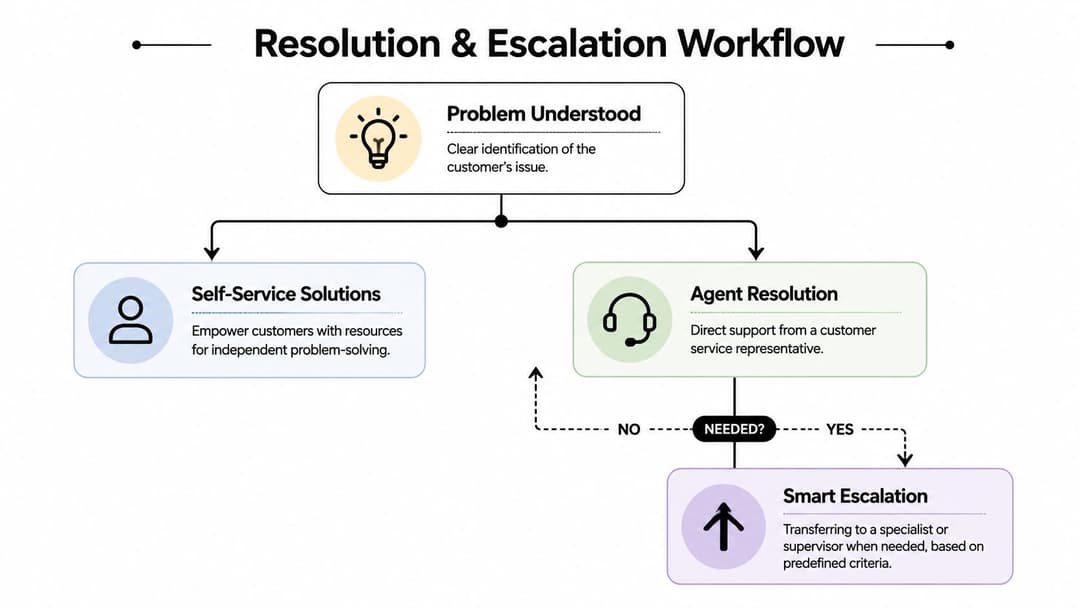
A strong workflow usually includes these lanes:
- Self-service for the obvious: Known fixes, account instructions, billing explanations, and setup paths.
- Agent-owned troubleshooting: The rep stays with the issue long enough to rule in or rule out common causes.
- Escalation by criteria: The case moves only when a predefined condition is met.
For teams working through channel complexity, this playbook for modern ecommerce support is a useful comparison point because it shows how process design changes support quality more than agent heroics do.
When escalation helps and when it hurts
Escalation is necessary when the issue crosses a capability boundary. It hurts when it's used as an escape hatch.
Escalate when:
- Authority is the blocker: The customer needs a refund approval, contract interpretation, or account exception.
- Specialization is required: The issue needs engineering analysis, security review, or deep system access.
- Risk is rising: The customer is becoming abusive, threatening, or creating legal exposure.
Don't escalate just because the customer is angry. Anger alone isn't a reason to move the ticket. Poorly managed escalation tells the customer, "You were too difficult for me."
If you do hand off, the standard should be a smooth transfer. The next person should receive the timeline, issue summary, attempted fixes, account context, and current emotional state. Customers should never have to restart the story. Teams that need cleaner handoffs should document a clear issue escalation process.
Protect the team while solving the issue
Support quality drops when agents absorb every hard conversation without recovery. Rotation matters. So do boundaries.
Teams should explicitly allow short resets after rough interactions. Helply's guidance on difficult customer handling recommends rotation protocols and 5-10 minute breaks after hard conversations, along with clear boundaries for ending abusive interactions. That's not a perk. It's a reliability measure.
A practical policy can look like this:
| Situation | Agent action |
|---|---|
| Frustrated but cooperative customer | Continue, clarify, and resolve |
| Repeated yelling or personal attacks | Warn once and reset expectations |
| Ongoing abuse after warning | End the interaction according to policy |
Support leaders often focus heavily on customer tone and not enough on agent stamina. That's a mistake. Burned-out agents escalate too late, apologize too vaguely, and miss details that matter.
From Reactive to Proactive Preventing Anger with AI
The cleanest angry-customer interaction is the one that never becomes angry. Prevention matters more than recovery, especially in SaaS environments where the same confusion can hit hundreds of users if the product, help content, and support systems don't work together.
Prevention starts before the ticket exists
A large share of frustration starts with predictable friction. A setting is hard to find. A billing page is unclear. A workflow fails without enough explanation. An email reply takes too long, so the customer opens a second channel and arrives already irritated.
AI is useful here when it reduces waiting and confusion in concrete ways. Fast answers to routine questions, page-aware in-app guidance, better triage, clearer summaries, and stronger bug reports all remove the kinds of dead time that turn mild annoyance into anger.
Good automation doesn't just answer questions. It identifies what screen the user is on, points them to the right setting, captures relevant session context, and routes the edge cases to a human with enough detail to act immediately.
For support leaders building that model, proactive support workflows are the right benchmark. The objective isn't to deflect people at all costs. It's to prevent avoidable confusion from becoming a support event.
Automation should remove friction not humanity
AI fails when teams use it to sound efficient instead of being helpful. Customers can tell when the reply is polished but empty.
That shows up most clearly in writing. If your automated replies sound stiff or generic, they increase irritation rather than easing it. Teams trying to improve tone can use resources on how to fix robotic AI emails so automated messages still sound accountable and human.
A workable split is simple:
- Let automation handle the repeatable. Password help, account navigation, policy explanations, status checks, known issue updates.
- Let humans handle the sensitive. Escalated emotions, contract disputes, strategic accounts, ambiguous failures, and abusive behavior.
- Let systems share context. The agent should inherit the full trail, not just a ticket number.
The point of AI in support isn't to avoid customers. It's to preserve human attention for the moments where judgment matters.
Use AI to support agents too
The value of automation isn't limited to customer-facing chat. It should also lower strain on the team.
That includes better internal search, suggested macros based on the actual issue, automatic case summaries, duplicate detection, and routing that spreads difficult conversations across the team instead of letting one experienced rep absorb all the pain. That last point matters because agent resilience is operational, not personal.
Teams should still keep explicit break rules and abuse thresholds in place. As noted in Helply's article on dealing with angry customers, agents need permission to take 5-10 minute breaks after hard conversations and clear backing to terminate abusive interactions. AI can reduce volume and improve context, but it can't replace managerial standards.
Closing the Loop with Follow-Up and Feedback
A resolved issue isn't the same thing as a repaired relationship. If the customer had to chase, repeat themselves, or escalate emotionally to get help, silence after the fix leaves the job half done.
A closed ticket is not the same as a repaired relationship
Follow-up should confirm two things. First, did the solution work. Second, does the customer feel the issue was handled competently.
That follow-up starts early, not late. The industry standard threshold for a verifiable response is 24 hours or less, and even a preliminary acknowledgment like "I'm checking into your issue" can provide the glimmer of hope that keeps the situation from becoming more volatile, according to Stunning's SaaS guide to handling rude customers.
That standard changes the way teams should think about updates. Customers don't need constant noise. They need proof of motion.
A useful follow-up sequence is short:
- Acknowledge receipt quickly
- Set the next checkpoint
- Confirm the outcome after the fix
- Invite any final friction point the customer still sees
If you're collecting trends systematically, customer feedback analysis workflows can help turn these interactions into something more useful than a closed queue count.
Turn angry conversations into operating data
Every angry interaction contains at least one signal. Sometimes it's a product defect. Sometimes it's weak onboarding. Sometimes it's a policy that agents can't explain clearly. Sometimes it's a routing problem that made the customer repeat themselves to three people.
The mistake is treating the case as isolated. Support leaders should tag the trigger, the path to resolution, whether escalation was needed, and what wording or action finally lowered tension. That creates a feedback loop across support, product, billing, and success.
A few patterns are worth reviewing regularly:
- Repeated confusion on the same screen
- High-friction handoffs between teams
- Policies that trigger long arguments
- Agent language that tends to calm or inflame
When teams do this well, angry tickets stop being random fires. They become one of the fastest ways to find broken experiences before they spread.
If your team wants to reduce angry tickets before they start, Halo AI helps automate routine support, guide users inside the product, capture richer issue context, and hand complex conversations to humans with the details already assembled. That gives customers faster answers and gives your team more time for the cases where empathy and judgment matter most.
How Halo helps
Halo helps B2B SaaS support teams scale without scaling headcount: an AI agent absorbs routine volume, an AI-first inbox keeps humans fast on the rest, and every conversation makes the system smarter. Learn more about Halo for customer support teams.