Support Intelligence: A Practical Guide for B2B SaaS
Learn what support intelligence is, how it works for B2B SaaS teams, and how to evaluate platforms that turn support data into real business insight.
 Matt PattoliFounder14 min read
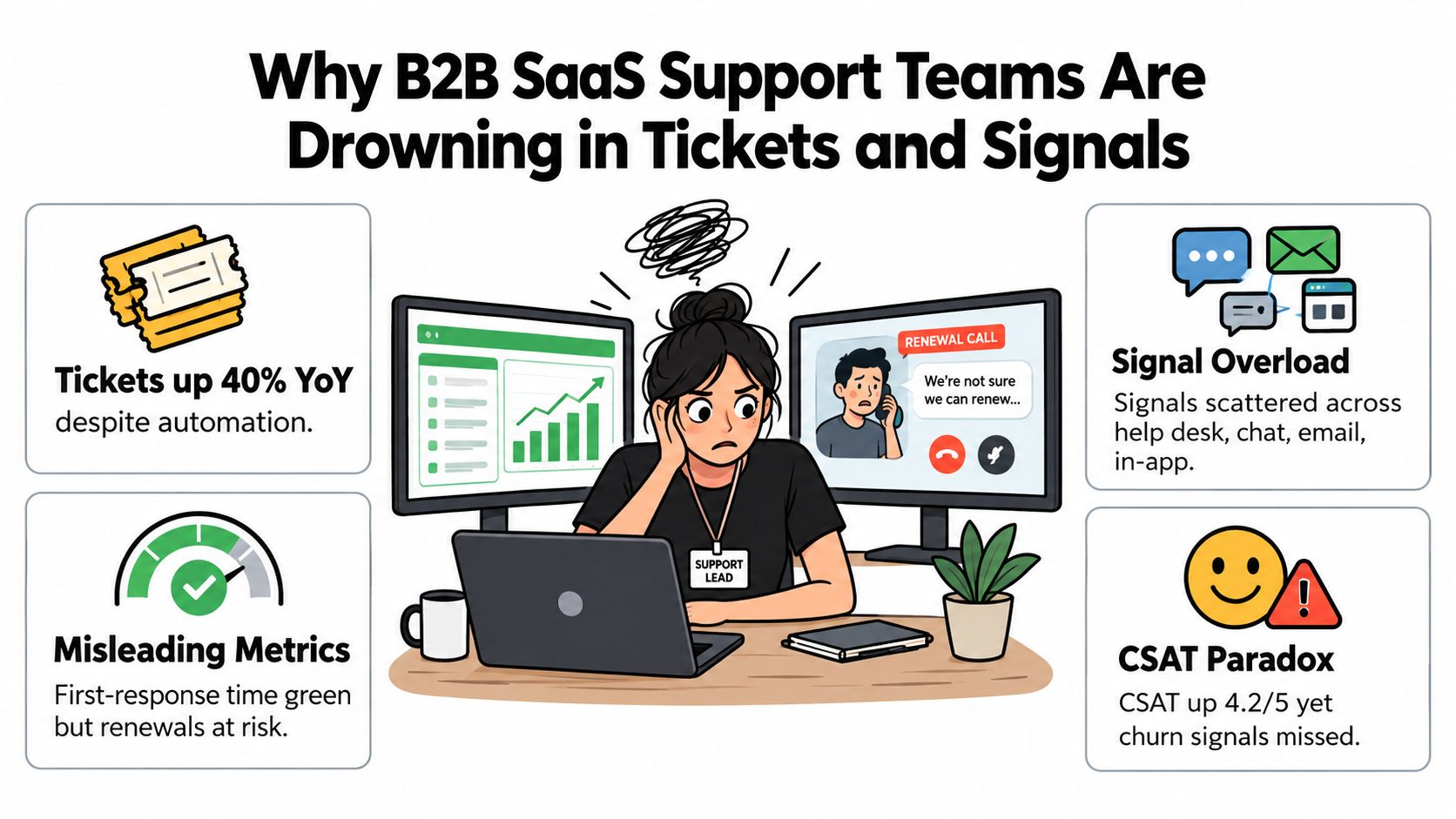
A support lead opens the morning dashboard and sees reassuring signals. First-response time is green, CSAT is holding steady, and the automation queue looks efficient. Then a renewal call goes badly because the customer has been struggling with a workflow for weeks, even though no single ticket looked severe enough to trigger attention.
That gap is where support intelligence matters. B2B SaaS teams already collect a large amount of customer evidence across tickets, chats, calls, product usage, billing events, and account activity. The problem isn't usually a lack of data. It's that teams still read support data as a record of work completed instead of as a live source of insight about customer health, product friction, churn risk, and expansion potential.
Support intelligence connects those signals and helps people act on patterns that would otherwise remain buried in individual conversations. It doesn't replace support operations, product judgment, or customer success. It gives each team a clearer view of what customers are experiencing and what that experience means for the business.
Why B2B SaaS Support Teams Are Drowning in Tickets and Signals
A familiar pattern plays out in growing SaaS companies. Ticket volume rises as the product adds integrations, permissions, workflows, and user roles. An expanding account also brings more stakeholders into support, so one implementation can generate questions from administrators, analysts, finance users, and executives. Headcount rarely grows at the same pace as product surface area.
The dashboard may still look calm. Macros and automated replies reduce visible handling effort, while a higher CSAT score suggests customers are satisfied. Yet a renewal manager hears that reporting is unreliable, a key integration feels fragile, or the customer's team has stopped using an important feature. The operational metrics describe throughput, but they don't explain the account's changing relationship with the product.
The rows hide the story
Traditional support reporting answers questions such as:
- How many tickets arrived?
- How quickly did an agent respond?
- How many conversations received a positive rating?
- How many contacts were closed or automated?
Those questions matter for staffing and service management. They don't reliably answer which enterprise accounts are degrading, whether a release disrupted a core workflow, or whether repeated “how do I” questions indicate a product gap rather than a documentation gap.
Automation can make this problem harder. A macro may close a ticket efficiently while concealing that dozens of customers are encountering the same confusing setting. An AI response can deflect a conversation while leaving the customer to return later with a more urgent version of the same issue.
Operational rule: A closed ticket is an activity outcome. A resolved customer problem is a business outcome.
Support leaders need a layer that groups conversations by account, product area, release, severity, and commercial context. That layer can reveal that several minor tickets share one root cause, or that a moderate issue is strategically important because it affects a renewing account.
Teams building that operating model can also review practical guidance such as Supercenter for support ops, especially when they're deciding how automation should fit into routing, escalation, and daily queue management. The central shift is simple: stop treating every ticket as an isolated unit of work. Read the collection as evidence about how customers use, struggle with, and value the product.
What Support Intelligence Actually Means
Start with the levels of analysis already widely recognized.
Descriptive analytics tells you what happened. Ticket volume increased, a queue aged, or customers contacted support about a particular feature. Diagnostic analytics asks why. It connects the increase to a release, a configuration change, a documentation gap, or a specific customer segment.
Predictive analytics estimates what may happen next. A pattern of failed onboarding steps, declining usage, and repeated escalations may indicate account risk. Prescriptive analytics recommends an action, such as assigning an account to a specialist, updating an article, or opening an engineering investigation.
Support intelligence goes further by combining those layers with context and reasoning. It isn't just a dashboard, a chatbot, or a deflection report. It's a system that can ingest support interactions, join them with account, product, and revenue information, then surface conclusions a human would struggle to find by reviewing records one at a time.
A thermostat is not a heating system
A thermostat reports the temperature. A more capable heating system learns occupancy patterns, anticipates changing conditions, and adjusts different zones before rooms become uncomfortable. The second system doesn't merely display information. It interprets context and takes action against a desired outcome.
Support intelligence applies the same distinction to customer operations. A dashboard may show that tickets about an integration are increasing. An intelligent system can connect those conversations to a recent version change, identify affected accounts, compare usage behavior, and recommend a product or customer success response.
That doesn't mean every platform using artificial intelligence qualifies. A vendor rebranding keyword tagging as intelligence still leaves the team with the same fragmented workflow. The useful test is whether the system can connect evidence across sources and make its reasoning usable in the tools where people work.
For a broader view of how customer context can be unified across business systems, this explanation of a customer intelligence platform provides helpful background. In practice, support intelligence should help a support leader answer not only “what is in the queue?” but also “what changed for this customer, why does it matter, and who needs to respond?”
The Four Layers of a Support Intelligence System
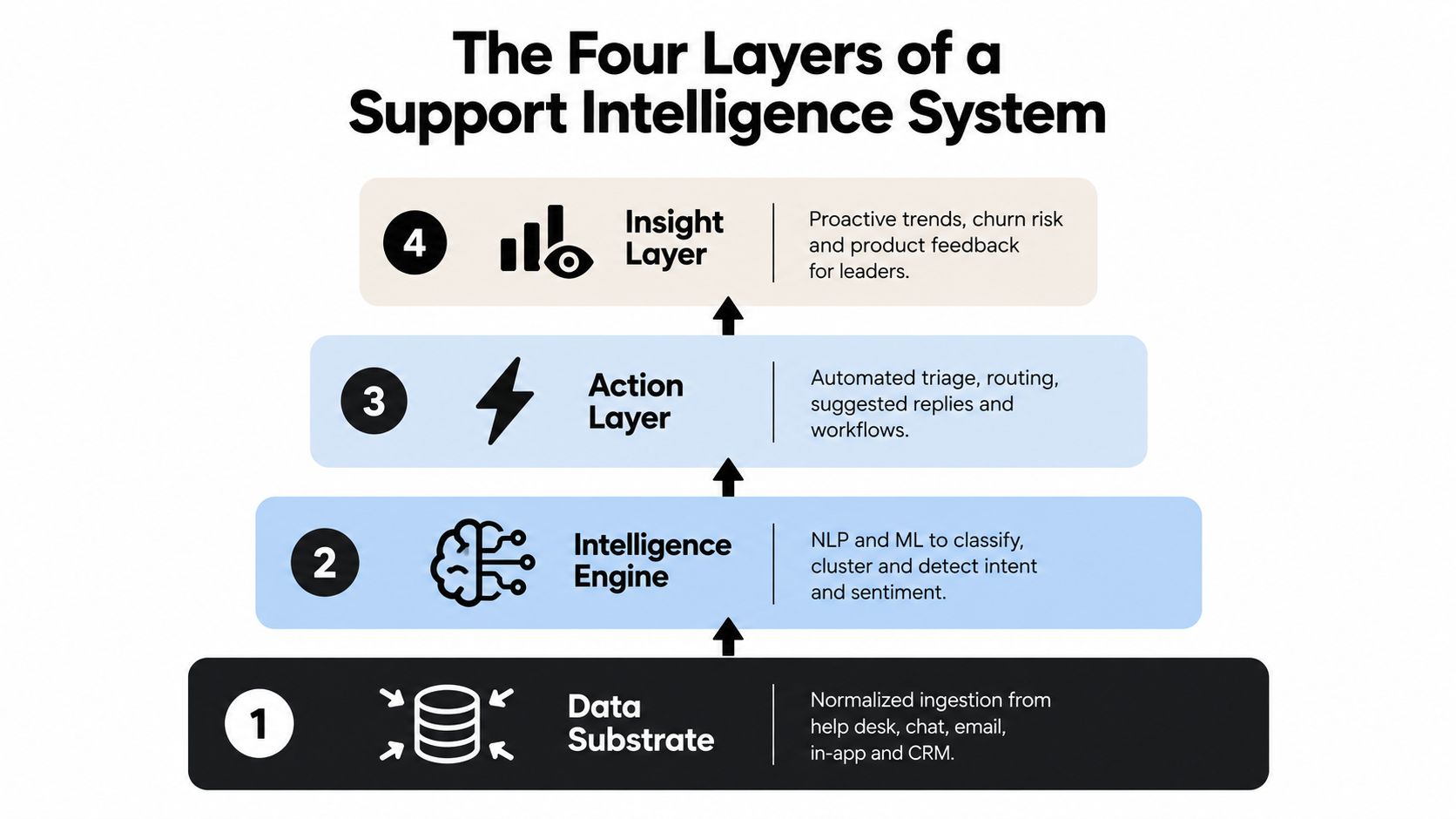
A reliable support intelligence system is layered. Each layer depends on the one beneath it, which is why teams often struggle when they begin with autonomous actions before fixing their data foundation.
Layer one builds the data substrate
The base layer normalizes information from the help desk, chat, email, in-app messages, and voice. It joins those interactions to CRM records, product telemetry, billing events, and knowledge content. Identity resolution matters here. If an account appears under different names across Intercom, HubSpot, Stripe, and the ticketing system, later reasoning will be incomplete.
Layer two creates understanding
The understanding engine classifies conversations by intent, sentiment, urgency, topic, product area, and customer health. Natural language processing and large language model techniques can also cluster previously unseen issues, which helps teams find emerging patterns before someone creates a formal category for them.
A useful system should preserve the original evidence behind its labels. Agents and managers need to know whether a conversation was classified as an integration failure because of explicit language, repeated workflow symptoms, or a related product event.
Layer three connects patterns
The reasoning layer looks across accounts, cohorts, product modules, and time periods. It can connect a cluster of ticket themes to a release version, compare affected customers with unaffected ones, or identify a relationship between support friction and renewal activity.
This layer turns “many customers asked about exports” into a question worth investigating: did a recent change alter export behavior, are users misunderstanding the interface, or is the documentation missing a critical step?
Layer four moves insight into work
The action layer routes findings to the people who can respond. A CSM might receive an account-risk alert, a product manager might receive a grouped feedback theme, and engineering might receive a bug report with conversation evidence. Agentic automation can draft replies, suggest routing, or escalate a risk for human review.
The order matters. Without normalized data, action workflows amplify confusion. Without trustworthy classification, routing sends the wrong issue to the wrong team. Teams exploring the knowledge foundation behind this architecture can also consult enterprise knowledge management guidance.
A practical architecture should make the movement visible, from raw interaction to interpretation, from interpretation to reasoning, and from reasoning to accountable action.
Data Sources That Make Support Signals Actionable
Most support teams already have the first tier of data. They store tickets, chat transcripts, help articles, macros, and sometimes call recordings. That material shows what customers said and how agents responded, but it usually lacks the context needed to explain commercial impact or product behavior.
The second tier adds operational context. CRM opportunities and renewal dates show what is commercially at stake. Product telemetry from tools such as Mixpanel or Segment shows whether a customer is using the workflow discussed in a ticket. Billing and provisioning events can expose account changes that make a support interaction more urgent.
A third tier adds surrounding context, including release notes, known-issue trackers, community discussions, and competitive intelligence. These sources help distinguish a new product defect from a recurring usability complaint or an issue customers are discussing outside the formal ticket queue.
| Tier | Data Source | Intelligence Unlocked |
|---|---|---|
| Surface signals | Tickets, chat, email, articles, macros, voice logs | Intent, sentiment, recurring questions, agent effort |
| Operational signals | CRM, renewal data, product usage, billing, surveys, community threads | Account risk, adoption friction, expansion signals, priority |
| Exogenous context | Release notes, known issues, competitive intelligence | Release impact, known defects, market context, emerging concerns |
Why the first tier isn't enough
A ticket that says “the dashboard is empty” has several possible meanings. The customer may have a permissions problem, a broken integration, an unused feature, or an account provisioning error. Product usage and account data help separate those possibilities.
The same joining process can identify duplicate bug reports, associate a support theme with an upcoming renewal, or show that customers who ask about one capability are also exploring an adjacent module. Without those relationships, the team sees conversations. With them, the team sees business signals.
Teams auditing digital behavior alongside support interactions may find Agentable's perspective on digital experience monitoring useful for thinking about how user behavior and reported friction fit together. The broader data-integration question is covered in this guide to multi-source data integration.
Before buying a platform, list each source, its owner, its identifier for accounts or users, and the decisions it could support. If no one can explain how a data source changes a workflow, adding it may create noise rather than intelligence.
Benefits and KPIs That Prove Real Value
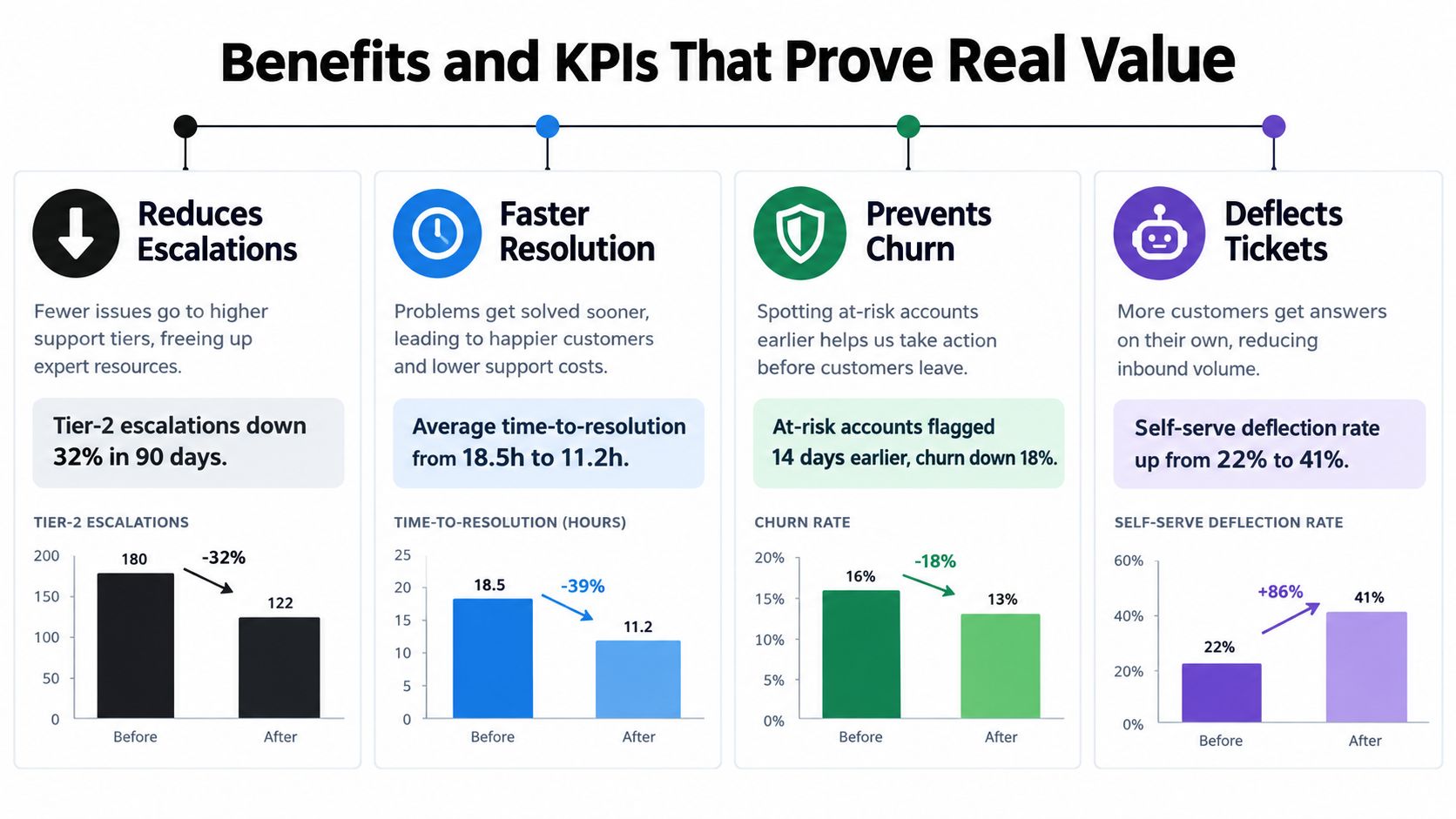
Support intelligence creates value only when it changes a decision or improves an outcome. A high automation count may look impressive, but it can conceal customers who abandon self-service and return later. The stronger measurement approach pairs each capability with a KPI tied to resolution, retention, product quality, or revenue.
AI adoption illustrates why this distinction matters. A 2026 industry summary reported that 88% of contact centers use some form of AI, while only 25% have fully integrated it into daily workflows. The same reporting said 80% of companies were using or planning to adopt AI chatbots for customer service, with telecom at 95% adoption and banking at 92%, according to the cited 2026 industry summary. The figures describe adoption, not successful intelligence.
Measure resolution, not just deflection
A benchmark reports a median tier-one deflection rate of 41.2%, with the top quartile at 58.7%, while only about 14% of AI-deflected interactions achieve full self-service resolution, as described in the customer service AI benchmark. That makes re-contact rate, end-to-end resolution, and escalation quality more useful than containment alone.
Operational depth can also affect cycle time. One benchmark analyzing more than 50,000 tickets across more than 30 organizations found median resolution time of 4.4 hours for tickets with heavy AI automation versus 71 hours without significant automation, according to the help-desk benchmark analysis.
Track a small set of decision-oriented measures:
- Escalation quality: Did routing send complex cases to the right specialist?
- Resolution integrity: Did the customer solve the issue without returning?
- Account impact: Did support signals reach the CSM before a renewal problem became visible?
- Product learning: Did recurring themes create validated engineering work?
- Revenue contribution: Did a support conversation reveal a qualified expansion opportunity?
Use customer support metrics guidance to build a scorecard that separates service activity from customer and business outcomes. The KPI should tell you whether the system improved the customer's situation, not merely whether it processed more rows.
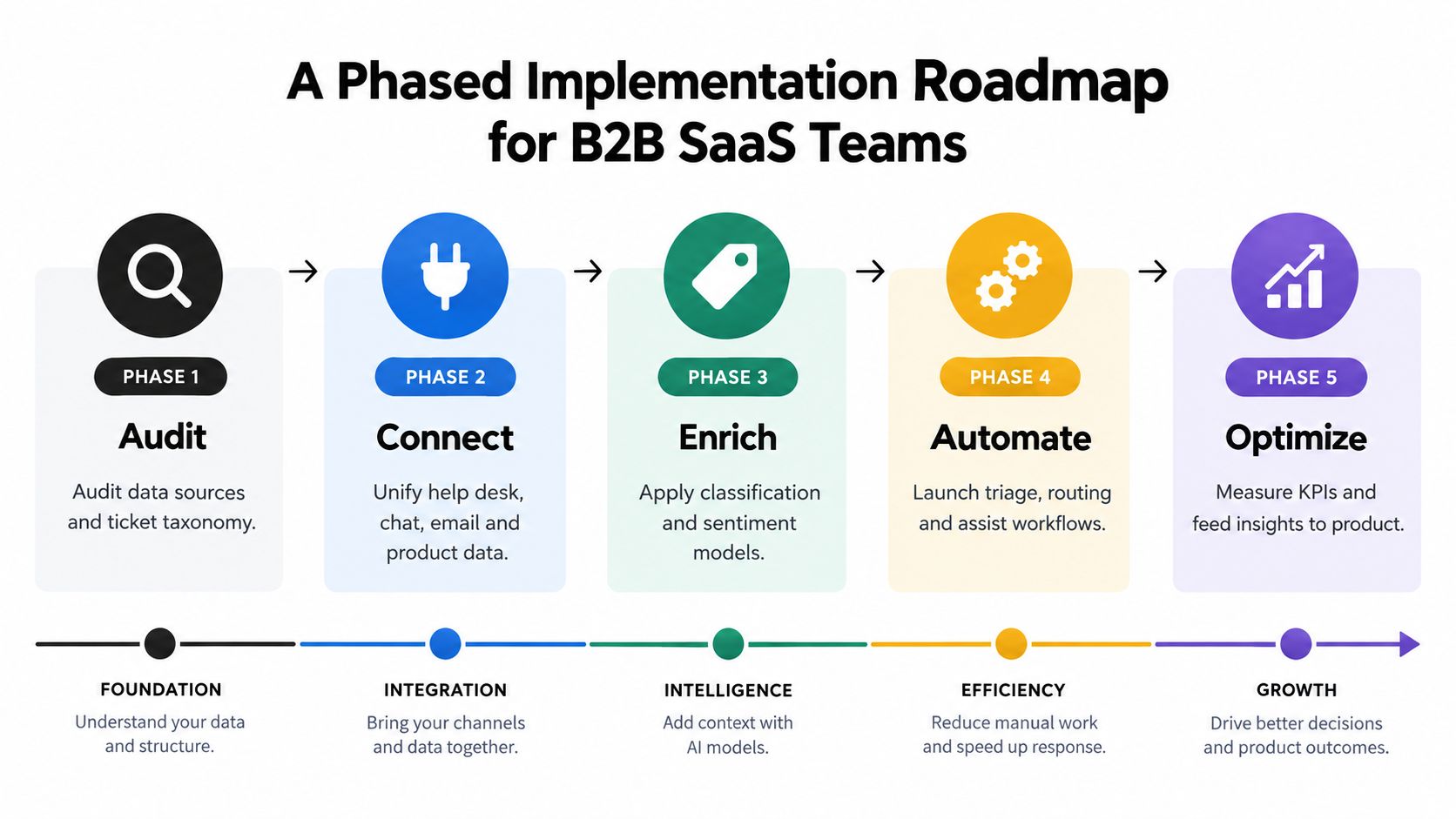
A Phased Implementation Roadmap for B2B SaaS Teams
Support intelligence works best as a maturity model. Each phase should have a readiness gate, because adding autonomous actions to inconsistent data produces confident errors rather than useful operations.
Phase one audits the foundation
Inventory every support channel, account identifier, product event, and commercial field. Confirm that a ticket can be associated with the correct customer, workspace, plan, and product context. The gate is simple: leaders can query the records they need without manual reconciliation.
Phase two standardizes meaning
Create a shared taxonomy for intent, product area, severity, escalation reason, and outcome. Don't build an elaborate classification scheme that agents won't maintain. Start with categories that support real decisions, then refine them as new issues appear.
Phase three adds analytical visibility
Move beyond first-response time and CSAT. Create views for recurring issues by cohort, product version, account segment, onboarding stage, and renewal status. A team should be able to distinguish a broad product problem from one customer's configuration issue.
Phase four assists the team
Introduce summarization, suggested replies, knowledge retrieval, and case routing. Keep humans responsible for sensitive escalations and evaluate suggestions against approved sources. The readiness gate is consistent performance on common workflows, not an attractive demo.
Phase five enables controlled action
Allow the system to draft customer updates, open structured bug tickets, group duplicate reports, and flag renewal risks for human review. Define what the agent may do automatically, what requires approval, and what must always go to a person.
Readiness gate: If operators can't trace an AI recommendation back to the underlying conversation and account context, the workflow isn't ready for autonomous execution.
A workflow platform can help coordinate these handoffs, but the operating model comes first. Teams considering that layer can review enterprise workflow software concepts. At every phase, test false positives, missed signals, escalation timing, and customer impact. Don't treat a successful automation as proof that the system understands the business.
Real-World Use Cases Across SaaS Teams
A customer success operations lead begins with account risk. The system clusters conversations across an enterprise account and notices a pattern before an upcoming QBR. Several tickets point to configuration drift that is degrading analytics. The signal reaches the CSM with the affected workflows and conversation evidence, giving the team time to address the problem before the meeting.
A product manager uses the same data differently. Trending intent signals show that one API error message is driving 18% of tier-one volume across mid-market accounts. The team can prioritize a clearer error state or a product fix instead of asking agents to write more macros. That number comes from the scenario described here, not from an external benchmark.
A RevOps leader applies a commercial lens. Billing-related conversations are joined to expansion pipeline, revealing that customers who encounter a specific invoice error convert to annual plans at half the rate of customers with clean billing experiences. The finding changes the conversation from “billing tickets are rising” to “this billing defect may be suppressing expansion.”
These scenarios use the same underlying evidence but produce different actions. Customer success cares about account health, product cares about root cause and prioritization, and revenue teams care about conversion conditions.
The important design choice is not creating a separate analytics tool for every stakeholder. It's preserving shared data while allowing each team to ask questions in its own operating language.
How to Evaluate Support Intelligence Platforms
A feature checklist won't tell you whether a platform can support your operating model. Score vendors across four dimensions, then weight those dimensions according to your stack, risk tolerance, and data maturity.
| Evaluation Dimension | What to Assess | Score (1-5) |
|---|---|---|
| Data architecture depth | Can it ingest conversation, product, account, and revenue context without fragile workarounds? | |
| Reasoning transparency | Can operators inspect evidence, confidence, classifications, and source context? | |
| Workflow embedding | Do insights reach the help desk, CRM, product backlog, warehouse, or collaboration tools? | |
| Governance and security | Are PII handling, isolation, retention, deletion, residency, and retraining controls clear? |
Ask for evidence, not promises
A useful evaluation includes a sample of your own conversations and edge cases. Test whether the system separates a billing question from a renewal risk, distinguishes a documentation complaint from a product defect, and routes a high-value account differently from a low-impact inquiry.
Ask how models adapt to your taxonomy and terminology. Static categories may work in a demonstration but fail when your product has specialized workflows or changing release language. Also inspect how the platform handles uncertainty. A recommendation without traceable evidence won't survive review by support operations, engineering, or a skeptical CRO.
Examine the handoff
The insight should appear where the next decision happens. If a risk alert lives only in another dashboard, the CSM may never act on it. If a product theme can't become a structured issue in the existing backlog, the product team still has to repeat the analysis manually.
Halo AI is one option in this category. Its platform connects support conversations and business context, supports autonomous ticket handling and product guidance, and provides a queryable layer for questions about customer health, product adoption, revenue signals, and anomalies. Evaluate it against the same data, transparency, workflow, and governance criteria as any other platform.
Halo AI connects support interactions with operational context so B2B SaaS teams can investigate customer friction, product patterns, and revenue signals in one place. Visit Halo AI to see how its agents and queryable intelligence layer could fit your support operations roadmap.