Bug Report Example That Actually Gets Fixed
See a real bug report example, learn the fields that speed up triage, and get a reusable template your engineers will thank you for.
 Grant CooperFounder13 min read
You've just found a bug that blocks a customer workflow. You open Jira, type “Checkout broken,” attach a screenshot, and move on to the next test. Twenty minutes later, a developer asks which browser you used, what data was in the account, whether the issue reproduces, and what should have happened. By the end of the day, the ticket is sitting in “Needs more information.”
A useful bug report example does more than describe a failure. It packages the conditions, evidence, and user impact so the next person can reproduce the problem without interviewing the reporter. The difference is structure, not eloquence.
Why Most Bug Reports Disappear Into Triage
Engineering triage is a queue with finite attention. Every missing environment detail, unclear action, or unexplained result creates another round-trip between QA, support, product, and development. A ticket can be technically accurate and still fail because it doesn't give the assignee a reliable starting point.
Modern bug-report corpora illustrate how far the process has moved beyond informal complaints. The BugsRepo dataset contains 119,585 bug reports from more than 50 Mozilla projects, with metadata and comments, 19,351 contributor profiles, and a structured subset of 10,351 reports for higher-quality analysis, as documented in the BugsRepo research. A mature report is a trackable record with status, lifecycle updates, contributor context, and information that supports triage, deduplication, and fix prioritization.
Practical rule: Write the ticket for the engineer who has never seen the feature, account, test data, or failure before.
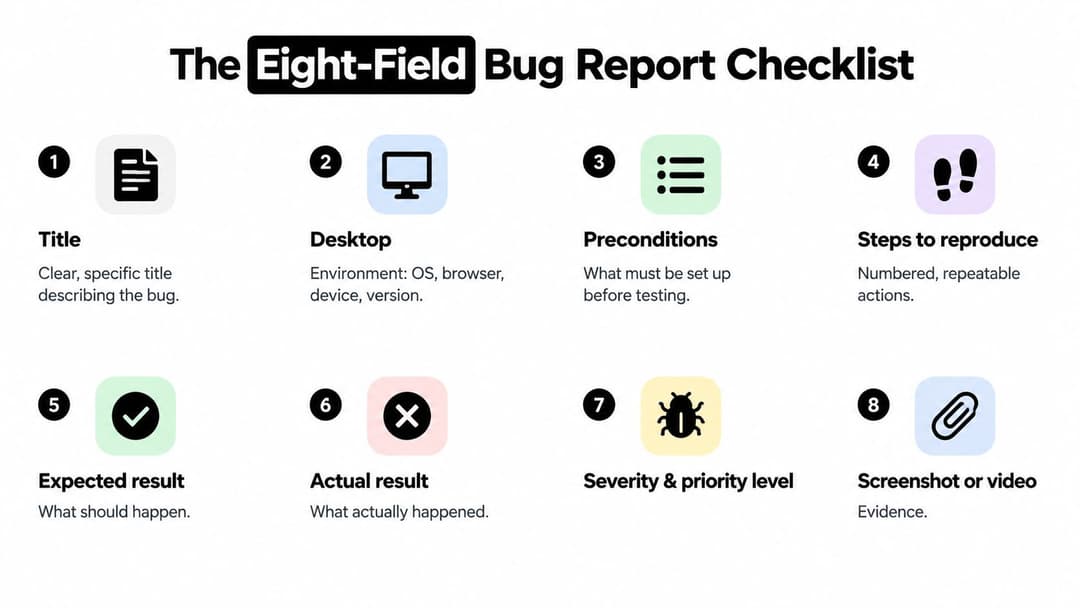
The worked example below uses eight fields that make a report actionable:
- Title: Identify the affected feature and failure condition.
- Environment: Record the configuration that produced the defect.
- Preconditions: State what must already be true.
- Steps to reproduce: Give numbered actions with exact values.
- Expected result: Define the correct behavior.
- Actual result: Describe what happened and its impact.
- Evidence: Attach visual, console, network, or log proof.
- Severity and metadata: Add impact, reporter, build information, and tracking context.
This structure also fits the wider discipline of QA in software development, where testing only creates value when teams can communicate, verify, and manage defects through a shared workflow. If your tickets repeatedly vanish between support and engineering, the issue may be the handoff format rather than the testing effort, as discussed in why bug reports get lost in the support queue.
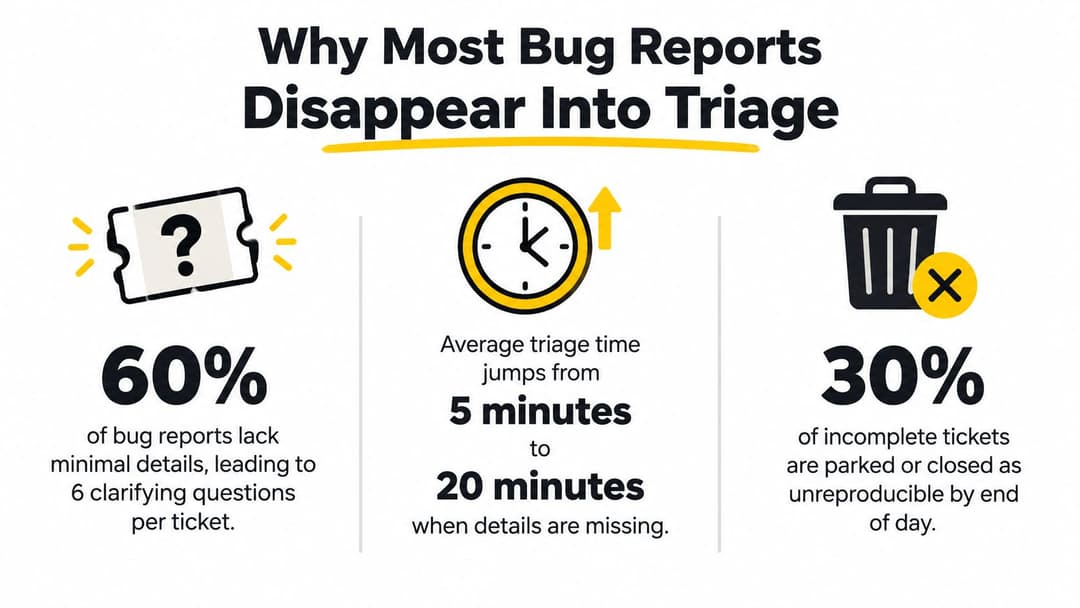
Historical research reinforces the cost of leaving these fields blank. One study found that, on average, over 70% of bug reports lacked crash-reproducing steps, stack traces, fix suggestions, or user content, while those fields had significant effects on resolution time across roughly 70%, 76%, 55%, and 33% of projects, respectively according to the study on bug-report quality. A strong report reduces questions before they're asked.
A Real UI Bug Report Example Walked Through Field by Field
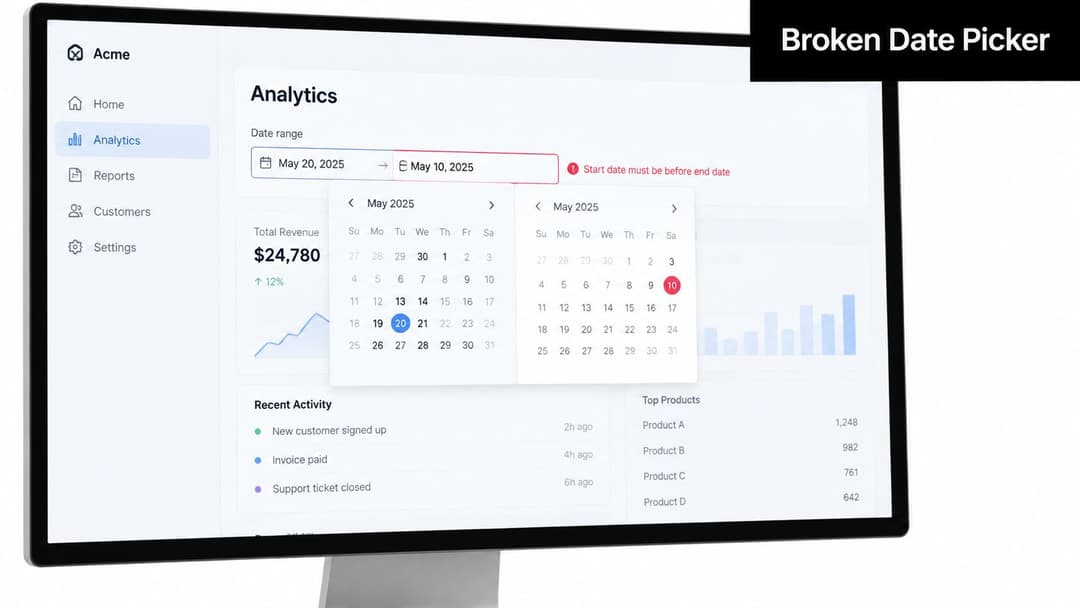
Consider a SaaS analytics dashboard where a user filters reports by date. The date picker accepts an end date earlier than the start date, then displays an empty chart. That's a functional defect, not merely a visual oddity, because the interface accepts an invalid state without explaining why the result is empty.
The completed report
Title
Date picker in Reports > Date Range allows invalid end-before-start values
The title is scannable and names the exact feature, condition, and failure. “Date picker broken” would force the engineer to open the ticket before knowing whether the problem involves formatting, selection, timezone handling, or validation.
Environment
- Browser: Chrome 128
- Operating system: macOS 14.6
- Device: Desktop
- Account tier: Pro
- Environment: Staging
- Build: include the tested build SHA in the actual ticket
Environment details matter because defects can depend on browser behavior, account entitlements, release state, or feature configuration. Guidance on what belongs in a bug-report environment specifically calls for operating system, browser, device, and app or build version.
Preconditions
The tester is signed in to a Pro account and is viewing the Reports page with the Date Range filter open.
This removes setup ambiguity. The developer doesn't need to guess which account permissions or page state are required.
Steps to reproduce
- Open the Reports page.
- Open the Date Range filter.
- Click Start Date.
- Select 15 March.
- Click End Date.
- Select 10 March.
- Click Apply.
Numbered, exact actions are easier to execute than prose. The guidance on bug-report templates treats reproducible steps as the critical part of the report because the engineer must be able to follow them without interpretation.
Expected result
The interface should reject the invalid range with a clear validation message, or automatically correct the end date so it isn't earlier than the start date.
Actual result
The filter accepts the invalid range and returns an empty chart without a warning. The report describes the user-visible outcome rather than guessing at the implementation, such as claiming that the date comparison function is defective.
Severity and evidence
Set severity to S2, with business impact described separately in your team's priority field if one exists. The evidence includes an annotated screenshot showing the selected dates and a 12-second screen recording showing the full interaction from opening the filter through the empty result.
That combination gives the engineer both a static reference and a short reproduction path. It also avoids a common support failure, where an image captures the page but hides the selected values or the moment the state becomes invalid. Teams handling visual context can use the same principle described in support tickets missing visual context.
An API Bug Report Example Showing the Same Pattern in a Backend Context
The same eight-field structure works for an API defect, but the evidence changes. A screenshot can't prove that a response failed to create a database record, so the report needs a request identifier, payload, response, trace, and storage observation.
The completed API report
Title
POST /v2/orders returns 200 OK but persists no order in 4% of requests
The title includes the endpoint, misleading status code, missing persistence, and observed frequency. The rate belongs in the title because it helps the team recognize a regression that is intermittent rather than universally reproducible.
Environment and preconditions
- Cluster: Staging, eu-west-1
- Service build: 7.4.2
- Database: PostgreSQL 15.4
- Occurrence: 1 in 25 requests
- Authentication: Test user
- Cart: Two SKUs
The precondition is an authenticated test user with a cart containing two SKUs. The report should also record the request ID and any available trace ID for each reproduced failure.
Steps to reproduce
- Authenticate as the test user.
- Create a cart containing the two seed SKUs.
- Send a
POSTrequest to/v2/ordersusing the seed payload and a redacted authentication token. - Record the matching request ID.
- Repeat the request under the same staging conditions.
- Query the
orderstable for the returned order identifier.
Expected result
The service should return 201 Created with an order_id, and the corresponding row should appear in the orders table within 50 ms.
Actual result
The service returns 200 OK, and the response body shape is unchanged, but no database row is created. The order-service log contains no line for the matching trace.
Severity and evidence
Set severity to S1 because the endpoint loses order data. Attach the distributed trace showing that the request exits the API gateway but doesn't reach the order-service queue, along with a timestamped log excerpt.
The UI report relies on screenshots and recordings. The API report relies on curl reproduction, request IDs, trace IDs, response bodies, and database or service logs. Neither format is universally superior. The correct evidence is the evidence that connects the reported symptom to the system component that must be investigated.
| Field | UI Bug Example | API Bug Example |
|---|---|---|
| Title | Date picker and invalid date condition | Endpoint, status, persistence failure, occurrence |
| Environment | Browser, OS, account tier, build SHA | Cluster, service build, database, occurrence |
| Preconditions | Reports page and open date filter | Authenticated user and seeded cart |
| Reproduction | Clicks and date selections | Redacted request, payload, repetition, query |
| Expected result | Validation or correction | 201 response and persisted row |
| Actual result | Empty chart without warning | 200 response with no database record |
| Evidence | Annotated screenshot and recording | Trace, request ID, and log excerpt |
What Separates Reports That Get Fixed From Reports That Get Closed
A ticket usually closes for a predictable reason. The report may be valid, but the team cannot reproduce it, distinguish it from an existing issue, or determine whether the behavior violates a requirement. Before submission, check which missing detail would block the next engineer.
Historical bug-tracking research found duplicate shares ranging from 6.60% in Eclipse to 20.53% in Firefox and 10.56% in mobile systems. Other environments reported duplicate rates from 35.8% to 41.6% in the Leiden University research record. Search-friendly titles and specific context therefore reduce avoidable duplicate work.
The triage comparison
| Failure Pattern | How Often It Appears | Why It Gets Closed | Fix-It Signal |
|---|---|---|---|
| Missing reproduction steps | A recurring triage pattern | The engineer cannot recreate the state | Numbered actions with exact values |
| Duplicate context | Reported across projects and systems | The ticket adds no distinguishable evidence | Searchable feature, condition, build, and request ID |
| Vague symptom | Qualitative triage pattern | The team cannot map the symptom to a requirement | Separate expected and actual results |
| Missing environment | Qualitative triage pattern | The defect may be configuration-specific | Browser, OS, device, build, account state |
| Unsupported severity | Qualitative triage pattern | Priority does not match user or data impact | Severity paired with a concrete impact statement |
“Orders sometimes fail” leaves too many possibilities: timeout, validation error, duplicate submission, or persistence failure. The API example removes that ambiguity by naming the response, missing row, trace behavior, and occurrence pattern. A useful title and evidence package should let triage identify the affected component without an interview.
The same standard applies to the second example showing what to leave out. Omit guesses such as “the database is broken” when the observed fact is only that no row was created. Record the response, logs, identifiers, timing, and repeatability instead. Halo AI can capture that missing context automatically, including the user state and sequence that people often forget while writing a ticket.
Security reports need a separate boundary. A suspected vulnerability should not enter an ordinary product queue when it includes exploitability, exposure, or sensitive impact. Teams handling external disclosures should understand compliance in bug bounty programs, because risk framing and disclosure handling differ from routine functional triage.
Use one final test: could a new engineer reproduce this from the ticket alone? If not, expect clarification, duplicate classification, or closure instead of a fix.
The Eight-Field Bug Report Checklist
Use this copy-ready gate before moving a ticket out of New. Each field should give triage enough context to route, reproduce, and assess the defect without an interview. Match the evidence to the failure type, whether the report concerns a UI flow or an API response.
- Title: Name the feature, failure, and trigger. Replace “broken” with “Date picker accepts end date before start date.”
- Environment: Record the OS, browser, device, application version, build SHA, cluster, database, account tier, and feature flags that could affect behavior. Include only values relevant to the failure.
- Preconditions: State the account, data, permissions, page, cart, or service state required before reproduction.
- Steps to reproduce: Use numbered actions, exact labels, seed values, commands, and request identifiers. Put the decisive action in its own step.
- Expected result: Describe the behavior required by the feature, including the correct response code or validation behavior when relevant.
- Actual result: State what happened, when it happened, and what the user or system lost. Keep implementation guesses separate from observed facts.
- Evidence: Attach a screenshot or recording for UI defects. For backend defects, include logs, traces, response bodies, or database observations.
- Severity and business impact: Separate technical damage from urgency. A silent data-loss path warrants a different assessment from a cosmetic alignment issue.
Submission gate: A blank field or “see above” means the ticket is not ready for triage.
Teams that share intake between support and testing benefit from written decision rules. The troubleshooting guides that work approach favors concrete conditions and actions over broad descriptions. Apply the same discipline to every field, while allowing the workflow to capture different evidence for UI and backend failures.
For teams standardizing intake across support and engineering, the software bug reporting workflow provides a reference for keeping fields consistent and traceable.
Using AI Agents to Capture Context You Would Otherwise Forget
The checklist is effective, but it still asks a person to remember details at the exact moment a failure interrupts their work. That's where an AI agent can change the reporting burden. Instead of asking the user to reconstruct the session later, the agent can assemble a draft while the context is still attached to the product interaction.
An agent such as Halo AI can capture browser version, viewport, locale, account role, and feature flags without making the reporter type each value. It can also attach session-replay frames and console errors, giving the ticket more than a verbal description of what appeared on screen.
From user action to engineering context
The workflow becomes more useful when the agent connects fields rather than collecting them in isolation:
- Environment and account state: The agent records the browser, viewport, locale, role, and active feature configuration.
- Evidence: It preserves relevant replay frames, screenshots, and console output around the failure.
- Metadata: It correlates the event timestamp with backend trace IDs and request IDs.
- Deduplication: It flags related tickets by similarity so the reporter can link to an existing issue instead of creating a disconnected duplicate.
- Drafting: It turns the captured material into a structured summary that the user reviews and confirms.
That doesn't eliminate judgment. An AI system can collect the state surrounding a confusing workflow, but it may not know whether a visual change violates an intentional design decision or merely feels awkward. Human-authored notes still matter for subjective UX regressions, accessibility friction, and business context that telemetry can't infer reliably.
The broader shift is from memory-based reporting to evidence validation. The reporter stops answering “Which browser was I using?” and starts checking whether the generated environment, sequence, and impact accurately describe the failure. For teams considering agent-based support beyond bug intake, what autonomous support agents are provides useful context for how these systems can connect user conversations with operational workflows.
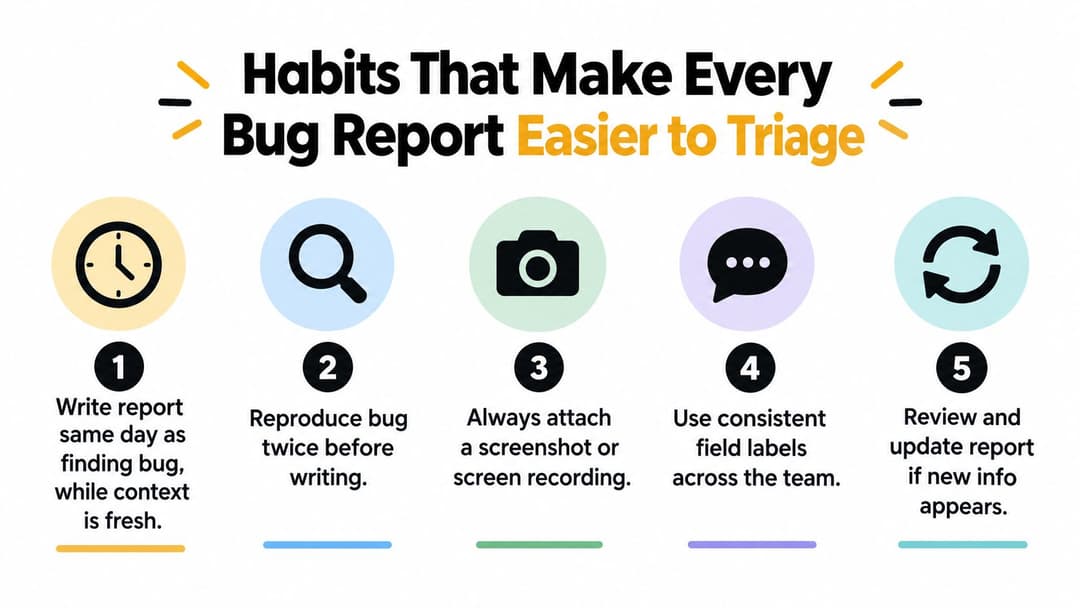
Habits That Make Every Bug Report Easier to Triage
A strong bug report example isn't the result of one careful tester rescuing a broken process. It comes from habits that make useful evidence the default output of testing, support, and development.
Five habits worth enforcing
- Write the report the same day. Context decays quickly. Record the exact account, build, sequence, and observed result while the failure is still clear.
- Use shared field names. If one team writes “browser details,” another writes “client,” and a third writes “runtime,” searches and grouping become harder. Standard labels make reports easier to scan.
- Require evidence before leaving New. A screenshot, recording, console line, request ID, or log excerpt should be present unless the defect is nonvisual and has another clear proof.
- Tie severity to impact. “Annoying” isn't a severity rationale. Explain whether the issue blocks a workflow, corrupts data, affects a narrow configuration, or creates a cosmetic mismatch.
- Review closed reports. Sample closed tickets regularly and look for repeated gaps, such as missing builds, vague steps, or duplicate titles. Fix the intake form when the same omission keeps appearing.
The team should also reproduce a flaky issue more than once when possible, then record the observed pattern instead of pretending the failure is deterministic. File a feature-flag bug when the defect exists only under that configuration, and include the flag state in the environment. Duplicate reports can still be valuable when they contain new customers, accounts, traces, or impact evidence, but they should reference the existing issue rather than compete with it.
Use the eight-field checklist during submission and the AI-assisted capture flow when users report failures from inside the product. The goal isn't to make every ticket longer. It's to make every sentence, attachment, and identifier useful to the person who must decide what happens next. A consistent support-to-engineering workflow gives those details a clear path into triage, ownership, and customer follow-up.
Halo AI can capture product context during support conversations, draft detailed bug tickets with reproduction steps and evidence, and connect those tickets to engineering workflows such as Linear. Visit Halo AI to see how your team can replace incomplete handoffs with structured, reviewable bug reports.
How Halo helps
When Halo's AI agent hits a real product issue, it doesn't just escalate — it files the bug in Linear, flags it in Slack, and hands your team the full conversation context automatically. Learn more about Halo's AI-first inbox.