Call Recording Analysis: Your 2026 Guide
Master call recording analysis with our 2026 guide. Learn transcription, sentiment, QA, compliance & how AI turns calls into insights.
 Grant CooperFounder13 min read
You've probably got a folder full of calls that nobody has time to listen to. Support wants coaching examples, sales wants objection patterns, and the manager just wants to know what happened on the call without jumping between recordings, notes, and CRM fields. Call recording analysis is what turns that noise into something a team can search, score, and act on.
For B2B SaaS teams, the shift is bigger than QA. Once recordings become structured data, they can feed coaching, forecasting, product feedback, and escalation review in the same operating layer. That's why the topic now sits at the center of support operations, not off to the side as a back-office archive.
What Call Recording Analysis Actually Means Today
A lot of teams still treat recordings like a shelf of old tapes. The problem is obvious the moment a manager asks, “How many times did buyers mention a competitor last month?” and the answer is, “We'd have to listen to a few hundred calls.” That's not analysis, that's archaeology.
Call recording analysis is the systematic conversion of recorded conversations into structured signals. Those signals can be searched, grouped, scored, and routed into workflows instead of sitting in passive storage. Salesforce's Einstein Conversation Insights is a good example of how far this has moved, since it can scan recordings for keyword-based insights, including up to 25 products in one custom Product Mentioned category, and it also ships with built-in product-mention and competitor-mention insights (Salesforce Conversation Insights).
From playback to operational intelligence
The old model was simple, a manager sampled a few calls, listened for tone, and made notes by hand. That still has value for edge cases, but it doesn't scale when the call volume climbs. Modern analysis treats every recording as input data, not as an audio file waiting for someone to open it.
Practical rule: if the call can't be searched by topic, rep, account, or issue type, it isn't really part of your operating system yet.
That matters because the business question has changed. Support leaders want to know which issues recur, sales leaders want objection patterns, and product teams want unfiltered language from customers. A recorded call now sits between all three functions, which is why platforms such as customer feedback analysis increasingly get discussed in the same conversation as QA and revenue operations.
The mental model is straightforward. Audio goes in, language gets transcribed, patterns get extracted, and the team acts on the result. The output isn't just a transcript, it's a set of usable signals that can tell you what customers asked, what the rep missed, and where the process broke down.
The Technical Pipeline Behind Every Analysis
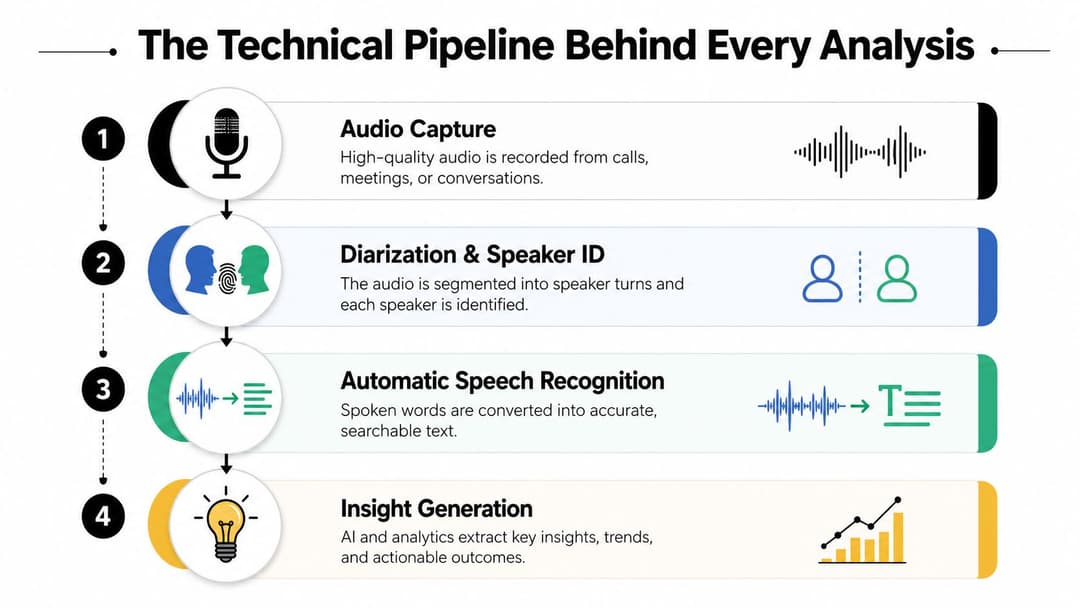
The pipeline starts before anyone says a word. If the audio isn't captured cleanly, or the metadata is thin, the rest of the stack gets weaker fast. Cisco's recording guidance covers capture across IP phones, border elements, and switches, while Microsoft's Azure Communication Services exposes controls to start, stop, pause, and resume recordings, which shows how much the analysis layer depends on the recording layer itself (Cisco recording architecture).
Capture, diarization, and transcription
Audio capture is the raw input. Diarization separates who said what, so the system can distinguish the agent from the customer. Automatic speech recognition then converts the conversation into text, which is the rough draft every downstream layer relies on.
Think of transcription as the transcript you'd hand to a manager who wants to skim the call. It's useful, but it still needs structure. If speaker labels are wrong or audio quality is poor, the transcript becomes harder to trust, and the rest of the analysis inherits that weakness. That's why teams should standardize capture rules and attach agent, timestamp, disposition, and account identifiers before they start analyzing anything.
Sentiment, intent, and topic extraction
Once text exists, the model can start working like an analyst. Sentiment tracks emotional tone, intent tries to identify what the caller wanted, and topic extraction groups similar conversations together. Smith.ai describes this broader AI call analytics approach as a mix of speech recognition, NLP, and machine learning, and recommends defining objective-specific metrics, custom keyword lists, sentiment thresholds, and intent categories before deployment (Smith.ai AI call analytics).
A useful analogy is this. Transcription is the rough sketch, sentiment is the emotional highlight reel, and topic extraction is the filing system. Without the filing system, you still have text, but you don't have a way to govern the conversation at scale.
For teams that also need to review contracts or internal policies, a tool like legal document review AI can handle adjacent document workflows, but call analysis itself still needs its own speech-first pipeline.
The key dependency is simple. Better metadata improves speaker attribution, topic grouping, and later QA decisions. Weak metadata makes the model work harder, and you get less confidence in the result.
You can see the same logic in platforms that ingest multiple sources. A system like multi-source data integration only becomes useful when the call transcript can sit next to the CRM record, the ticket, and the product note in one queryable layer.
Metrics, KPIs, and QA Scoring That Drive Improvement
Once teams trust the pipeline, the next question is what to measure. The trap here is collecting every metric available and then using none of them to make a decision. Good QA design starts with a short list of signals that lead to action.
The metrics that actually change coaching
Some metrics belong in almost every review. Talk ratio shows how much of the conversation the rep owns. Silence duration can flag awkward pauses or dead air. Filler words often indicate hesitation or lack of preparation. On the effectiveness side, question rate shows discovery depth, objection frequency surfaces friction, sentiment trend tracks how the call changed emotionally, and next-step commitment tells you whether the conversation ended with a real action.
A manager does not need all of these to be perfect. The point is to build a rubric that fits the job. In support, silence, compliance phrasing, and resolution behavior may matter more. In sales, question quality, objection handling, and next-step commitment matter more.
Useful filter: if a metric doesn't change coaching, process, or escalation handling, don't put it on the main dashboard.
How QA scoring turns metrics into behavior change
A QA score is basically a weighted judgment made visible. The score can roll up many smaller observations, such as whether the rep followed the script, asked enough discovery questions, handled objections cleanly, and set the next step. That makes the score useful for trend review, but the real value is in the rubric behind it.
A practical workflow looks like this.
- Define the outcome first: decide whether the team is optimizing for compliance, conversion, deflection, or issue resolution.
- Choose a small metric set: use only the signals that support that outcome.
- Create review rules: specify what counts as a pass, a miss, or a coaching opportunity.
- Tie scores to action: route low-confidence or low-score calls to managers, not to a static report.
That approach is close to how enterprise platforms now operate. Salesforce's Conversation Insights can turn recordings into predefined categories and summaries inside daily manager workflows, while tools such as key performance metrics for customer service help teams align scorecards with support outcomes instead of vanity reporting.
The other advantage is consistency. Once the rubric is set, every call is measured the same way. That's what turns QA from opinion into a repeatable operating system.
Privacy, Consent, and Retention You Cannot Skip
Teams want to jump straight to coaching dashboards. That's a mistake if the recordings themselves haven't been governed properly. If people don't know when they're being recorded, who can access the audio, or how long it stays in the system, analysis becomes a liability.
Governance is part of the design, not a cleanup task
Consent and disclosure need to be obvious to the caller. Retention needs to be defined before the first file is stored, especially when calls may contain customer data, payment information, or employee performance signals. The same applies to access. If everyone can listen to everything, the system starts to feel like surveillance instead of operations.
A privacy-by-design approach works better because it starts with purpose, scope, and limits. The guidance in the Wonderment Apps privacy by design principles is useful here because it frames privacy as something built into the workflow, not added after deployment.
Why the stakes keep rising
Cisco says 63% of customer service leaders plan to use generative AI in support (Cisco customer service AI planning). That matters because more AI in support usually means more transcripts, more searchable content, and more opportunities for old recordings to be reused in new ways. The governance burden doesn't shrink when analysis gets smarter, it grows.
Teams should be clear about who can query recordings, who can export them, and what happens when someone asks for deletion. They should also define whether recordings are kept for coaching, compliance, product learning, or all three, because those uses don't always share the same retention window.
Keep the policy short enough that managers can explain it, and strict enough that legal would sign off on it without a cleanup round.
Halo AI-style systems that ingest calls alongside email, docs, notes, and CRM records need this guardrail from day one. If the data layer is broad, the policy needs to be specific. That's where a GDPR compliant support AI platform becomes relevant, because the value of the knowledge layer depends on how defensible the intake rules are.
Architecture and Integration Patterns for Modern Teams
The architecture question is bigger than call analysis alone. A recording platform can be excellent and still become a dead end if it can't move information into the rest of the stack. For B2B SaaS teams, the core value comes when the transcript can travel with the customer record.
Where call analysis sits in the system
Modern deployments usually sit between telephony, CRM, helpdesk, and knowledge tools. The recording system captures audio, the analysis engine creates transcript and insight objects, and the downstream systems consume those objects through events or APIs. That is the difference between a dashboard and an operating layer.
The important detail is metadata. Account ID, rep ID, ticket ID, product area, and timestamp are what let one call connect to the rest of the customer story. Without that structure, the transcript is just text floating on its own.
Operational rule: analysis gets more valuable when the transcript is queryable alongside the customer's history, not when it lives in a separate tab.
Why integration changes the use case
When call insights sit next to emails, docs, internal notes, and CRM data, an AI agent can reason over a fuller context. That matters for support because the system can see what was promised, what was logged, and what was said on the call before it suggests a next action. It also matters for sales and success because product adoption patterns, churn signals, and escalation history become visible in one place.
A platform like Halo AI follows that logic by ingesting calls with other sources into a single knowledge layer, then letting Ask AI or an autonomous agent query that layer in plain English. In practice, that means a user doesn't need to hop between the call recording, the helpdesk, and the CRM to understand what happened.
Legacy systems still matter
Teams are not starting from scratch. They already have older telephony, ticketing, or CRM systems that can't be replaced overnight. That's why the integration pattern should respect the systems that are already there and wrap intelligence around them, rather than forcing a rip-and-replace project. A legacy system integration approach is usually the more realistic path.
The best architecture is the one that compounds. Each new call adds to the knowledge layer, each resolved issue improves the next recommendation, and each escalation makes the record richer for the next person who touches it. That's what changes analysis from a reporting exercise into a living workflow.
Deployment Roadmap and Real Business Impact
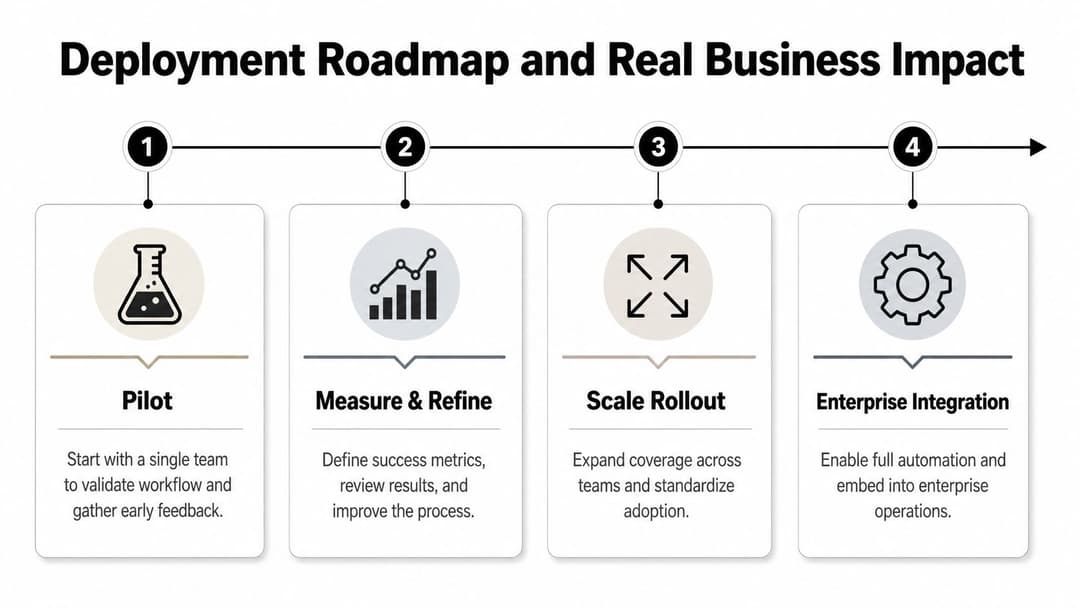
The rollout usually works best when it starts small and gets stricter over time. A single queue or a single team gives you enough signal to test the workflow without creating a governance mess. Once the early process is stable, the platform can expand into adjacent teams and deeper integrations.
A practical rollout path
Phase one is the pilot. Pick one queue, one manager, and a small QA rubric. The goal is not completeness, it's proving that the system can capture clean calls, surface useful themes, and support a real coaching decision.
Phase two is measurement and refinement. Here, the team looks for patterns in the transcript quality, the QA score distribution, and the exception cases that keep showing up. If the rubric is too broad, it gets tightened. If the metadata is missing, the capture process gets fixed.
Phase three is scale rollout. More teams get onboarded, the taxonomy gets standardized, and the alerts start routing to the right owner instead of landing in a shared inbox.
Phase four is enterprise integration. At that point, call insights feed the broader support and revenue stack, and the knowledge layer starts influencing automation, routing, and internal search.
What business impact looks like in practice
The first wins are usually operational, not dramatic. New reps get better examples for coaching because managers can pull the exact call segments that mattered. Support leaders get faster visibility into repeat issue types because transcripts and topic tags make patterns easier to spot. Product teams get more grounded feedback because they're reading customer language instead of filtered summaries.
A useful example is forward caller ID into AI workflows, where call context is preserved before the handoff to automation. Hosted Telecommunications has a practical guide on forward caller ID to AI agents, and that kind of routing logic shows how call context can travel with the interaction instead of being lost at the boundary.
The win is not that a system listens to more calls. The win is that the same call can teach coaching, improve routing, and enrich the knowledge layer at once.
That is why platforms like Halo AI matter in deployment conversations. They're not just another place to store conversations, they connect the call to the rest of the support stack so every interaction can add context for the next one.
Common Pitfalls and What to Do Instead
The biggest mistake is treating analysis like a dashboard project. Teams build a nice view of sentiment or topic volume, then no one knows what to do after the alert appears. If there's no action path, the reports become background noise.
Another common miss is ignoring consent until launch week. By then, the recording policy is already tangled with the workflow, and legal or operations has to unwind it under pressure. Fix the disclosure, access, and retention rules first, then automate.
A third mistake is over-trusting one score. A single QA number can hide the difference between a clean process and a good conversation, and it can also hide which coaching issue matters most. The better pattern is to use one score for prioritization and several supporting signals for diagnosis.
- Start with one decision: choose whether the analysis should improve quality, conversion, compliance, or resolution.
- Tie every alert to an owner: make sure a manager, rep, or operations lead gets the next task.
- Keep the taxonomy tight: too many categories make the system harder to trust.
- Review exceptions weekly: the odd calls often reveal the broken process.
- Keep governance visible: if the policy is buried, the rollout will stall.
The teams that get value out of call recording analysis don't treat it as passive storage, and they don't wait for perfect data before starting. They define the use case, govern the input, wire the insights into the workflow, and let each call improve the next one.
If you want call recording analysis to become part of your support operating system instead of another isolated tool, see how Halo AI ingests recordings alongside emails, docs, CRM data, and internal notes into one queryable knowledge layer. It gives your team a practical way to turn conversations into context, so coaching, routing, and escalation handling all improve from the same source of truth.
How Halo helps
Halo turns support conversations into business intelligence: Ask AI answers questions across your tickets, calls, CRM, and billing data in plain English, so revenue and product teams can act on what customers are actually saying. Learn more about Halo's AI call reviews.