Generative AI vs Agentic AI: What Teams Should Choose
Generative AI vs agentic AI explained with clear criteria, real support use cases, governance guardrails, and adoption guidance for B2B teams in 2026.
 Matt PattoliFounder14 min read
Most advice on generative AI vs agentic AI starts with a capability ladder: generative AI creates, agentic AI acts, therefore agents must be the next purchase. That framing is incomplete and expensive. The core decision is whether autonomous execution produces better economics than a simpler human-reviewed workflow, and whether your permissions, escalation paths, and audit trails can contain failure.
Generative AI is already broadly used in business functions by 72% of organizations, while 23% report scaling at least one agentic system in production, according to enterprise AI adoption data from Toolglance. The gap matters. Many teams are ready to generate drafts, summaries, and answers. Far fewer are ready to let software change CRM records, issue credits, file bugs, or close tickets without a person approving every step.
| Question | Generative AI | Agentic AI |
|---|---|---|
| Primary job | Produce content or recommendations | Complete a goal through multiple actions |
| Human role | Prompt, review, and execute | Set boundaries, monitor, and handle exceptions |
| Typical support value | Drafting, summarizing, translation | Resolution, tool use, and workflow completion |
| Main risk | Incorrect or ungrounded output | Incorrect action and cascading side effects |
| Best buying criterion | Output quality per reviewed artifact | Cost and reliability per successful outcome |
Why the Generative AI vs Agentic AI Question Is Really About Governance
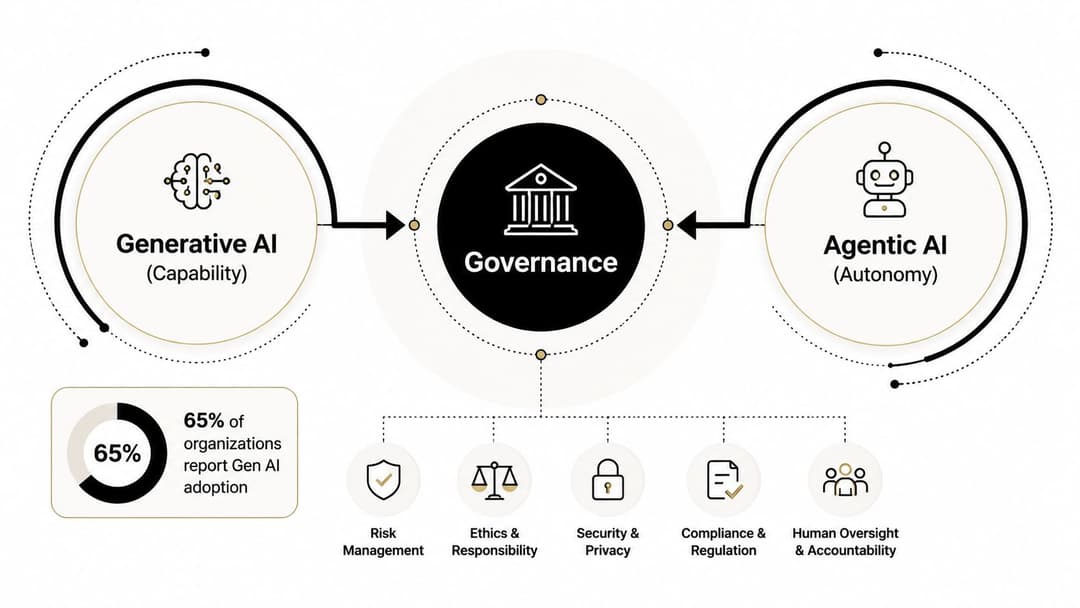
The popular advice says to begin with the most autonomous system your technology can support. I recommend the opposite. Begin with the smallest action surface your governance can safely control, then expand only when the economics justify it.
A useful market signal is that ambition has moved faster than operational readiness. PwC's 2026 survey of industry readiness for agentic AI identifies governance, data readiness, scalability, mindset, change readiness, and workforce engagement as barriers to progress. That means the purchasing question isn't whether an agent can call a tool. It's whether your organization knows which tool calls are permitted, who owns exceptions, and how investigators reconstruct what happened.
Autonomy increases the blast radius of a bad instruction. A generative system can draft an incorrect refund explanation that a support specialist catches. An agent can interpret the same policy incorrectly, issue the refund, update the ticket, and send a customer message before anyone sees the mistake. The difference isn't cosmetic. It changes your controls, staffing model, incident response, and total cost of ownership.
The buying gate support leaders should use
Before approving agentic deployment, I'd require clear answers to three questions:
- Permission scope: Can the system access only the records and actions required for its assigned workflow?
- Escalation behavior: Does it stop and route the case when confidence, policy, or data quality falls outside defined limits?
- Auditability: Can an operator review every decision, tool call, data change, and customer-facing message?
Teams that need a practical guardrail checklist can use this guide to responsible AI guardrails as a starting point. My recommendation is direct: use generative AI while governance is still forming, and introduce agentic execution only after controls work in a test environment and under real operational pressure.
What Generative AI Actually Does
Generative AI creates an artifact from an instruction. The artifact might be a reply, image, code snippet, summary, translation, or knowledge-base draft. The model can use retrieved context and prompt rules to make that output more relevant, but a person generally decides whether the result is correct and what happens next.
The architecture is familiar to most support teams. A foundation model processes the request, a retrieval layer supplies product or account context, prompt orchestration applies instructions, and a user-facing surface presents the result through a chat window, copilot, or editor. The system's value is usually concentrated in a single response or generated work product.
The investment signal reflects how quickly this category became an enterprise priority. Gartner forecast worldwide generative AI spending at $644 billion in 2025, up 76.4% from 2024, while Stanford HAI reported $33.9 billion in global private investment in generative AI during 2024, an 18.7% increase from 2023. The Stanford HAI 2025 AI Index distinguishes market spending from private investment, but both figures show generative AI operating at global scale rather than remaining a niche pilot category.
The building blocks
| Layer | Function |
|---|---|
| Foundation model | Predicts and generates text, images, code, or other content |
| Retrieval layer | Supplies relevant product, policy, or account information |
| Prompt orchestration | Applies instructions, formatting, tone, and workflow context |
| Human-facing surface | Presents the draft through chat, a copilot, or an editor |
| Human review | Validates the output and takes the consequential action |
For customer support, this makes generative AI a strong amplifier. It can draft a macro reply, summarize a long thread, suggest troubleshooting steps, or convert internal documentation into a customer-friendly article. It can't reliably verify every claim, maintain operational state across systems, or execute side effects merely because it produced a convincing answer.
That limitation is useful, not embarrassing. A reviewer remains a natural quality gate. Teams evaluating support applications can explore generative AI for customer service, but they should judge the system on usefulness, groundedness, tone, and review effort rather than pretend it has completed the customer's task.
What Agentic AI Actually Does
Agentic AI pursues an objective through actions. It can interpret a goal, plan steps, call APIs or interfaces, read current system state, write approved data, evaluate outcomes, and continue until it resolves the task or reaches an escalation condition.
AWS describes agentic AI as a progression toward autonomous, asynchronous systems that act on delegated intent in changing environments. AWS also highlighted the role of Anthropic's Model Context Protocol and Claude 3.7 Sonnet in accelerating practical tool-using behavior in February 2025. The important shift isn't that the model writes better text. It's that the system connects reasoning to tools, memory, external state, and execution.
Industry market research cited in 2026 projected the AI agents market at $7.84 billion in 2025, rising to $52.62 billion by 2030, with a 46.3% compound annual growth rate. Those projections appear in this market overview of AI agents. The market is newer than generative AI, and its defining unit of value is a completed workflow rather than a generated response.
The components that create agency
| Component | Role |
|---|---|
| Planner | Breaks a goal into ordered or conditional steps |
| Tool registry | Defines available APIs, interfaces, and permitted operations |
| Memory or state store | Retains task context, prior actions, and current status |
| Action executor | Performs tool calls and updates external systems |
| Guardrail layer | Enforces permissions, policies, approvals, and escalation |
| Feedback loop | Checks results and determines whether to continue or stop |
A support agent might read a ticket, search product documentation, inspect account status, reproduce a problem in a page-aware interface, create a Linear issue with reproduction details, and respond to the customer. That sequence includes branching decisions and side effects. If the account lacks eligibility for a refund, the agent should stop and escalate rather than improvise.
This is why agentic workflows require more than connecting a language model to a button. The system needs durable state, observable actions, clear failure handling, and a boundary around what “done” means. An agent that can act but can't prove what it did is not production-ready. It's an unattended risk surface.
How Generative and Agentic AI Differ Where It Matters
The cleanest comparison is operational, not philosophical. Generative AI normally ends with content. Agentic AI continues through an environment loop, where each result changes the next decision.
| Dimension | Generative AI | Agentic AI |
|---|---|---|
| System architecture | Model, retrieval, prompts, user interface | Model plus planner, tools, memory, executor, and guardrails |
| Primary output | Text, image, code, summary, or recommendation | Completed action sequence and changed system state |
| Data requirements | Curated knowledge and prompt context | Live operational context from ticketing, CRM, billing, and product systems |
| Interaction pattern | Request and response | Goal, plan, tool calls, checks, and escalation |
| Latency profile | Usually one generation step | Multiple dependent steps and tool calls |
| Control surface | Prompts, policies, and human review | Permissions, approvals, escalation triggers, monitoring, and kill switches |
| Failure impact | A flawed artifact reaches a reviewer | A flawed decision may create several downstream changes |
| Audit requirement | Review of the generated artifact | Record of every decision, tool call, write, and exception |
Architecture changes the economics
A generative support copilot may retrieve a policy and draft an answer in one interaction. The cost model is comparatively simple: model usage, retrieval, interface operations, and the reviewer's time.
An agentic workflow adds planning loops, tool calls, state management, retries, observability, and rollback. It may reduce manual work, but it can also create more latency and more points of failure. The right question is not “Can the agent do more?” It's “Does each additional action remove enough human effort or improve resolution enough to pay for the added complexity?”
Data requirements also change. A draft assistant can work from a controlled knowledge base and the ticket text. An agent resolving an account issue may need current CRM data, billing status, product documentation, permissions, and a reliable way to confirm that the final action succeeded.
For procurement teams comparing vendors, the CIO procurement guide by DataLunix offers useful context on evaluating automation services. Use that kind of resource to structure vendor questions, but insist on workflow-specific evidence. A polished demo proves that a system can complete a happy path. It doesn't prove that the system stops correctly when data conflicts, permissions fail, or the customer request falls outside policy.
Customer Support Use Cases and Where Halo AI Fits
Support teams don't need to choose one approach for every ticket. They need to assign each task to the least autonomous system that can complete it economically and safely.
Generative AI wins when the work ends in a draft. Use it to create macro replies, summarize long ticket threads, translate help-center content, propose troubleshooting steps, and turn internal notes into customer-facing documentation. The support specialist still owns the judgment and sends the final response.
Agentic AI earns its keep when the work requires coordinated execution. Strong candidates include autonomous ticket resolution, policy-bound refunds or credits, bug-report filing in Jira or Linear, guided product navigation, and multi-step lookups across CRM, billing, ticketing, and documentation systems.
Rank the workflow before choosing the model
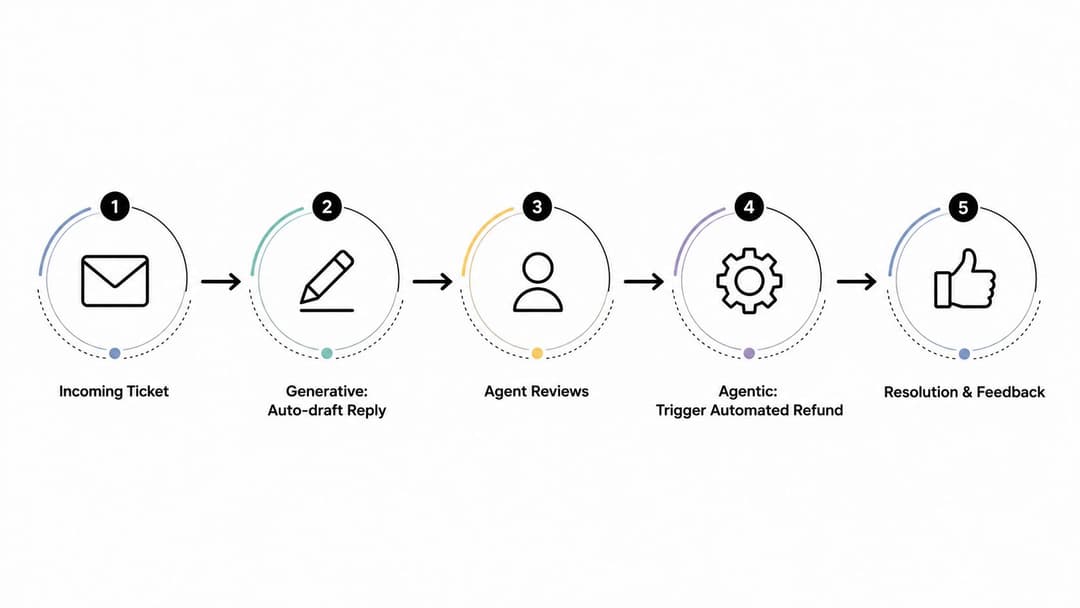
Consider a billing question. Generative AI can explain the relevant policy and draft a response. An agent can check account eligibility, calculate the permitted action from current data, issue the approved credit, update the ticket, and notify the customer. The agent has a stronger business case only if those steps happen often enough, follow stable rules, and remain observable.
A product bug follows a similar pattern. Generative AI can summarize the customer's report and suggest reproduction steps. An agent can inspect the session context, interact with the product, reproduce the issue, create a detailed bug report, and attach the evidence. Human engineers still decide severity and remediation, but the intake workflow becomes actionable rather than merely descriptive.
Halo AI is an example of the agentic approach in support. Its agents can resolve tickets end to end, guide users through a product interface, and create bug reports with reproduction steps, escalating when confidence drops or policy limits are reached. Teams evaluating that pattern can review Halo AI's customer support solution alongside simpler copilots.
Operational rule: If a human still has to copy the answer into another system, click through the workflow, verify the result, and update the record, you bought assistance, not autonomous resolution.
Start with narrow workflows. Refund eligibility, password guidance, known configuration fixes, and structured bug intake are easier to govern than ambiguous retention negotiations or exceptions involving multiple teams. Autonomy should follow repeatability, not excitement.
How to Measure Each System in Production
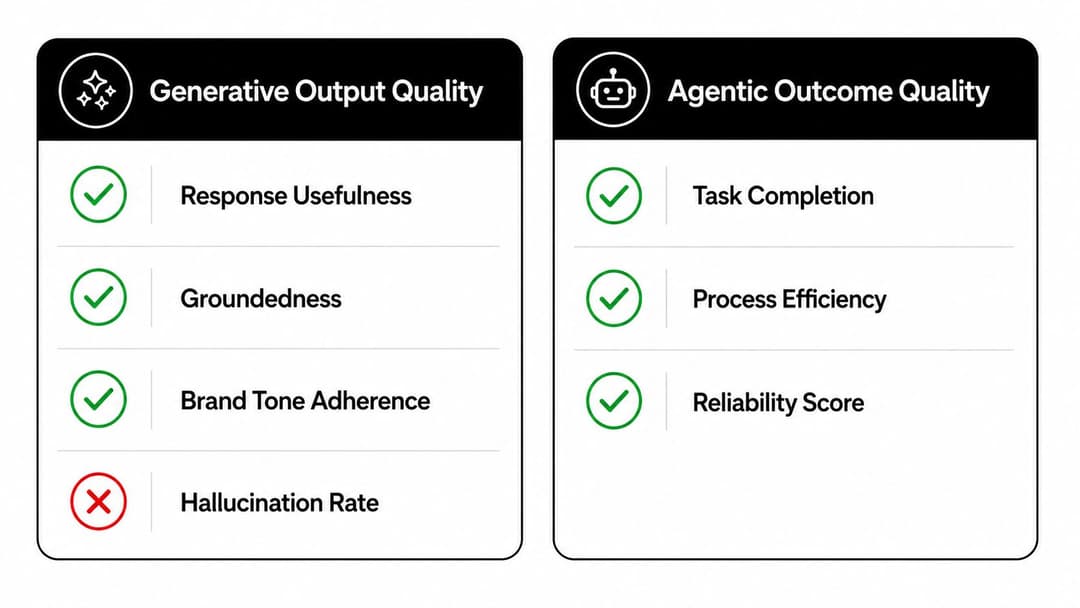
Generative AI and agentic AI require different scorecards because they create value in different ways. A useful draft can save a specialist time even after editing. An agent earns credit only when it completes the intended workflow accurately, safely, and with a verifiable result.
For generative systems, measure response usefulness, groundedness, brand tone adherence, and hallucination rate. Sample human reviews and model-based evaluations expose quality problems, but reviewer effort determines the business case. If specialists routinely rewrite every draft, the system is adding workload rather than reducing it.
Agentic systems need the CLEAR dimensions: Cost, Latency, Efficacy, Assurance, and Reliability. Apply them to a support scorecard:
- Cost: Cost per successfully resolved ticket, including model usage, tool calls, infrastructure, and human intervention.
- Latency: Time from ticket intake to verified resolution, rather than time to the first generated response.
- Efficacy: Accuracy of the diagnosis and the action taken.
- Assurance: Policy compliance, audit completeness, permission adherence, and safe escalation.
- Reliability: Task success across repeated cases, consistent behavior, and recovery from tool failures.
Teams tracking these measures can use our customer support metrics guide for a broader operating framework.
The production AI agent KPI framework from Google Cloud supports this outcome-focused approach. Add tool-call success rate, rollback frequency, escalation correctness, boundary-violation rate, drift against the human baseline, override rate, and work completed without manual intervention.
Output quality can make an agent appear effective while failed tool calls, loops, unnecessary escalations, or incorrect writes remain hidden. Measure the path from intent to verified result. ROI depends on that full path, and so does the true cost of failure.
Safety, Control, and the Cost Trade-off Buyers Underweight
Governance maturity is the buying gate for agentic AI. Capability comes second.
Before an agent can write to production systems, require three controls. First, issue scoped permissions with least-privilege access. A ticket-resolution agent may need to read CRM context and update a support case, but it shouldn't have unrestricted billing or customer-record permissions.
Second, define explicit escalation paths. The agent must stop when policy is ambiguous, required data is missing, confidence falls below the approved threshold, or a requested action exceeds its authority. “Ask a human if unsure” is not a control until the team defines what unsure means and where the case goes.
Third, maintain immutable audit logs for every tool call. Record the input, decision, permission context, action, result, and escalation reason. If an agent refunds outside policy or modifies the wrong CRM record, the team needs a reconstructable trail, not a vague activity summary.
| Dimension | Generative AI | Agentic AI |
|---|---|---|
| Usage cost | Model and retrieval usage | Model, retrieval, tool calls, retries, and orchestration |
| Human cost | Reviewer time per artifact | Exception handling, oversight, and incident response |
| Engineering burden | Prompt, evaluation, and knowledge maintenance | Integrations, state, monitoring, rollback, and permission management |
| Failure mode | Incorrect content reaches a reviewer or customer | Incorrect actions alter systems or trigger downstream work |
| Safe default | Human review before execution | Restricted actions with approval and escalation |
| ROI question | Does the draft reduce handling effort? | Does successful autonomy outweigh added complexity? |
AWS's 2026 summary of IDC research identifies skills shortages, observability, integration issues, and cost concerns as obstacles to agent deployment. PagerDuty's 2025 global survey found that 51% of companies had deployed AI agents and another 35% planned to deploy them within two years, as reported in this summary of the survey. Adoption pressure is real, but it isn't a reason to skip controls.
Treat safety and total cost as one decision. A generative copilot costs tokens plus review. An agent adds execution spend, monitoring, rollback, integration maintenance, and the operational cost of investigating bad actions. Deploy autonomy where the workflow is narrow, repetitive, measurable, and reversible. Keep augmentation for work where human judgment remains cheaper than building a safe action loop.
A Practical 90-Day Path From Generative to Agentic Support
A staged rollout prevents a support team from confusing a successful demo with production readiness. Use one workflow, one owner, one baseline, and one promotion gate.
Days 1 to 30
Choose a high-volume, low-risk task such as draft replies or ticket summarization. Establish the baseline for usefulness, groundedness, reviewer time, escalation behavior, and cost per reviewed interaction. Keep the reviewer in the loop and document the policy boundaries that an eventual agent would need.
Days 31 to 60
Introduce one bounded agentic workflow. Give it read-only CRM access first, require human approval for every write operation, and limit its tools to the exact actions needed for the workflow. Capture every tool call and test failure paths deliberately, including missing data, conflicting records, failed integrations, and requests outside policy.
Days 61 to 90
Run a hard reliability and cost checkpoint. Compare successful resolutions with added tool spend, latency, escalations, overrides, rollback events, and audit findings. Promote the agent only when the workflow meets its agreed reliability threshold, deflection remains above target, and no critical incidents have occurred.
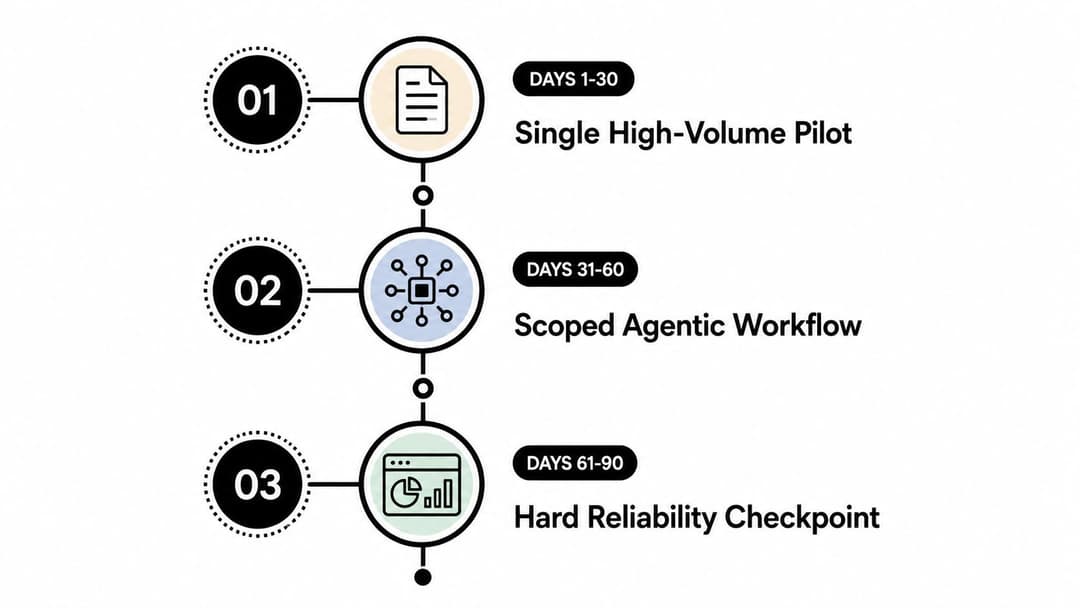
The sequence matters because generative AI establishes the knowledge and evaluation discipline that agentic AI depends on. If your team can't measure whether a draft is grounded or whether a reviewer catches errors, it won't measure autonomous failure well.
Halo AI provides autonomous support agents that resolve tickets, guide users through product interfaces, and create detailed bug reports while escalating cases that exceed policy or confidence limits. Visit Halo AI to evaluate whether a governed, measurable agentic workflow can earn its keep in your support operation.
How Halo helps
Halo deploys an AI support agent that resolves tickets across chat, email, and in-app messaging, guides users through your product with page-aware UI guidance, and escalates to your team with full context when a human is needed. Learn more about Halo's AI customer support agent.